




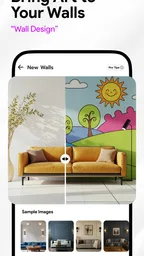



AI Room Planner: Home Design review
 Analysis by Appsdrops
I’d treat AI Room Planner: Home Design as a fast way to explore decorating directions, not as a substitute for a measured floor plan or a professional design consultation. The idea is appealing: use AI to help picture changes to rooms, outdoor areas, and gardens, then decide which ideas are worth pursuing. In practice, the value depends on how clearly you describe what you want and how flexibly you interpret the results.
Where the first attempt can get stuck
Hangover Studios’ free House & Home app is aimed at people who want visual inspiration without starting from a blank page. Its short label, “AI Room Planner,” sets a useful expectation, but I would not assume that the word “planner” means it can produce a construction-ready layout. The strongest reason to try it is to see possible design directions; decisions about exact dimensions, materials, or installation still need separate checking.
The first friction point with any AI room-design tool is the gap between the room in your head and the result on screen. A vague prompt such as “make it modern” leaves plenty of room for interpretation. If the result feels off, that does not necessarily mean the app is broken: the request may need a clearer style, a more specific colour direction, or a practical constraint such as keeping the existing furniture.
I’d make the first request deliberately narrow. Try one change at a time, such as exploring a warmer colour scheme or a calmer bedroom mood, rather than asking for a complete renovation with several styles and requirements mixed together. This makes it easier to judge whether the generated idea is useful and to adjust the next request with purpose.
AI images can also look more decisive than the underlying design really is. A polished-looking room is not proof that its furniture will fit, its lighting will work, or its materials are suitable for your home. I use generated designs as conversation starters and mood-board material, not as a shopping list or a promise of what a contractor can reproduce.
Start with a useful brief
Before opening the app, decide what you want to learn from it. Are you choosing between two colour palettes, trying to make a small living area feel less crowded, or looking for a fresh direction for a garden? A single, practical goal gives the output a clear test: does this image help me make that decision?
Be specific about what should stay as well as what can change. If a sofa, dining table, or major feature needs to remain, say so in the brief. Likewise, separate “I want a brighter feel” from “I need more storage”; they are related, but the first is about atmosphere while the second is about function. Clear priorities are especially helpful when a result looks attractive but solves the wrong problem.
For a real-life example, imagine you are refreshing a rented living room before buying anything. I would ask for visual ideas that work around the existing sofa and focus on a different colour mood or arrangement. Then I would compare the concepts against the room’s actual limitations, such as fixed furniture and the need to avoid costly changes. That is a more grounded use than treating one generated image as a finished makeover plan.
Simple setup checks before judging a result
If the app does not behave as expected, I’d begin with basic checks rather than repeatedly submitting the same request. Confirm that the app has finished loading, that your internet connection is working, and that the image or instructions you intend to use are ready. If a screen appears incomplete, give it a moment and try again before changing several things at once; otherwise, it becomes difficult to tell what helped.
It is also worth checking that the app is up to date. The current version is 18.2.1, and the minimum operating-system requirement is version 8.0. If installation or startup is the problem, compare your device’s software version with that requirement and make sure there is enough available storage for normal app use. These are general device checks, not a guarantee that every issue comes from the phone.
Keep your first test uncomplicated. Use a room or outdoor space you can describe clearly, and avoid making several unrelated requests in one go. If you are comparing concepts, change one meaningful detail between attempts. This gives you a cleaner comparison and helps you notice whether a different style instruction, rather than random variation, produced the result you prefer.
The app is rated for Everyone, so its intended audience is broad. That does not mean every design suggestion will suit every household. If children, pets, accessibility needs, or household routines affect your choices, include those needs in your own evaluation instead of assuming an appealing image has accounted for them.
Recovering a workflow that goes off course
When a generated direction misses the mark, I would not keep adding adjectives to the same overloaded request. First identify the mismatch: is the style wrong, is the room too cluttered, or has an important existing feature disappeared? Then revise only that part. This small reset is often more informative than asking for “something better” without explaining what failed.
A useful habit is to keep a short note of the prompt and the decision it was meant to support. For instance, if you are exploring a dining-area refresh, record whether you are testing colour, furniture placement, or overall atmosphere. When you return to the app, you can continue from a clear question rather than trying to remember why a particular image seemed promising.
Do not treat a disappointing image as a reason to abandon the whole project. AI design is most helpful when it expands the range of ideas you can consider, and some outputs will be less relevant than others. Save or otherwise keep track of the concepts you find useful, if the app’s available controls allow it, and carry the underlying idea into your own notes. I would avoid relying on any one result as the sole record of a plan.
There is also a practical limit to iteration. If several attempts keep producing attractive but unusable concepts, the task may need a different tool. A conventional floor-plan app is a better fit when exact room dimensions and furniture clearances are central. A human designer or contractor is the safer choice when the decision involves structural work, electrical changes, or costly materials. AI inspiration can help you explain what you like, but it cannot replace those checks.
When the app may not be the cause
Some frustrations come from the design question itself. A photo or description may not communicate the room’s proportions, lighting, or fixed features well enough for a convincing concept. Even a strong visual result can mislead if the real space has awkward corners, low light, or furniture that cannot move. Before blaming the app, compare its idea with what you know about the room and decide whether the input gave it enough context.
Connectivity can be another source of delay in apps that rely on AI processing. If a request stalls, check whether other online services are responding and try again later rather than sending the same request repeatedly. If the rest of the device is also slow, restarting it and checking for an app update are reasonable general steps. I would not assume a particular cause from one failed attempt.
Likewise, a result that ignores a constraint may reflect how the request was framed. If you need to preserve a particular item, state that plainly and keep the rest of the brief focused. If the next result still conflicts with a non-negotiable requirement, treat that as a sign to use a more controllable design method rather than spending a long time trying to coax the image into accuracy.
What it offers, and what it costs to explore
There is no upfront price to try the app, which makes it approachable for someone who wants to test an idea before committing to a larger project. It has over one hundred thousand installs and an average rating of 4.3 from 243 ratings, alongside 13 written reviews. Those figures offer some context, but they do not tell me whether the app will handle your particular room or design brief well.
In-app purchases range from $5.99 to $399.93 per item. I would check the purchase details carefully before paying, especially if you are only looking for a few concepts or are still deciding whether AI-generated design suits your process. Free access makes experimentation easier, but it is sensible to understand any paid option in the app before confirming a purchase rather than assuming every tool or result is included at no cost.
The app’s release date is December 7, 2025. That makes it a relatively recent option to consider, but recency alone does not tell you how dependable it will feel on your device. My advice is to begin with a small, low-stakes design question and judge the actual results and workflow before building a larger project around it.
Who I’d recommend it to
I’d recommend AI Room Planner: Home Design to people who know the room they want to change but feel stuck for inspiration. It may be particularly handy for comparing broad looks before discussing a refresh with family or deciding what to research next. Because it covers interiors, exteriors, and gardens, it can serve as a first stop when you are still exploring what kind of change feels right.
It is less suitable if you expect reliable technical drawings, exact furniture fit, product sourcing, or a guaranteed match to a reference image. It is also not my first choice for a user who already knows the design and mainly needs precise measuring and project documentation. In those cases, a measurement-focused planning tool or professional guidance will answer the important questions more directly.
For Android users, Hangover Studios lists version 18.2.1, with support beginning at operating-system version 8.0. The app is free to install, rated Everyone, and includes optional purchases. On iOS, availability and compatibility can depend on the specific store and device, so I would check the relevant app store before planning around it.
A practical verdict for everyday decorating
My overall view is that this is best used as an idea generator with a clear, modest job: help me see a few possible directions, then let me decide what is realistic. Its most useful workflow is to start with one room and one question, keep essential constraints visible, and judge each output against the real space rather than its visual polish. That approach gets more value from the app and reduces the risk of confusing inspiration with a workable plan.
If you want a low-commitment way to break a decorating stalemate, the free entry point and broad home-design focus make it worth trying. If accuracy, measurements, or professional-level planning are the priority, I would use a more specialized alternative and treat AI concepts only as references. For me, that distinction is the key to enjoying the app: use it to widen your choices, not to make the final decision for you.
What we like
- Generates room concepts quickly from an uploaded photo.
- Offers ideas across several interior design styles.
- Helps visualize changes before buying furniture.
- The interface is straightforward for first-time users.
- Useful for gathering inspiration for a room makeover.
What could be better
- Generated layouts may not match exact room dimensions.
- Some results can include unrealistic furniture placement.
- Image quality depends on the photo you upload.
- Design suggestions may not reflect local product availability.
- Useful features may require an account or paid access.





