

AI Photo Editor: Photo Enhance review
 Analysis by Appsdrops
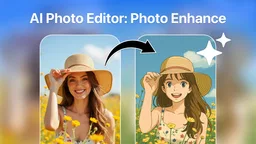
AI Photo Editor: Photo Enhance is built around a familiar frustration: a picture that matters to you looks soft, or an unwanted detail distracts from the subject. I like the practical focus. Rather than asking you to learn a full photo-editing workflow, this beauty app centers on improving images and retouching them with AI-assisted tools. That makes it appealing for quick fixes, though it also means the result depends on the source photo and on whether you are comfortable letting an automated edit make visual decisions.
My view is that AI Photo Editor: Photo Enhance makes most sense as a convenient repair tool, not as a replacement for a careful editor. It is free to install, with optional in-app purchases, and is developed by Amobear Application - AILABS. Its audience rating averages 3.9 from around 11,000 ratings, while more than a million installs suggest that plenty of people are curious about this kind of one-tap enhancement. Those figures are useful context, but the deciding question is simpler: do you need a quick improvement, or precise control over every pixel?
How quickly a photo fix feels useful
The app’s appeal is the short path from noticing a problem to trying a correction. If a portrait is slightly blurry or a small object pulls attention away, an AI-focused editor can be easier to approach than a traditional editor full of sliders, layers, and separate retouching tools. I would use it when I want to test a likely improvement quickly, rather than spend time tuning exposure, sharpening, and local edits by hand.
That is a sensible expectation, not a promise that every image will be transformed instantly or perfectly. Processing speed can depend on the image and the device, and the available product details do not establish a universal time. I’d judge the experience by whether the wait feels worthwhile for the particular photo. A simple image with one clear subject is a better first test than a crowded scene with fine detail everywhere.
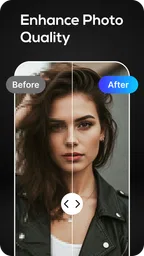
For a practical first run, I would choose a copy of a photo rather than treating the original as disposable. Compare the result at normal viewing size and then zoom in around hair, skin, and edges. Enhancement can make a small image look cleaner at a glance while introducing artificial texture or softened boundaries when inspected closely. That comparison is more useful than judging the edit only from a tiny preview.
When the automatic approach helps—and when it doesn’t
AI enhancement is most persuasive when the original is close to usable: a little softness, mild visual noise, or a modest distraction. It cannot reliably recreate details that the camera never captured, so I would not expect a very blurry face to become a convincing high-resolution portrait. The more the tool has to guess, the more important it is to inspect the outcome instead of accepting it because it looks sharper at first.
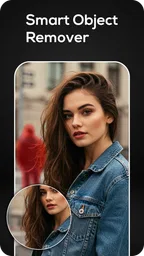
Object removal has a similar trade-off. Removing a small item against a plain wall or open sky gives an editor a relatively simple area to fill. Removing something that crosses patterned fabric, a railing, or a person’s outline is much harder because the surrounding scene provides less obvious material to rebuild. My tip is to try the edit, then check the boundary where the object was. A clean-looking thumbnail can hide a repeated texture or a smudged edge.
For a quick social post, a slight imperfection may be an acceptable exchange for speed. For a family photograph you plan to print or keep as a record, I would preserve the original and be more cautious. The same edit can be “good enough” for a small screen and disappointing when enlarged. This is one reason I see the app as a useful companion to, rather than a substitute for, a more controlled editor.
A realistic everyday workflow
Imagine taking a group photo at a café and noticing a stray cup near the edge, while the faces are a little soft in the indoor light. I would first try to improve the image, then inspect the faces before deciding whether the result is worth keeping. If I also remove the cup, I would examine the table edge and nearby objects for signs that the background has been reconstructed awkwardly. Doing those checks separately helps identify which adjustment improved the photo and which one caused trouble.
That workflow is more reliable than stacking several automated changes immediately. Each extra correction gives the software another opportunity to alter detail, and it can become difficult to tell whether an odd patch came from enhancement or retouching. I recommend keeping a clean original and making changes in small steps. If the first treatment already looks unnatural, adding more edits usually does not rescue it.
This app is also a reasonable option for someone who edits only occasionally. A person who does not want to learn a complex retouching interface may appreciate having enhancement and unwanted-object cleanup in one place. By contrast, a photographer who needs precise masking, consistent color across a set, or dependable preservation of small details will likely prefer a dedicated editor with hands-on controls.
Busy editing sessions and stability
Heavy use is where I would be most careful about expectations. Working through several photos, trying alternate treatments, and inspecting each result can put more demand on a phone than making one quick edit. The app’s product details do not establish how it behaves under a long batch session, so I would not assume that every device will process a large queue equally smoothly. For an important set of images, try one or two first and decide whether the pace and results suit you before committing the whole group.
Reliability is not only whether an app opens; it is whether the edited file is the one you intended to keep. A practical habit is to check the finished image in your usual photo viewer and make sure the original remains available before clearing anything or moving on. If a result looks unexpectedly different, return to the untouched image and try a less ambitious correction. That gives you a straightforward recovery path without relying on a particular undo or backup feature.
I would also avoid making a final decision from a single preview. Review the image after the edit has completed, and look at the exact area you changed as well as the whole frame. A retouch that seems convincing when enlarged can draw attention to itself when the full composition is visible; the reverse can happen too, with a small flaw disappearing at normal size. Matching your inspection to how you plan to use the photo is a useful way to avoid over-editing.
Device fit, cost, and alternatives
The listed minimum operating-system requirement is Android 8.0, so it is aimed at a broad range of Android devices, though that alone does not guarantee identical speed or smoothness on every model. I would leave some patience for older or less capable phones when trying demanding edits, and avoid judging the app from one slow or complicated image. The current release is v1.0.3_20261008. It is rated for Everyone, but the app’s age rating is separate from whether its editing style is right for a particular user.
There is no purchase price to start, but in-app items range from $1.99 to $49.99 each. If you only need occasional fixes, begin with the free experience and see whether it covers your normal photos before spending anything. If a feature you want is behind a purchase, consider how often you would use it and compare that cost with a traditional editor you already have. The key is not to pay for the idea of perfect restoration: AI edits still need judgment, and some difficult images will remain difficult.
Compared with general-purpose photo editors, this app puts the emphasis on automated repair rather than detailed manual adjustment. That is a strength when you want a quick attempt at sharpening or object cleanup; it is a limitation when you want to decide exactly how skin texture, color, or edges should look. Compared with simply cropping a distracting object out, removal can preserve the original framing, but it may leave reconstruction artifacts. Cropping remains the more dependable choice when it does not cut away something important.
Some users may also prefer a standard editor for sensitive or personally important pictures, simply because they want a more deliberate, visible workflow. I would not treat an AI result as a faithful restoration of historical detail. Keep the untouched file, especially when the photograph has sentimental value or will be used as a record. For casual portraits and everyday snapshots, experimentation is easier to justify.
My performance verdict
Overall, AI Photo Editor: Photo Enhance is worth a try if your main goal is to rescue an almost-good photo without learning a complicated editing process. Its strongest use case is a modest, clearly defined correction: improve a slightly soft image, or test whether removing a small distraction makes the subject stand out. I would not rely on it to repair severe blur, rebuild complex backgrounds flawlessly, or deliver the consistency a professional workflow demands.
My practical recommendation is to start with a nonessential photo, make one change at a time, and compare the result at the size where you will actually view or share it. If the edit looks natural and the process feels comfortable on your phone, it may earn a place in your occasional-editing toolkit. If you need precise control, predictable batch work, or careful preservation of fine detail, a manual editor is the better choice. That balance—quick convenience in exchange for less control—is the main thing to understand before using it.
What we like
- Quick edits make photo touch-ups accessible to beginners.
- Enhancement tools can help bring out details in older photos.
- A straightforward interface keeps common editing actions easy to find.
- AI effects offer a quick way to explore different visual styles.
- The app is useful for making casual photos look more polished.
What could be better
- AI results may look unnatural on some faces or images.
- Processing can take longer with large or low-quality photos.
- Some features may require a subscription or in-app purchase.
- Edited images may not preserve every detail of the original.
- Results can vary depending on lighting and photo quality.





