





AI Home Design: Interior DecAI review
 Analysis by Appsdrops
I can see the appeal of AI Home Design: Interior DecAI in the first few minutes: home projects are easy to imagine and hard to start, while an AI design app promises a quick way to explore possibilities. I’d treat it as a source of visual inspiration, not as a substitute for measuring a room, checking materials, or planning a renovation. That distinction matters once the novelty wears off. A striking concept can help me decide what mood I want; it cannot, by itself, tell me whether a sofa will fit through a doorway or a wall can safely be altered.
From a quick idea to a useful first-week experiment
This is an Art & Design app from Smart AI DEV, aimed at people thinking about interiors, decor, and home changes. It is free to install, with in-app purchases listed from $1.99 to $129.99 per item. That makes it easy to try, but I would check what is included before building a project around repeated use: a free download does not necessarily mean every option or continued use is free.
For a first session, I’d keep the goal narrow. Rather than asking an AI tool to solve an entire home, choose one decision that is currently blocking progress: whether a living room should feel warmer, whether a bedroom needs a calmer look, or which general direction might suit an awkward corner. A focused question gives you a better basis for judging an idea than a vague request to “make it look better.” It also makes it easier to separate a genuinely useful suggestion from a design that merely looks polished.
The app’s premise is particularly tempting when I’m staring at a room and can’t picture alternatives. A visual design concept can help turn fuzzy preferences into something I can discuss with a partner, housemate, or tradesperson. I’d use it to compare broad styles and spot combinations I hadn’t considered, then write down what I actually like: perhaps a lighter palette, less visual clutter, or a different balance between furniture and open space. Those notes are more durable than an image that looks impressive but does not fit the room.
One practical habit is to keep a small “real room” checklist alongside any concept: approximate dimensions, fixed features, what must stay, and the amount of change I’m willing to take on. AI-generated inspiration can drift away from those constraints. Before acting on a design, I’d check whether it respects the room’s actual layout and everyday needs. If it doesn’t, I’d treat the result as a mood board rather than a plan.
That distinction also helps with expectations. This is a creative aid, not a professional interior-design service or a construction tool. I would not rely on an attractive visual to confirm structural safety, wiring, plumbing, product availability, or a realistic renovation budget. For those decisions, measurements, product research, and qualified advice remain essential. The app is most useful early in the process, when the question is “What direction could I explore?” rather than “Can I build this exactly as shown?”
Where it can earn a repeat visit
The first-week test I’d use is simple: does the app help me make one decision I was previously avoiding? For example, if I’m refreshing a rental living room without major alterations, I might use an AI design concept to compare a few broad decorating directions, then choose which details are worth investigating in real life. The value is not that the concept dictates the answer; it gives me a starting point for discussing color, atmosphere, and priorities.
Another useful scenario is preparing for a conversation with someone who shares the space. People often use the same words—“modern,” “cozy,” “minimal”—to mean different things. A visual concept can make the disagreement more concrete: perhaps one person prefers a brighter, simpler room while another wants stronger colors. I’d use the output to identify the parts we agree on, not assume that one generated image has settled the question.
For renters, the app is best approached with a reversible-change mindset. Inspiration around decor can be useful even when repainting, replacing fixtures, or remodeling is off the table. I’d separate ideas into “could try now” and “would require permission or a bigger commitment.” That keeps an exciting concept from turning into a list of changes that are impractical for the home I actually have.
What remains valuable after the novelty fades
AI design apps are easy to compare with familiar alternatives: browsing interior photos, saving references, sketching a layout, or asking a designer for guidance. Reference boards are excellent for collecting real products and consistent examples, but they can take time to organize and may not feel tailored to a particular room. A human designer can account for context and constraints, though that is a different kind of commitment. An AI home-design app sits between those approaches as a low-friction way to explore ideas. Its lasting value depends on whether those ideas help me make better choices, not on how many concepts I can generate.
That is why I’d revisit AI Home Design: Interior DecAI when a real project changes, rather than opening it just to browse endlessly. A new room, a different furniture arrangement, or a fresh decorating goal gives the app a clear purpose. If I have no decision to make, another round of visual inspiration can quickly become repetitive. The most useful recurring workflow is to bring a specific question, compare the result with the room’s constraints, and leave with one next step—such as measuring a space or researching a material.
For month-to-month use, I’d also keep a simple record outside the app: the room, the goal, the ideas worth saving, and the practical questions still unanswered. This is a small but important trade-off. It prevents me from treating a series of attractive concepts as progress when I haven’t decided what to do. It also makes repeat sessions more focused: instead of starting from scratch, I can see which direction I already explored and avoid circling back to the same broad ideas.
The app has a 4.6 average from around 333,000 ratings, and it has passed 10 million installs. Those figures suggest it has found a large audience, but popularity is not proof that its approach will fit every person’s taste or project. I’d use its scale as reassurance that it is an established choice to consider, while still judging it by whether its design ideas suit my own room and whether the purchase structure feels worthwhile for how often I use it.
Keeping the app useful without making it a chore
Maintenance is not only about updates; it is also about how much attention I have to spend to get something useful. The app is on version 1.6.4 and requires Android 6.0 or later. For someone on a compatible Android device, that minimum requirement is modest, but I would still leave space for ordinary app upkeep and keep important project notes somewhere I can find them independently. I would not make an app the only home for decisions that matter to a renovation.
Because it is free to download but offers paid in-app items, I’d set a personal limit before exploring paid options. First I’d establish whether the free experience is enough for my intended task; then I’d consider paying only if a specific purchase clearly supports a project I’m actively working on. The listed range runs up to $129.99 per item, so it is sensible to inspect the purchase details carefully rather than assuming every paid option is a small add-on. If I only want occasional inspiration, a free reference board or a notebook may be a better fit.
I’d also avoid treating generated concepts as a catalog of products I can buy. A design image can communicate a look without identifying a real item, its dimensions, durability, or price. When I like a detail, I’d translate it into a searchable description—such as a shape, color, finish, or storage need—and then check actual products separately. This extra step is less exciting than browsing concepts, but it is the point where inspiration becomes a feasible shopping decision.
There is a privacy-minded practical habit worth keeping, too: before sharing any picture or room information with an app, I’d remove personal details from the frame where possible. A room photo can unintentionally show family photographs, mail, or other identifying items. I’m not making a claim about this app’s data practices; it is simply a sensible precaution for any design tool that might be used with images of a lived-in home.
When repeated use starts to feel tiring
The main fatigue risk is not complicated maintenance; it is the endless possibility of trying another style. When a tool makes experimentation easy, it can encourage me to keep generating alternatives instead of choosing a direction. I’d limit a session to a particular room and a short list of questions. If I’m no closer to a decision after looking at concepts, I’d stop and return to real constraints: what I can afford, what I can change, and what I need the room to do each day.
Another source of frustration is the gap between visual coherence and practical fit. A concept may suggest an appealing overall atmosphere while overlooking storage, accessibility, existing furniture, or the way a household actually uses the room. Those are not small details in daily life. I’d judge an idea not just by whether it looks good, but by whether it supports routines such as working, relaxing, keeping toys out of walkways, or sharing limited space.
That makes the app a weaker choice for someone who already knows the exact product, measurements, and renovation plan they need. In that situation, a shopping comparison tool, a measured floor plan, or direct advice from a relevant professional is more useful. It is also not the right place to settle technical questions about construction or compliance. The app’s role is strongest when I’m exploring visual direction; it becomes less valuable as the decisions move toward engineering, sourcing, and implementation.
Its content rating is Everyone, which makes the app broadly accessible as a design tool. The release date is May 22, 2024. Those details provide context, but they do not change my core test: whether I can turn a generated idea into a clear, realistic next action. A newer or widely used app still has to earn repeat attention through usefulness, not just novelty.
My long-term verdict
I’d recommend this app to people who enjoy visual exploration and have a home decision they want to clarify before spending time or money. It can be a helpful first stop for brainstorming decor and renovation directions, especially when a room feels stuck and it is hard to explain what should change. I’d approach it as a sketching partner: useful for starting a conversation, but not the authority that finishes one.
It is less compelling for someone who wants precise room planning, verified product recommendations, technical renovation guidance, or a tool they will use only once and expect to solve everything. The in-app purchase range is another reason to be deliberate: occasional users should check what they need before paying, while frequent users should decide whether the app genuinely improves their process month after month.
My best advice is to give it a real, bounded test. Pick one room, name one problem, and keep a record of the ideas that survive contact with measurements, budget, and daily routines. If the app helps you make a decision you can act on, it has earned a place in your design process. If you find yourself collecting endless attractive possibilities without moving forward, close it and switch to measuring, researching actual products, or asking a professional. That is the difference between a fun first-week experiment and a tool worth keeping around.
What we like
- AI-generated room concepts make it easy to explore different design directions.
- A photo of your room can help tailor ideas to the space you already have.
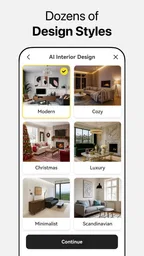
- Multiple interior styles provide inspiration for varied tastes.
- Quick renders are useful when you want ideas without hiring a designer.
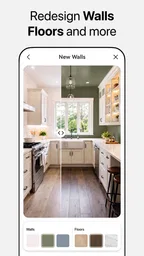
- The app can help visualize a room makeover before you begin.
What could be better
- AI may alter room details or produce layouts that are impractical.
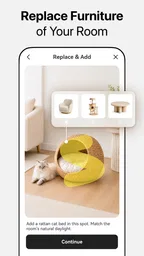
- Generated images may not reflect accurate furniture sizes or measurements.
- Results can vary in quality depending on the source photo.
- Some features or design options may require a paid plan.
- AI concepts may not account for your budget or local product availability.





