

AI Hairstyle Try On & Color review
 Analysis by Appsdrops
I like the idea behind AI Hairstyle Try On & Color because choosing a haircut is an unusually personal decision to make from a picture on a salon wall. This Art & Design app from Vit Corp. gives you a way to explore how different hair looks might suit your own photo before you commit to a change. Its appeal is less about replacing a stylist and more about making the first conversation with one easier: you can arrive with a clearer sense of what you like, what feels too bold, and what you want to ask about.
Seeing a hairstyle on your own photo changes the decision
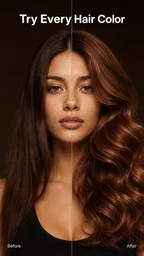
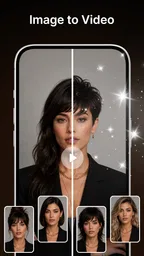
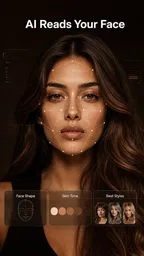
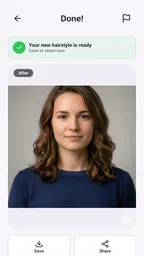
The central idea is simple: use AI to preview hairstyles and colors on a photo of yourself. That personal reference is more useful than scrolling through inspiration images of people with different face shapes, hairlines, and coloring. A style that looks effortless on a model may feel very different when you imagine it against your own features, and a preview can help make that difference easier to discuss.
I would treat the result as a visual prompt, not a prediction of exactly how a cut or color will look in real life. Hair has texture, movement, and volume; lighting and styling also change its appearance. A photo-based preview can help you compare the broad impression of a look, but it cannot settle practical questions such as whether a particular cut works with your natural texture or how much effort it takes to style each morning.
That distinction makes the app most valuable early in the decision process. If you are unsure whether you want a shorter shape, a different color, or a noticeably new style, seeing options on your own image can turn a vague idea into something you can react to. It is especially useful when your reference folder has become a jumble of looks you admire but cannot quite picture on yourself.
In the app store, it has a 4.3 average from around 6,100 ratings, with over 1 million installs. Those figures suggest that plenty of people are interested in trying this kind of personal style preview, but the useful question for me is whether it helps you make a better-informed choice. I think it can, as long as you keep its role realistic.
How to get a more useful preview
The photo is the starting point, so I would choose one that shows your face clearly and represents how you usually look. A straight-on image with even lighting is generally easier to judge than a dramatic selfie with shadows, a strong angle, or hair covering much of the face. If you are comparing several looks, use the same photo each time; otherwise, differences in pose and light can make the comparison less meaningful than it seems.
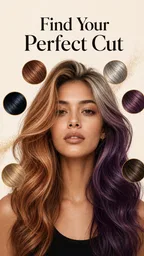
It also helps to change one idea at a time. Try a cut direction first, then explore color separately, rather than switching several aspects of your appearance at once. This is a practical way to identify what is actually appealing: perhaps you like the shorter shape but not the brighter color, or the color works for you while the new length does not. The point is not to conduct a scientific test, but to avoid confusing several changes with one another.
When a preview catches your eye, save the idea in your own notes or keep the image available for a stylist conversation if the app gives you a way to do so. I would describe what I like about it in plain terms—such as the overall length or the color direction—instead of asking a hair professional to reproduce an AI image exactly. That gives them room to adapt the inspiration to your real hair and explain what is achievable.
One useful habit is to compare a bold option with a more modest one. If you are considering a dramatic change, a gentler variation can help you decide whether you want the whole transformation or just one part of it. For example, exploring a new color alongside a smaller change in cut may feel more wearable than committing to both at once. This kind of side-by-side thinking is where a visual tool can be more helpful than collecting still more reference photos.
A realistic use: preparing for a salon visit
Imagine that you have a haircut appointment coming up and know only that you want something different. You might use the app at home to explore a few directions, then narrow them down to the two or three that feel most like you. At the salon, those previews can give you a starting point for a conversation about maintenance, texture, and how much length you are comfortable losing.
This is a better use than treating the preview as a final instruction. A stylist can assess your hair in person and explain how a look may need to change to suit its density, condition, or natural pattern. The app helps you communicate the mood and shape you have in mind; the professional helps translate that into a cut and color that work outside a screen.
It can also be handy if you are trying to decide whether a change feels like you before booking a consultation. Seeing a possibility on your own photo may reveal that you love the idea in theory but would rather keep your current length. That is still a useful outcome: ruling out a look at home can save you from approaching an appointment with expectations you are not ready to act on.
Where the preview has limits
The most important tradeoff is that a picture cannot capture the full experience of wearing a hairstyle. A preview may make a look seem polished without showing the daily styling it could require. It also cannot tell you whether a color suits your hair’s condition or what steps a real color change would involve. For those questions, a stylist’s advice is more dependable than a visual simulation.
Photo choice can affect how confident you feel in the result. A dim, angled, or heavily filtered image is a weak basis for comparing styles, and a preview that looks surprising may reflect the source photo as much as the hairstyle. I would avoid making a costly or irreversible decision from one image. Try a better-lit photo and consider the same look from a couple of angles in your imagination before treating it as a serious candidate.
There is also a difference between experimenting and expecting an exact match. The app is designed around trying looks on a photo; that does not mean the final result will reproduce every detail shown. If you want reliable guidance about upkeep, salon technique, or what a particular change would demand from your hair, reference pictures and a direct professional consultation are the better tools.
The app is free to download, but it offers in-app purchases priced from $19.99 to $38.99 per item. I would explore the experience before paying for anything and check what an offered purchase includes at the point of purchase. If you only want to test a general idea before an appointment, first decide whether the available free experience answers that question; someone who expects extensive, ongoing experimentation should pay closer attention to the purchase terms.
It is rated for Everyone, which makes it broadly accessible as a creative styling app. Still, anyone using a personal photo should be thoughtful about which image they choose and where they share any resulting preview. I would use a photo I am comfortable working with and avoid treating a generated look as a promise about a real-world result.
How it compares with familiar alternatives
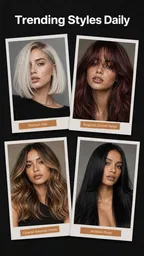
The usual alternative is to search for photos of hairstyles on other people. That gives you more context about how a cut can look in different settings, but it asks you to imagine the style on yourself. This app’s advantage is that the experiment starts with your own image, which can make a broad change feel easier to evaluate. Its limitation is the reverse: one personal-photo preview may offer less real-world variety than a collection of reference images showing different hair types and styling choices.
A salon consultation is stronger when you need practical advice, because a stylist can examine your actual hair and talk through what is realistic. The app is more convenient for casual exploration and can help you arrive with a clearer preference. I would use the two together rather than choosing one: use the preview to discover what attracts you, then rely on an experienced professional to assess how to make that idea work.
Compared with a general image-editing app, the focused purpose here is the appeal. You are not simply adjusting a photograph for a polished portrait; you are exploring a change in personal style. That narrow focus makes it easier to approach as a decision aid, though it does not turn an AI image into hair-care advice. If you mainly want professional guidance on a cut or color, a stylist is the more suitable option.
Who will get the most from it
I think AI Hairstyle Try On & Color is most useful for people who are curious but hesitant: someone considering a new look, struggling to explain a preference, or trying to choose between a safe change and a bolder one. It can also help a friend group discuss ideas, provided everyone understands that the preview is for inspiration rather than a guarantee.
It is less suited to anyone looking for a precise consultation, a detailed account of maintenance, or certainty about how their hair will behave after a salon service. If you already know exactly what you want, the extra visual experiment may not add much. And if you are uncomfortable using a personal photo in a styling app, browsing salon examples or talking directly with a hair professional may feel like a better fit.
The app is currently at version 1.3.1 and works on devices running Android 7.0 or later. It is a focused, free-to-start Art & Design app for exploring hair ideas, rather than a substitute for a stylist’s judgement. My recommendation is to approach it with a clear question—such as whether you prefer a shorter silhouette or a different color direction—use a well-lit photo, and treat the result as a conversation starter. For that specific job, it can make an uncertain decision feel more concrete without pretending that a screen can decide what your hair should be.
What we like
- Preview different hairstyles before making a real-world change.
- Try a range of hair colors in virtual portraits.
- A quick way to explore looks without salon appointments.
- Useful for comparing styles when planning a makeover.
- Digital previews avoid the cost of experimenting with dye.
What could be better
- Results may look different from the hairstyle in real life.
- Photo quality can affect how convincing the previews appear.
- Some styles may not suit every face shape or hair texture.
- Virtual color previews cannot predict your exact dye result.
- The app may offer limited options without in-app purchases.





