AI Hair Try On & Color Changer review
 Analysis by Appsdrops
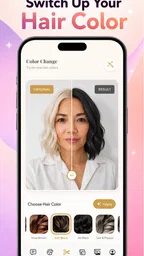
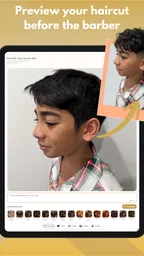
I like the idea behind AI Hair Try On & Color Changer: let me preview a different haircut or shade before I make a change that will take weeks to grow out or fade. This beauty app is best approached as a visual aid, not a promise of an exact salon result. Its most useful role is helping me narrow down what I might ask a stylist for, or simply explore a look without committing to it.
Seeing a possible new look before making the cut
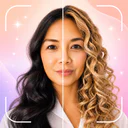
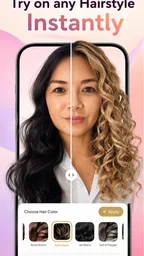
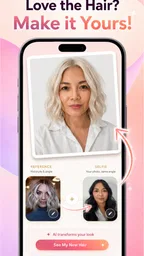
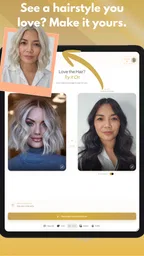
The app’s central appeal is straightforward: it gives me a way to experiment with hairstyles, haircuts, and colours on an image rather than relying only on imagination. That matters because a style that looks appealing on someone else can feel quite different when considered against my own face and colouring. Even an imperfect preview can help me decide whether I’m drawn to a change at all.
I’d use this kind of AI hair preview to compare broad directions: for example, whether I prefer a lighter or darker shade, or whether a shorter shape feels more like me. The preview is a starting point for a decision, not a substitute for seeing how hair behaves in real life. Texture, density, natural movement, and the skill of the person cutting or colouring it all affect the final result.
That distinction is especially important with colour. A screen image can make a shade look more flattering or more dramatic than it would under daylight, indoor lighting, or against the actual base colour of someone’s hair. I’d treat an attractive result as a clue about the mood I want, then describe that mood to a stylist rather than expecting an exact match.
The app is developed by Dream Prayer Developer and sits in the beauty category. It is free to download, with in-app purchases priced from $3.99 to $34.99 per item. That makes it easy to consider as a low-commitment experiment, though I’d check what an item costs and what it includes before buying anything. The app is rated for Everyone, and its average rating is 4.5 from 549 ratings, with 42 written reviews and over 50,000 installs.
How I would make a preview more useful
The quality of any try-on depends heavily on the photo being used. I’d choose a clear, front-facing image with the hairline visible and the face evenly lit. A strong shadow, a hand covering part of the hair, or a busy background can make it harder to judge whether a style suits me. This is practical advice for getting a more readable comparison, not a claim that the app requires a particular photo setup.
I would keep the first round of experiments simple. Rather than switching colour and cut at the same time, I’d compare a few colour directions while keeping the haircut similar, then try different lengths or shapes separately. That makes it easier to understand what I actually like. If I change several things at once, the result may look appealing without telling me which choice made it work.
A useful trick is to save or note the looks that feel close, then compare them side by side with the original photo. A single preview can be persuasive simply because it is new. Seeing several options together helps reveal whether I consistently prefer a warmer shade, more length, or a less dramatic change. It also gives me something concrete to discuss with a hair professional, even if the preview itself isn’t salon-accurate.
I’d also look at the overall impression rather than scrutinizing every edge. AI-generated hair previews can be less convincing around the hairline, ears, or areas where hair overlaps clothing. Those details matter if I’m judging realism, but the tool can still be helpful for answering a broader question: do I want to explore this general style, or does it feel wrong for me?
A realistic use: preparing for a salon appointment
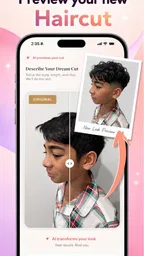
Imagine I have an appointment coming up and I’m considering going shorter, but I’m unsure whether a noticeable change will suit me. I could use the app to compare a few different haircut directions, keeping my photo and the rest of the look consistent. If one option feels promising, I can take that idea into the consultation and ask the stylist what would work with my current hair and maintenance routine.
The benefit here is not that the app tells me what to request with technical precision. It helps me arrive with a clearer preference. Instead of saying only “I want a change,” I can explain that I’m leaning toward a softer, shorter shape or a particular colour family. A stylist can then adapt the idea to my hair’s texture and condition, which a digital image cannot assess for me.
The same workflow is useful when I’m choosing between a subtle update and a more striking transformation. I’d start with options close to my current look, then move further away only if I’m still curious. That gives me a sensible way to test my comfort level. If the most dramatic preview feels exciting but the quieter one feels more wearable, that difference is worth noticing before I book a major service.
For colour, I’d use the previews to identify a direction rather than a precise formula. “Warmer,” “cooler,” “deeper,” or “brighter” is often a more realistic takeaway than expecting a digital shade to translate exactly to real hair. This is particularly useful if I’m not sure how to describe what I want; an image can help start the conversation, while the stylist can explain what is achievable.
Where the preview has limits
The biggest trade-off is that a generated image can look more decisive than the real-world choice deserves. A flattering result may encourage me to make a change, but it cannot tell me how the cut will sit after washing, whether a colour will need frequent upkeep, or how the look will behave as it grows out. I’d use it to explore possibilities, not to make a final commitment on its own.
Photo conditions also affect how confidently I’d judge the result. A picture taken in warm indoor light can skew how I perceive colour, while an angle that hides part of the hair may make a cut difficult to evaluate. If a preview seems surprisingly perfect or oddly off, I’d first consider whether the original image gives a fair basis for comparison before deciding that the style itself is right or wrong.
There is a difference between wanting inspiration and needing technical advice. If I’m planning a complicated colour correction, trying to assess damage, or deciding what can safely be done to my current hair, a virtual preview is not enough. A professional consultation is the better choice in those situations. The app can help me express what I hope to achieve, but it cannot replace an assessment of my hair in person.
Cost is another consideration. Although the app is free to download, optional purchases range from $3.99 to $34.99 per item. I’d explore the basic experience first and only pay if a specific purchase clearly supports the way I intend to use it. Someone who just wants to make one quick comparison may not find paid extras worthwhile, while a frequent experimenter may value having more options if those options match their needs.
It also isn’t the right choice for someone who expects a fully realistic preview of every strand or a guarantee that a salon can reproduce the image. In that case, reference photos of real cuts and colours, combined with advice from a stylist, are a better route. The app is more appealing to someone who wants a convenient first pass before doing that more grounded research.
Who is most likely to enjoy it?
I can see the strongest fit for people who are curious but hesitant: anyone who has saved haircut ideas for months, wonders whether a new colour would feel too bold, or wants to discuss options with a stylist without relying on vague descriptions. It can also be a fun private way to explore looks when there is no immediate plan to book an appointment. The value is in making a decision feel more concrete, not in producing a final answer.
Compared with ordinary image searches, the app’s advantage is the personal angle: a general reference photo shows how a look works on someone else, whereas a try-on lets me consider it against my own image. The trade-off is that real reference photos show actual hair and styling, while an AI preview may smooth over the details that determine whether a look is realistic. I’d use both when the decision matters: the app to explore, and real examples to understand what the haircut or colour looks like in everyday life.
People who already know exactly what they want may not gain much from experimenting. Nor would I recommend relying on a preview as the only input for a high-maintenance change. But if the main obstacle is visualizing a few possibilities, this is a sensible sort of tool to try before making a bigger decision.
The current version is 1.0.19, and the minimum operating-system requirement is 7.0. For someone whose device meets that requirement, the practical decision is less about technical complexity and more about expectations: use it to compare ideas, keep the most promising images, and bring those references into a real conversation about what suits your hair.
My take before you download
I’d recommend AI Hair Try On & Color Changer to a friend who wants a low-pressure way to test the direction of a new look. Its strongest use is helping turn “maybe I should change my hair” into a more specific set of preferences. It is less convincing as a final preview of exactly how a cut or colour will look after a salon visit.
My advice is to start with a clear photo, change one variable at a time, and treat the best-looking result as inspiration rather than a guarantee. If that approach sounds useful, the free download makes it easy to explore before deciding whether any optional purchase is worthwhile. If you need expert judgement about what your hair can handle, take the idea to a stylist instead. That balance is what makes the app useful: it helps me imagine the change, while leaving the actual hair decision where it belongs.
What we like
- Preview different hair colors before making a real-life change
- Try a range of hairstyles without visiting a salon
- Useful for comparing looks with friends or family
- Can help you find inspiration for your next haircut
- A virtual preview avoids the upkeep of experimenting with dye
What could be better
- Results may look less convincing with poor lighting
- Hair overlays may not follow curls or flyaways accurately
- Some styles or colors may require a paid upgrade
- The app needs a clear photo for the best results
- A preview cannot show how a color will look in person





