
AI GPT Generator-Text to Video review
 Analysis by Appsdrops
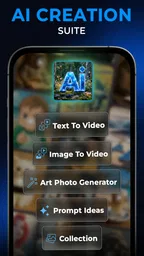
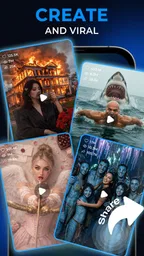
When I need to turn a quick idea or a still image into something more animated, I’m usually looking for a shortcut, not a full editing suite. AI GPT Generator-Text to Video is an Art & Design app from AI Tech Labs built around that kind of starting point: provide text or an image, then use AI to create a video or a 3D-style photo. Its appeal is the short route from concept to visual draft, though the result still needs a human eye before I’d share it as finished work.
From a rough idea to a first visual
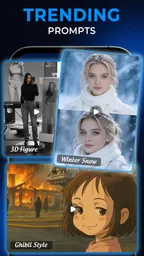
I’d approach the app with a specific, compact prompt rather than a broad instruction. A line describing the subject, setting, and mood gives the generator a clearer job than something like “make this amazing.” For example, a small shop owner could start with a still photo of a new product and describe the feeling they want for a social post. That makes the output easier to judge: does it suit the product, and is the motion useful, or merely decorative?
The same idea works when there is no image to begin with. A writer planning a scene, a student illustrating a presentation, or someone making a playful greeting can use a short text concept as a starting point. I see the app’s strongest role as turning an idea into a draft quickly, not replacing a carefully directed animation workflow. Keeping the request focused also makes it easier to decide what to change if the first result misses the mark.
The app is free to install, with in-app purchases ranging from $0.99 to $36.99 per item. That makes it reasonable to try before committing money, but I’d check what a paid option actually provides in the app before buying. If you only need one occasional visual, a purchase may not be worthwhile; if you expect to experiment regularly, the available choices matter more. I would treat the free entry point as a chance to test whether its output suits your taste, not as a promise that every workflow is free.
Choose the input with the final use in mind
Text and images are different kinds of starting material, and it helps to choose deliberately. Text gives you room to describe a scene that does not exist yet. An image gives the process a concrete subject, which can be useful when the identity of a person, object, or product should remain central. If the picture itself is important, I’d use a clean, uncomplicated source image rather than one already crowded with details that could compete for attention.
For a practical example, imagine preparing a post about a handmade mug. I’d begin with a clear photo, then describe a simple visual direction instead of asking for several unrelated effects at once. After generation, I’d check whether the mug still reads clearly and whether the animation supports the post. This small review step matters: a lively result is not automatically a useful one, especially when viewers need to recognize a particular object.
Make the first pass easy to evaluate
One useful habit is to separate the creative brief into essentials and optional flourishes. The essentials are the subject and the intended mood; optional details might include the setting or a stylistic touch. If the output is off, I’d revise one part at a time rather than rewriting everything. That gives me a better sense of which instruction is helping and avoids turning the next attempt into a completely different idea.
I’d also decide in advance where the result will go. A playful clip for a private message can tolerate odd details that would look careless in a business announcement. A visual for a class presentation has to communicate its point clearly, while a personal experiment can be judged mainly on whether it is fun. Thinking about the audience before generating helps prevent a common mismatch: an eye-catching image that does not serve the message.
Review the output before handing it off
Generation is only one part of the job. Before passing a result to a social platform, a presentation, or a friend, I’d inspect the most important subject, the overall mood, and any details that could distract from the message. If the subject has become hard to recognize or the motion changes the tone, I’d revise the prompt or choose a different source image. A quick visual check is a sensible handoff, not an optional finishing flourish.
That handoff is particularly important for commercial or public-facing work. A small business might use an AI-made visual as a concept draft, then decide whether it meets its own standards before posting. A student might use one to make a slide more engaging, but still check that it does not confuse the topic. In both cases, the app can help produce material, while the person using it remains responsible for judging whether that material is appropriate.
I would not assume that a generated video is ready for every platform or purpose without checking its presentation there. The practical question is not only whether the image looks appealing inside the app, but whether it remains clear in the place where people will see it. If the intended use demands precise timing, consistent branding, or detailed control over every frame, a dedicated video editor is likely a better next step.
Where it fits among creative tools
Compared with a conventional image editor, this app’s distinctive focus is moving from a text or image idea toward AI-generated video or a 3D-style photo. A standard editor is generally the better choice when I need to adjust exact colors, crop with precision, or make a deliberate sequence of manual edits. Compared with a full video editor, this app is more appealing when the goal is to get a visual starting point without building an animation from individual clips and edits.
That difference makes it useful as a first stage in a larger process. I might create a draft here, decide that the concept works, and then continue elsewhere if the final piece needs more control. I would not choose it as my only tool for a polished campaign or a video that must follow a tightly specified brief. The simpler the goal, the more likely its quick-generation approach will feel convenient; the more exact the requirements, the more likely I’ll want a specialist editor afterward.
There is also a difference between making something entertaining and making something dependable. AI-generated imagery can be a good prompt for a visual idea, but it may not preserve every detail that matters to a product, person, or scene. I’d use it to explore possibilities and would be more cautious when accuracy is central. That is a useful boundary for anyone deciding whether to use this app for casual creativity, school work, or a public-facing project.
Who is likely to enjoy it
I can see this being a good fit for people who enjoy experimenting with visual ideas but do not want to begin with a complex editing timeline. It may suit casual creators, students making illustrative material, and small businesses looking for a quick concept to evaluate. The age rating is Everyone, and the app has reached over 10 million installs, which suggests broad reach, though popularity alone does not tell me whether its particular output will meet an individual user’s needs.
The current version is 1.9.5, and the minimum operating system is Android 7.0. Its average rating is 3.5 from around 24,000 ratings, with 249 written reviews. I’d read that rating as a reason to approach it with realistic expectations: try a simple task first and judge the result yourself rather than assuming it will match every example or prompt. These figures offer context, but they do not replace checking whether the app works for your own creative habits.
It is less suited to someone who needs predictable, frame-by-frame control or a guaranteed faithful rendering of a reference image. It may also frustrate anyone who wants a complete professional editing environment in one place. If your usual work involves careful retouching, exact brand rules, or a long sequence with precise transitions, I’d start with software designed for those jobs and treat AI generation as an optional source of ideas instead.
When the workflow starts to break
The biggest risk in a prompt-led process is expecting the app to infer details that were never clearly expressed. A vague request can leave too much room for interpretation, while an overloaded prompt can make it harder to tell which instruction shaped the result. I’d keep each attempt narrow, inspect the output, then make a targeted adjustment. That approach is more informative than repeatedly changing several things at once.
Another point of friction is the gap between a striking draft and a usable deliverable. A 3D-style photo may look interesting but still not communicate the intended information. A generated video can be entertaining yet unsuitable for a serious announcement. If the first result is close but not right, I’d decide whether the problem is the input, the idea, or a need for more manual control. Sometimes the best move is to take the concept into another tool rather than spending more time trying to force a perfect result here.
Because in-app purchases range up to $36.99 per item, I’d be especially careful to understand the purchase choice before confirming it. The app is free to download, but that does not mean every possible use or option costs nothing. For a one-off experiment, test the basic workflow first. For ongoing use, compare the cost of the option you are considering with how often you genuinely expect to create visuals.
My take after considering the full process
AI GPT Generator-Text to Video makes the most sense to me as a fast idea-to-draft tool: start with a short text description or an image, generate a visual, inspect it, and hand it off only if it fits the intended use. Its appeal is accessibility and the chance to explore motion or a 3D-style look without starting from a traditional editing timeline. The trade-off is that speed does not guarantee control, accuracy, or a polished final result.
I’d recommend giving it a try if you want to make casual visual experiments, create a rough concept, or add a distinctive touch to a simple post. I’d skip it as a primary production tool when exact details and fine editing matter more than quick generation. Starting with one clear, low-stakes idea is the best way to find out whether its creative shortcuts suit you—and whether the result is good enough to pass along.
What we like
- Creates video drafts from text prompts with little manual editing.
- Can help turn rough ideas into visual content quickly.
- Text-to-video generation may suit social media posts.
- AI-generated visuals can inspire new creative directions.
- A mobile interface makes creation possible away from a computer.
What could be better
- Generated scenes may not match the prompt precisely.
- Video quality can vary between generations.
- Fine control over motion and scene details may be limited.
- Creating polished clips may require repeated prompt adjustments.
- AI-generated content may need review before sharing.





