




AGE-R medicube Digital clinic review
 Analysis by Appsdrops
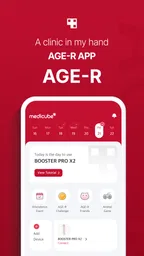
AGE-R medicube is best approached as a companion to Medicube’s beauty-care devices, not as a general skin-care guide. I see its main appeal in bringing device-related information and routines into a phone, where they can be checked alongside everyday care. That focus makes it potentially useful for someone who already uses AGE-R products, but less compelling if you simply want broad beauty advice or a standalone routine planner.
How easy is it to read and navigate?
As a beauty app from APR_Corp., AGE-R medicube is built around the company’s AGE-R ecosystem. That narrower purpose can be a benefit: instead of sorting through unrelated tips, a device owner can use one app as a place to engage with the product experience. The name “Digital clinic” suggests guided care, but I would treat it as a digital companion rather than a substitute for professional skin advice.
The app is free and rated for Everyone, which lowers the barrier to trying it. Its current version is 2.13.2, and it requires Android 7.0 or later. Those details help with the practical question of whether an older Android phone may be able to run it, though a supported operating system alone does not guarantee that every screen will feel comfortable to use.
For readability, the key test is whether the information you need is easy to find when you are holding a device and trying to follow a routine. I recommend checking the app at a relaxed moment first: locate the sections you expect to use, read any instructions in full, and make sure you can return to them without having to remember a sequence from memory. This small setup step is especially worthwhile if you plan to use the app during a treatment rather than just browse it once.
People who prefer clear, step-by-step guidance may appreciate having device-related material on a phone, but no app can make complex instructions effortless simply by being digital. If text feels crowded on your screen, or you find it hard to keep your place while switching between the app and a device, take time to review the routine before starting. A larger display, where available, can make reading more comfortable than trying to scan a phone while in the middle of care.
Motor and sensory considerations
Using a beauty-device companion involves more than tapping through menus. A person may be holding a handset in one hand while handling a device with the other, or may need to look back and forth between a screen and a mirror. That divided attention is a genuine usability issue, particularly for anyone with limited hand control, tremor, fatigue, or difficulty focusing on small text. I would avoid assuming that a phone-based workflow is automatically convenient for everyone.
A practical workaround is to read the relevant instructions before beginning and leave the phone somewhere stable and easy to see. That reduces the need for repeated handling and makes it easier to concentrate on the device itself. If you rely on audio, magnification, or other phone accessibility settings, test them with the app before depending on them during a routine; the most useful setup is the one that lets you understand the guidance without rushing or repeatedly changing screens.
Sensory comfort matters too. Skin-care routines can involve close attention to how the skin feels, while a screen adds visual demand. I would keep sessions unhurried and stop if a device or routine causes discomfort rather than treating app guidance as a reason to push through. The app can support a personal-care habit, but decisions about irritation or unusual reactions should be based on your own wellbeing, not on the desire to complete a digital sequence.
It may also be a poor fit for someone who prefers to avoid using a phone during personal care. A printed instruction sheet or a routine learned in advance can be simpler, especially when notifications and other phone distractions tend to interrupt concentration. In that situation, the app’s value is less about constant access and more about checking details beforehand.
Using it in different everyday situations
The most realistic use case is a person who has already chosen a Medicube AGE-R device and wants to make its care routine part of a regular schedule. For example, I might check the instructions after setting up a device, then review them again before an evening routine so I do not have to guess what to do. Keeping that check separate from the hands-on part of the routine can make the process calmer and easier to repeat.
It can also suit someone who travels with a device and would rather keep relevant guidance on a phone than rely on remembering every detail. The trade-off is that travel often means smaller spaces, less stable surfaces, and more distractions. I would prepare the routine before leaving home and avoid trying to learn unfamiliar steps in a rushed setting.
For a shared household, it is sensible to think about whose phone is being used and who is following the routine. A digital companion is most useful when the person using the device can comfortably access and understand the information themselves. If another person is helping, they should make sure the instructions are clear to the device user rather than turning the app into a substitute for that person’s own choices.
AGE-R medicube is less suited to people who want an independent beauty library covering many brands, ingredients, or skin concerns. General beauty platforms and editorial guides are usually better for comparing products across companies. A notebook or basic reminder tool may be better for someone who only wants to record when they completed a routine. The app’s more specific role is tied to Medicube’s device-centered experience.
Where the digital clinic approach still has limits
The phrase “digital clinic” can create expectations of personal diagnosis or individualized medical guidance. I would not use it that way. A beauty app can help organize an experience around devices, but it should not be treated as a clinician, and it cannot replace qualified advice when a skin concern is persistent, painful, or worrying. That distinction is important for anyone hoping that an app will tell them what condition they have or which treatment is medically appropriate.
Another limitation is the device-centered focus itself. If you do not own or plan to use an AGE-R product, the app may have little day-to-day purpose compared with a broader skin-care resource. Even for device owners, having an app does not necessarily make a routine easier if the phone is awkward to handle, the screen is hard to read, or the person prefers not to use digital guidance while caring for their skin.
There is also a learning curve in deciding what role the app should play. I would start by using it as a reference point, not by making it the center of every skin-care decision. Check the instructions, establish a comfortable routine, and then see whether returning to the app genuinely helps. If it adds extra steps without making the device easier or clearer to use, a simpler approach may serve you better.
The app has an average rating of 3.8 from around 1,800 ratings, with 69 written reviews, and it has been installed over 500,000 times. Those figures suggest a sizable audience and a mixed overall experience rather than universal enthusiasm. I would take that as a reason to judge it by your own needs: device owners may find the focused companion useful, while people seeking a polished all-purpose beauty adviser may want something else.
Who I would recommend it to
I would recommend trying AGE-R medicube if you use a compatible Medicube AGE-R device, prefer keeping guidance on your phone, and can comfortably read and navigate the app in your usual care setting. It is most promising for someone who values having device-related support close at hand and is willing to prepare a routine before using the device. The free price makes a trial easier to justify, although the app is only worthwhile if it fits the way you actually care for your skin.
I would skip it if you are looking for diagnosis, broad product comparisons, or a full beauty routine unrelated to Medicube devices. I would also be cautious if phone use makes personal care more stressful, if you have difficulty switching attention between a screen and a device, or if you need large, highly legible instructions and have not yet checked how the app works with your phone’s accessibility settings. In those cases, a simpler reference or advice from a qualified professional may be the better choice.
A measured inclusive verdict
AGE-R medicube has a clear potential role: it brings a device-specific beauty experience to mobile rather than trying to cover every skin-care question. That focus is useful for the right person, but it also defines who may not benefit. I would treat it as an optional companion, prepare instructions before a session, and keep personal comfort ahead of completing any routine.
For a device owner who finds phone guidance readable and manageable, it may help make care feel more organized. For someone who needs a wider beauty resource, a diagnosis, or a low-distraction routine, another option is likely more appropriate. My overall view is cautiously positive: the app is worth considering when its narrow purpose matches your needs, but its usefulness depends on the person, the device, and the comfort of the way they use it.
What we like
- Guided routines make it easier to follow a consistent skincare plan.
- Treatment tracking helps users monitor their device sessions.
- The app provides a convenient companion for compatible AGE-R devices.
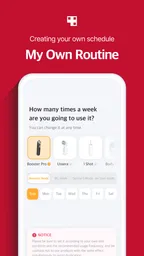
- Routine options can be tailored to different skincare goals.
- A digital record can help users notice changes in their skincare habits.
What could be better
- Some features may require a compatible AGE-R device.
- Device availability and app features can vary by region.
- Results depend on consistent use and may take time to appear.
- Users may need to create an account to access key features.
- The app is less useful for people who do not own AGE-R products.





