Age Changer - Future Face AI review
 Analysis by Appsdrops
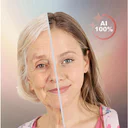
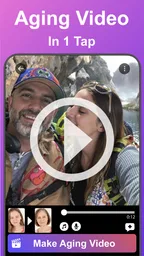
I’m cautious with camera apps that promise a dramatic look in a few taps, because a striking preview is only useful if it’s easy to understand and comfortable to use. Age Changer - Future Face AI is a beauty app built around changing the apparent age of a face in a selfie and turning the result into a video. I’d treat it as a playful way to explore a different look, rather than as a full photo editor or a tool for making a realistic prediction of how someone will age.
Understanding the main interaction
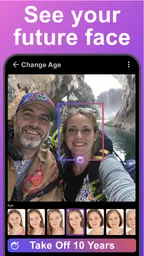
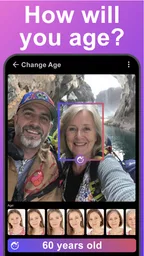
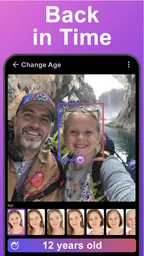
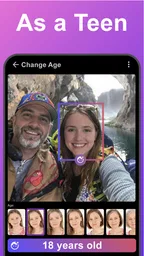
The app’s central idea is simple: start with a camera selfie and see a younger- or older-looking version of the face. That focused purpose is a strength for someone who wants a quick visual experiment without learning a broad editing suite. UpName develops it, and the app is free to install, with optional in-app purchases ranging from $0.99 to $99.99 per item. That wide span is worth keeping in mind before buying anything: I’d check the item and its terms in the app store rather than assuming every extra costs the same.
At the time of writing, it is at version 5.2 and has an average rating of 4.3 from 666 ratings, with 50K+ installs. Those figures suggest that people are trying it, but they don’t tell me whether a particular face, lighting setup, or phone will produce a result I like. My practical advice is to judge it on a small, low-stakes test first: take a clear, front-facing selfie and see whether the result is legible and entertaining before spending time on a more carefully staged image.
For readability and navigation, a narrow purpose can be helpful: there is less conceptual work than in an editor with dozens of unrelated tools. Still, a simple concept does not automatically make every control easy to read or operate. I would look for clear labels, visible confirmation before an action, and a way to tell which version of the image I’m viewing. If any step feels ambiguous, pause rather than repeatedly tapping; that is especially useful when an app includes optional purchases.
Make the face easy to interpret
With an age-effect app, the input image matters as much as the effect. I’d choose a selfie with the face unobstructed and evenly lit, and avoid a strong side angle or a busy background when possible. This is not a guarantee of a better transformation, but it reduces distractions when you’re judging whether the change is actually on the face. A useful comparison is to keep the original beside the edited result, instead of relying on memory for what changed.
There is also a small but important distinction between a fun visual and a believable one. An age-altered face can be amusing precisely because it looks exaggerated; that does not make it a dependable forecast of someone’s future appearance. I would not use the result as a basis for health, identity, or other serious decisions. For a birthday joke, a group chat, or a private experiment, the playful framing makes much more sense.
Motor and sensory comfort
Camera-based editing can be awkward for anyone who finds precise touch gestures difficult, has limited reach or dexterity, or prefers not to hold a phone steady. A practical workaround is to prepare the phone on a stable surface and frame the selfie before beginning, rather than trying to adjust posture and controls at the same time. If the app’s controls require repeated fine adjustments, that may still be frustrating; I would not assume the workflow accommodates every motor need simply because the main idea sounds straightforward.
Sensory preferences matter too. Face transformations can be startling, uncanny, or emotionally uncomfortable, especially when the result is more dramatic than expected. I’d try the effect on my own image first, in a calm setting, and stop if the visual change feels unpleasant. The app is aimed at everyone by its age classification, but that does not mean every effect will suit every person’s comfort level or every family conversation.
For users who are sensitive to moving images, the video aspect deserves particular thought. A still result may be easier to inspect than a moving one, so I’d take time with the preview before sharing or replaying anything. If movement is uncomfortable, or if someone simply wants a static portrait, an ordinary photo editor with age-style filters may be a better fit than a tool whose appeal includes a video outcome.
Where it fits into everyday life
A realistic use case is a casual family gathering: someone takes a well-lit selfie, tries an older-looking transformation, and shows the result around for a laugh. The easiest way to keep that enjoyable is to ask before using another person’s face, especially if the image may be saved or shared. I’d also avoid making a joke about someone’s real age or appearance unless I know they are comfortable with it. The effect is lighthearted only when the people involved find it lighthearted.
It can also work as a quick creative prompt. For example, I might compare a few expressions or angles to see which one produces the clearest, most amusing clip, then keep just the best version. That is more useful than taking many nearly identical selfies: it saves effort and makes it easier to decide whether the transformation itself is entertaining. A plain, front-facing image is a sensible starting point; elaborate makeup, filters, or dramatic shadows can make it harder to judge what the app has changed.
In the beauty-app category, this is much narrower than a general retouching tool. A conventional editor is usually the better choice if I want control over blemishes, color, cropping, or a polished portrait. An age-change effect is the better choice when the specific goal is a quick older-or-younger visual and the novelty matters more than detailed editing. I would not pick this app for professional headshots, careful portrait retouching, or a realistic aging study.
Access across different situations
Not everyone wants to take a fresh selfie in the moment. Some people may prefer to work from an existing image, while others may be in a place where using a camera feels intrusive or inappropriate. Since the app’s stated idea centers on a camera selfie, I’d use it where taking a face photo is comfortable and appropriate, and avoid trying it in public settings where others might appear in the frame. A quiet, private setting gives the user more control over the image and the experience.
Device support is another practical consideration: the minimum operating-system requirement is version 9. Before installing, I’d check that the phone meets that requirement and has enough room for the app and any media I choose to keep. This is particularly helpful when using an older device or a phone with limited storage. The app is free to download, but optional purchases mean I would also keep an eye on any purchase screen and make sure it is clear what an item provides before confirming.
For someone with low vision, the key question is whether the controls and preview are comfortable to inspect on their own device. I would try the app with the phone’s usual display settings and, if needed, use the system’s familiar magnification or text-size options. Those adjustments can help with general phone use, but they cannot guarantee that every in-app control or transformed face will be easy to interpret. If the preview remains hard to distinguish, asking a trusted person to help assess it may be more useful than repeatedly retaking the selfie.
Limits I would keep in view
The main limitation is that the concept is intentionally narrow. If I want layered edits, precise retouching, or a broad set of creative controls, I’d reach for a more versatile photo app. Another friction point is that face effects are highly dependent on the source image: a result that looks amusing on one selfie may look confusing on another. That variability is a reason to treat the first output as an experiment, not a promise of consistent results.
I’d also be thoughtful about privacy whenever a face photo is involved. Before using any camera or image-based app, I personally consider whether I’m comfortable putting that image into the workflow and whether I want to keep or share the finished result. I would avoid uploading someone else’s face without their permission. These are sensible habits for any face-editing tool, not a claim about this app’s particular data practices.
The age classification is Everyone, which makes the app broadly suitable from a store-age perspective, but parents may still want to guide younger users around consent, purchases, and how altered images are shared. The optional purchase range is especially relevant in a shared-device household: I’d check purchase controls on the device and make sure a child understands that a free install can still include paid items.
Who I’d recommend it to
I’d recommend trying Age Changer - Future Face AI if you want a focused, playful selfie transformation and are comfortable experimenting with face photos. It is most appealing when the goal is a quick reveal or a short visual gag, not when you need reliable editing tools or a serious portrait workflow. The average rating of 4.3 gives a useful snapshot of user sentiment, but my own decision would still come down to whether the effect works with the kind of selfie I actually take.
I’d skip it if you dislike face-altering effects, need a highly controlled editing process, would rather avoid camera-based apps, or feel uneasy about optional purchases. I’d also choose another tool if accessibility depends on specific controls that I cannot test comfortably on my device. The most inclusive way to approach this app is not to assume that one simple effect suits everyone, but to let each person decide whether the image, movement, and sharing context feel right for them.
Overall, this is a small, specific beauty app with an easy-to-understand creative premise and clear limits. I’d use it in a relaxed setting, start with one clean selfie, check the result before making more, and keep the transformation in the realm of entertainment. That makes the experience more comfortable, avoids unnecessary retakes, and gives me a fair sense of whether this particular age-change effect is worth keeping on my phone.
What we like
- Quickly creates playful age-progressed and younger-looking portraits.
- Simple controls make it approachable for first-time users.
- Photo effects can inspire entertaining social media posts.
- A useful way to preview different looks without editing skills.
- Results can make fun conversation starters with friends.
What could be better
- Portrait results may look unrealistic or inconsistent.
- Clear front-facing photos are often needed for better results.
- Some features may require payment or an in-app subscription.
- Processing can be slower on older phones or with large photos.
- Uploading personal photos may raise privacy concerns.





