

AARP SafeTrip™ review
 Analysis by Appsdrops
Driving is one of those everyday tasks that can become harder when attention, confidence, or changing road conditions get in the way. I see AARP SafeTrip™ as a tool aimed at making people more aware of their driving habits, rather than as a navigation app or a substitute for careful driving. That distinction matters: it may suit someone who wants to reflect on how they drive, but it is not the right choice for a driver who expects turn-by-turn guidance or an emergency service.
Getting oriented without adding another driving task
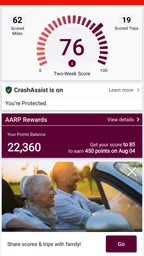
SafeTrip is a free app from AARP in the auto and vehicle category. Its purpose is straightforward: encourage safer driving habits. I appreciate that focus because many driving apps compete for attention with maps, alerts, scores, and constant prompts. A habit-focused tool can be useful if it helps a person notice patterns without asking them to interact with a screen while the car is moving.
The app has an average rating of 4.4 from 399 ratings, and it has passed 100,000 installs. Those figures suggest that drivers have found a reason to try it, though popularity alone cannot tell you whether its approach will suit your needs. I would think of it as a personal driving-awareness aid, not as proof that a trip is safe or that a driver has improved.
For readability and navigation, the most important question is whether you can understand the app’s purpose before you set off. I would take a moment while parked to explore its screens and learn where the information you care about appears. That small preparation is especially helpful if menus or unfamiliar icons slow you down. Once driving begins, the safest workflow is to leave the phone alone and review anything meaningful after arriving.
The app is rated for Everyone, which makes it broadly approachable from an age-rating perspective. That does not automatically mean every screen is equally easy for every person to use. Someone with low vision, limited experience using smartphones, or difficulty processing dense information should check the actual interface on their own device before relying on it. A larger display or operating-system text settings may help, but the practical test is whether the essential information remains comfortable to read.
Make the first session a parked session
I would set up and explore SafeTrip before a regular journey rather than trying to learn it in a car park just before pulling out. Look for the main areas you expect to use, check that text is legible at your usual phone distance, and make sure you can close or leave a screen without confusion. If another person helps you with phone settings, ask them to show you the route back to the app’s main view instead of simply configuring it for you. Knowing how to recover from an unexpected screen is more useful than memorizing every menu.
A practical use case is a driver who wants to compare their habits across familiar errands. For example, someone who makes a weekly grocery run could use the app as part of a routine: prepare the phone before leaving, drive without handling it, and review the relevant information after parking. Repeating the same process makes it easier to notice whether the tool is useful to them, while avoiding the misleading impression that one uneventful trip proves a lasting change.
Motor and sensory needs call for a careful workflow
For drivers with limited hand movement, tremor, or discomfort reaching for a phone, the key benefit of a driving-awareness app depends on whether interaction can be kept out of the trip itself. I would not recommend trying to tap through screens while moving, even at a stop in traffic. Prepare the phone before departure, secure it safely, and plan to review it only when fully parked. If that routine still requires awkward or repeated handling, the app may create more strain than value.
Drivers who are sensitive to sound, visual motion, or competing notifications may also want to consider how SafeTrip fits into their existing phone setup. Keep the interface out of sight while driving and avoid adding any sound or alert setting you find distracting. I would not assume that an app designed around driving awareness will automatically be comfortable for every sensory profile; the right choice is the one that supports attention rather than pulling it away from the road.
Passengers can help with setup or post-trip review, but they should not turn the journey into a running commentary about every maneuver. That can make a driver anxious and distract everyone in the vehicle. A calmer approach is to agree beforehand that the driver will focus on driving and that any review happens later, in a supportive conversation. This is particularly useful when a family member is trying to help an older driver stay confident without making them feel monitored.
SafeTrip may be a poor fit for someone who needs an app to accommodate a specific vision, hearing, dexterity, or cognitive requirement and cannot confirm that the interface works comfortably for them. In that case, I would prioritize a tool already tested with their assistive setup, or ask a trusted person to help evaluate it while the vehicle is stationary. A general age rating is not a guarantee of individual accessibility.
Where it fits among driving apps
The usual alternatives serve different jobs. A navigation app is the better choice when you need directions, traffic-aware routing, or help finding a destination. A vehicle’s built-in safety systems are more relevant for alerts available directly in the car. SafeTrip’s appeal is narrower: it is for people interested in reflecting on driving habits. I would not replace navigation, roadside assistance, or sound judgment with it, and I would not expect it to diagnose a vehicle problem.
This distinction can prevent a common disappointment. If you install it hoping to get spoken directions or live hazard warnings, you may be looking for a different kind of product. If you already have maps covered and want an additional prompt to think about your own driving, its focused purpose may make more sense. The app is most useful when you know what question you want it to help you consider, rather than expecting it to solve every driving concern.
One useful approach is to use it selectively instead of treating it as a dashboard that needs constant attention. Choose a familiar trip, keep your attention on the road, then review the app after parking. If the information is clear and relevant, continue the routine; if it is confusing or simply adds worry, there is little reason to force it into every drive. This trial-and-review method is a better measure of personal value than installing it and immediately judging the whole experience.
Access in different situations, and the limits to keep in mind
SafeTrip’s value can change with the setting. A driver with a predictable commute may find it easier to build a calm review routine than someone making unfamiliar trips under time pressure. A family member helping another driver can make the first exploration less stressful, while a person driving alone may prefer to understand the app completely before depending on any part of it. In either case, the journey itself should not become a testing session.
Phone access can also be a practical barrier. If the device is difficult to reach, the display is hard to see in daylight, or the driver relies on a mount that blocks their view, the app should not be used in a way that compromises safe positioning. The phone’s place in the car matters as much as the app’s interface. I would rather skip a feature than adjust a device while driving or mount it where it competes with the road.
Another trade-off is that driving feedback can be interpreted too confidently. A single trip is affected by traffic, weather, passengers, and route conditions, so I would treat any review as a prompt for reflection rather than a verdict on someone’s ability. If a driver feels judged or becomes preoccupied with achieving a better result, the tool may undermine the confidence it was meant to support. Use it as one input, not a score that defines safe driving.
The app’s current version is listed as aarp-v4.0.0.0-95522-g164d726-prod, and it requires Android 10 or later. That compatibility detail is worth checking before planning to use it, particularly on an older phone. SafeTrip is free, so trying it does not require a purchase, but the more important cost is attention: it should earn a place in a driver’s routine by being easy to understand and useful after a trip.
AARP released SafeTrip on November 22, 2022. I would still judge it by how it works on the phone and in the driving routine at hand, not by its release history. Before making it part of regular use, check that the installed version opens reliably, that its text and controls are comfortable for the intended driver, and that the phone can remain untouched while the vehicle is moving.
Who I would recommend it to
I would suggest SafeTrip to a driver who wants a simple way to pay attention to driving habits and is comfortable reviewing an app after trips. It may also be worth exploring with a family member who is trying to support safer routines, provided the conversation stays respectful and the driver remains in control. The best use is modest: make the app part of a deliberate reflection habit, not a constant companion demanding attention on the road.
I would steer away from it if you primarily need navigation, in-car warnings, or a tool that has already been shown to meet a particular accessibility need. I would also skip it if reviewing driving information increases anxiety or encourages phone interaction during a journey. In those situations, a dedicated navigation solution, the vehicle’s own controls, or a more accessible tool may be a better match.
My overall view is that AARP SafeTrip has a sensible, limited role: it can encourage drivers to think about how they travel, but it cannot make a trip safe on its own. Its strongest quality is that its purpose is easy to explain; its biggest practical test is whether its interface and review routine work for the individual using it. For me, the right way to use it is parked, unhurried, and as a prompt for reflection—not as another screen to manage behind the wheel.
What we like
- Trip tracking can help family members follow your progress.
- The app can provide driving alerts during a monitored trip.
- It offers roadside assistance access for eligible AARP members.
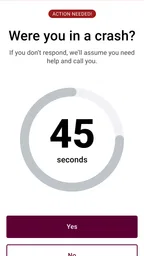
- Crash detection may help trigger a request for emergency assistance.
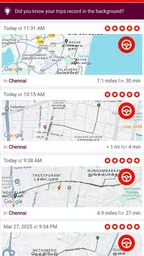
- Trip information can help you review your driving habits.
What could be better
- Some features may require an active AARP membership.
- Location tracking can drain your phone battery on long trips.
- Reliable alerts depend on cellular service and GPS availability.
- Background location access may raise privacy concerns.
- Crash detection can mistake hard braking for a collision.





