


AAA Mobile review
 Analysis by Appsdrops
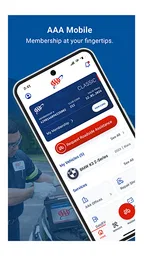
I think of AAA Mobile less as a general-purpose travel app and more as a pocket companion for people who already rely on AAA. It is a free lifestyle app from American Automobile Association, Inc., and its value is tied to having familiar AAA services close at hand when you are away from home. If you are already a member, keeping the app on your phone can make sense; if you are not, it is worth checking which services you can actually use before expecting it to replace a broader travel or roadside tool.
What the app is useful for today
AAA Mobile has been around since August 10, 2010, and its current version is 26.14.0. That long history makes it a more established service companion than a new app built around a single travel feature. The overall store rating is 4.5 from around 83,000 ratings, and it has passed 10 million installs. Those figures suggest broad use, but they do not tell me whether every feature will be useful to a particular member.
The practical appeal is having AAA-related help available while you are out. Rather than treating the app as something to browse for entertainment, I would install it with a specific purpose: making it easier to find or use services connected to my membership when plans change. It is most relevant when I already know I am likely to need AAA, not as a substitute for every map, booking, or vehicle app on my phone.
That distinction matters. A membership-focused app can bring together useful touchpoints, but it is not automatically the best choice for comparing every roadside provider or planning every part of a trip. I would keep my ordinary navigation option and other travel tools if I use them; AAA Mobile is better judged by whether it makes AAA support more convenient.
A better fit for members than casual travelers
If you are an existing AAA member, the app is easier to justify. It gives you a mobile way to engage with services associated with an organization you already use, which can be more convenient than searching through old messages or looking for a card in your wallet. That convenience is especially appealing for people who drive often, share a car with family, or like to keep essential service information in one place.
If you rarely drive, are not a member, or only want a basic map and directions, the app may not earn a place on your home screen. A standard maps app is likely the more direct choice for navigation, while a dedicated travel planner may suit someone focused on itineraries and reservations. AAA Mobile is strongest when the AAA relationship itself is the reason you are opening it.
The age rating is Everyone, and the app is free to download. Free installation should not be confused with every service being free to use: membership terms and eligibility still matter. I would check what my membership includes before relying on a particular service, especially if I am traveling away from home or using an account shared with someone else.
How I would use it on a normal day
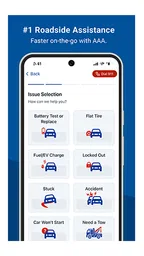
Imagine leaving work and discovering that the car will not start. In that moment, the useful thing is not a polished home screen; it is being able to reach the relevant AAA service without first figuring out which number or account detail to search for. I would open the app, confirm that I am signed into the right account, and look for the appropriate support option. The sensible preparation is doing that account check before a stressful situation, rather than discovering a sign-in problem at the roadside.
A second, less obvious use is as a pre-trip check. Before a longer drive, I would open the app at home, make sure my account access works, and familiarize myself with where the service areas I might need are surfaced. That small bit of preparation can reduce fumbling later. It is also a good moment to confirm membership details, instead of assuming that an old card or another household member’s account will cover every situation.
For a family that shares driving, I would treat the app as part of a larger handoff routine: make sure the person driving knows which account is active and where to find help, rather than assuming one person’s phone will always be available. This is a practical benefit of a mobile service hub, but it depends on each driver having a workable way to access the account and knowing the membership rules.
What its long-running version history means
The current version number, 26.14.0, shows that the product continues to be maintained within a mature app line. I take that as evidence of ongoing versioning, not proof that a particular feature was recently added or that the interface has been redesigned. Without a specific change history to point to, it would be misleading to claim that a named tool arrived in a particular update.
For existing users, the useful takeaway is modest but real: this is not an abandoned one-off download. A maintained version gives me a reason to keep the app installed if I depend on AAA services, while still checking the app after updates if a familiar screen or workflow has moved. People who have not opened it in a long time should sign in and orient themselves before a trip, rather than assuming that old habits will match the current layout.
The long lifespan also creates a fair expectation that AAA Mobile should be judged as a service channel, not just by how attractive it looks. The important test is whether it helps me get to the right AAA resource with less effort. A plain interface can be perfectly adequate if it gets me there reliably; a slick interface is not much use if I have not prepared my account or do not qualify for the service I need.
Where it differs from ordinary alternatives
Compared with a general maps app, AAA Mobile has a narrower job. Maps are built around directions, traffic, and places; this app is oriented toward the AAA relationship and the services connected to it. I would use both rather than trying to make one replace the other. For route choices and live navigation, my usual maps app is the obvious tool. For AAA-related assistance, the AAA app is the more relevant starting point.
It also differs from independent roadside apps. Those may be more useful to a driver who wants to compare providers or arrange help without an existing AAA connection. AAA Mobile makes more sense when I want to work through the organization I already belong to. That focus is a strength for members, but it is also a boundary: a focused member app should not be mistaken for a universal directory of all travel services.
Likewise, someone planning a holiday around hotels, flights, and detailed itineraries may get more value from a travel planner. I would not choose this app solely because I want a broad trip-organizing workspace. Its appeal is more grounded in everyday driving and access to AAA, so its usefulness rises or falls with how often I use those services.
Friction worth planning around
The biggest limitation is that convenience depends on context. Being able to open an app does not remove the need for an eligible membership, a working account, and a suitable service for the situation. If you download it only after a problem starts, you may face setup or sign-in steps at the least convenient time. My advice is to install it and check access while you have a calm moment.
Another trade-off is focus. Drivers who want one app to handle every part of a journey may find AAA Mobile too specialized. It should not be assumed to replace navigation, a vehicle manufacturer’s own app, or a dedicated booking tool. Keeping several apps may feel less tidy, but choosing the right tool for each task is often faster than forcing a membership app into a role it was not designed to fill.
I would also avoid assuming that every household member can use the same account in the same way. Membership arrangements and service eligibility can matter, so it is worth checking the details for the people who may drive the car. That is not a flaw unique to the app; it is the practical boundary of tying a digital service to a membership.
Who should keep it installed
I would recommend trying AAA Mobile if you are a AAA member who drives regularly and wants a convenient mobile route to AAA services. It is particularly sensible for people who take longer drives, share driving responsibilities, or want to prepare before an unexpected roadside issue. I would install it, sign in, and test the basic account access before I needed assistance.
I would skip it, or at least avoid making it a priority, if you do not use AAA, drive only occasionally, or mainly need turn-by-turn directions. In those cases, the standard alternatives may answer your needs more directly. The app store lists it as free, but the real question is not the download cost; it is whether your membership and driving habits make its service focus worthwhile.
For me, AAA Mobile works best as a practical backup rather than an app I expect to open every day. Its value is in reducing the distance between a member and the organization’s services when there is a reason to reach them. I would keep it ready if AAA is already part of how I manage driving, but I would not ask it to replace my maps app or a broader travel planner.
What I would watch as it develops
For a future update to matter to me, it would need to make common member tasks easier to find and complete, especially when someone is distracted or dealing with a vehicle problem. I would also pay attention to whether updates preserve familiar access for long-time users. Those are expectations, not claims about what the current release has changed.
Overall, AAA Mobile is a focused, free companion for people who already have a reason to use AAA. Its long-running presence and current version make it a reasonable app to keep available, while its narrow purpose means it is not a must-have for every driver. If you are a member, set it up before you need it; if you are not, choose a tool around the service you actually want.
What we like
- View policy details and coverage information in one place.
- Access digital insurance ID cards from your phone.
- Find nearby AAA services using the built-in locator.
- Request roadside assistance without making a phone call.
- Manage your AAA account while away from home.
What could be better
- Some features may require an active AAA membership.
- Available services and offers can vary by region.
- Roadside assistance requests depend on location services.
- Account access requires signing in with your AAA credentials.
- Some tasks may redirect you to external websites or services.





