


AAA Auto Club review
 Analysis by Appsdrops
When a car problem interrupts a trip, the first challenge is figuring out what to do next. AAA Auto Club brings roadside help, discounts, and travel tools together in one mobile app, giving members a place to begin instead of juggling several separate services. I find that practical focus is the app’s biggest appeal: it is meant to support everyday plans as well as the moments when a journey takes an unexpected turn.
A mobile starting point for everyday travel
AAA is a lifestyle app from American Automobile Association, Inc., and it is free to download. Its central promise is straightforward: help users connect with roadside assistance and make use of member-oriented travel and discount resources. The app has a 4.8 average from around 42,000 ratings, and its broad role makes sense for people who already rely on AAA services or want those resources close at hand.
I like that the purpose is easy to understand before opening the app. It is not presented as a general-purpose map or a replacement for every travel service; instead, it collects several AAA-related needs under one familiar name. That framing helps set expectations. You can think of it as a convenient access point for help and trip-related benefits, rather than an app that needs to take over your whole travel routine.
The starting condition matters. If you are already a AAA member, the app is likely to feel most relevant because its roadside assistance and discounts connect with services you may already use. If you are simply looking for travel planning tools, those features may still be useful, but the value will depend on whether AAA’s offerings fit the way you travel. Either way, the app’s aim is to reduce the effort involved in finding the right AAA resource at the right time.
From opening the app to choosing a next step
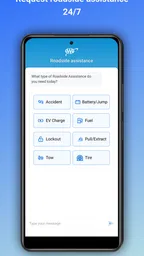
A sensible real-world workflow begins before trouble strikes. You install the app, open it when you need a travel-related service, and choose the part of AAA that matches the situation. For a routine trip, that may mean exploring travel tools or checking available discounts. If the car has a problem, roadside help becomes the priority. Keeping these needs in one app can make the first decision feel simpler: start with AAA, then move toward the relevant service.
The most useful design idea here is the connection between a broad starting point and a specific outcome. A driver might begin with an unexpected vehicle issue, while someone planning a day out might start by looking for travel support or a discount. Those are different intentions, but they belong to the same general journey. I appreciate that the app’s purpose covers both the urgent and the routine, rather than being limited to a single narrow task.
Still, the experience depends on how clearly each path leads to the next action. In any service app, a user under pressure needs to understand what to select and what will happen afterward. AAA’s roadside-help focus gives the app a clear reason to exist, but the real test for a driver is whether the route from opening the app to getting help feels direct. For less urgent tasks, a little browsing is easier to tolerate; during a stressful roadside moment, clarity matters much more.
Everyday use beyond a breakdown
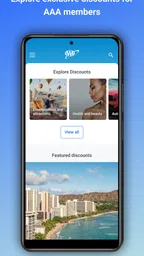
It would be easy to judge a roadside app only by what happens during an emergency, but AAA also includes discounts and travel tools. That broader mix gives users a reason to keep the app around between breakdowns. I see that as a useful distinction: an app that only matters when a car fails can feel like dead weight most of the time, whereas travel-related resources can be relevant during ordinary planning too.
Discounts can add value when they fit purchases or outings a user already has in mind. Travel tools can also help make the app part of the preparation stage rather than something opened only after plans go wrong. The benefit is less about having every possible travel feature and more about having AAA-related options together. For someone who likes to keep practical services on a phone, that consolidation can be reassuring.
At the same time, I would approach the app with a clear idea of what I want from it. If I need roadside help, I would go straight to that task rather than wandering through general travel content. If I am planning a trip, I would treat the app as one useful source among the tools I already use. That simple separation makes the experience feel more purposeful and helps avoid expecting one app to solve every part of a journey.
Where the handoffs matter
AAA’s app is best understood as a bridge between a user’s need and AAA’s services. The app can bring the user to the relevant starting point, but a request for roadside assistance is ultimately about arranging help beyond the phone screen. That handoff is central to the experience: the app is not the repair itself, but a way to begin the process of seeking support when a vehicle problem changes the plan.
That distinction is worth remembering because it shapes what a good outcome looks like. A successful interaction is not simply tapping around in an app; it is reaching the appropriate service and knowing what to do next. In the same way, a discount or travel tool is valuable when it leads to something useful in the user’s real plans. The mobile experience and the service it connects to work as parts of one journey, with the app acting as the convenient front door.
For a smooth handoff, users should be ready to explain their situation clearly and follow the directions shown by the service. That is sensible preparation for any roadside request, not a special trick. When a problem happens, staying focused on the immediate need is more helpful than exploring unrelated sections. For routine travel, the opposite applies: there is room to browse and decide which resources are worth using.
I also think the app’s all-in-one pitch works best when users already understand the relationship between AAA and the services they want. The app gathers access points, but the broader experience still depends on the service behind each one. That is a normal trade-off for a membership-oriented app: convenience comes from central access, while the actual result depends on the relevant AAA offering and the user’s circumstances.
What a good result looks like
In the best case, a driver opens AAA when something goes wrong, finds the roadside-help path without unnecessary detours, and moves on to the next step with less confusion than they would have faced searching elsewhere. A traveler planning ahead can use the same app to explore useful tools or discounts. The result is a more organized starting point for several related needs, not a promise that every trip will be effortless.
That practical outcome is why I can see the appeal of AAA Auto Club for people who want their auto-club resources close by. It combines a clear emergency-oriented purpose with features that can be relevant on ordinary days. Rather than treating travel assistance and everyday benefits as unrelated, the app puts them under one roof, which can make the AAA experience easier to remember and access.
The app also has a substantial audience: it has more than a million installs and around 9,000 written reviews. Those figures suggest that many people use it as a companion to AAA services, though the best measure for any individual is whether its tools match their own needs. A high average rating is encouraging, but personal usefulness will still depend on membership, travel habits, and how often the available resources come into play.
Where the flow can lose momentum
The clearest limitation is that a broad collection of services can create a little extra decision-making. Roadside help, discounts, and travel tools serve different situations, so users need to choose the right route. That is manageable during trip planning, but it can feel more demanding when a driver is already stressed. A focused first step and a calm approach can help keep the process on track.
Another consideration is that the app’s value is not identical for everyone. Someone who frequently uses AAA-related services may find it worth keeping readily available. Someone who rarely travels or does not use those benefits may have fewer reasons to open it. The app is free, but usefulness still comes down to fit: having a tool installed is only helpful when its services connect to real needs.
It is also important not to confuse a convenient mobile entry point with a complete substitute for the wider service experience. The app helps users reach AAA resources; it does not remove the fact that roadside support involves a real-world handoff or that travel benefits must suit the user’s plans. Keeping that expectation in mind makes the app easier to judge fairly. Its role is to make access more convenient, not to make every part of travel happen automatically.
On the technical side, the current version is 3.9.6, and it requires Android 8.0 or later. The content rating is Everyone, so the app is positioned for a general audience. These details make it straightforward to assess basic compatibility before downloading, while the app’s overall purpose remains the more important question: will you use AAA roadside support, discounts, or travel tools often enough to want them together?
Who is likely to get the most from it?
I would recommend considering AAA for drivers who already depend on AAA and want a convenient mobile route to its services. It may also suit people who like having travel resources and discounts close at hand, especially if those benefits fit their regular plans. The app’s strongest case is not flashy technology; it is the convenience of knowing where to begin when a car-related issue or travel need comes up.
People who expect a highly specialized trip planner or a universal roadside service may want to keep their expectations narrower. AAA is centered on AAA’s own help and benefits, so its usefulness follows that focus. For many users, that is precisely the point. For others, it may be an occasional-use companion rather than a daily app.
Overall, AAA Auto Club makes a practical case for keeping roadside help, discounts, and travel tools in one place. The flow begins with a need, guides the user toward a relevant AAA resource, and then hands off to the service or benefit that can address it. Some situations will still require patience and clear next steps, but the app’s purpose is easy to grasp and its range extends beyond emergencies. If AAA is already part of your travel routine, it is a sensible app to have ready when plans go smoothly—and especially when they do not.
What we like
- Members can access roadside assistance around the clock.
- Trip planning tools can help map routes and locate useful stops.
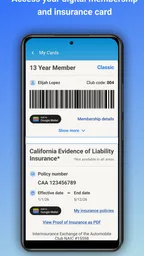
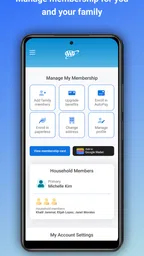
- The app can display membership details for quick reference.
- Users can request help without placing a phone call.
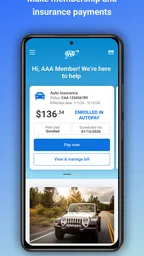
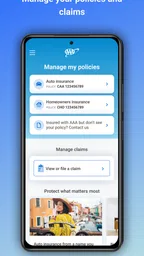
- Digital services make it easier to manage AAA membership on the go.
What could be better
- Some features may require an active AAA membership.
- Roadside help availability can vary by location.
- Response times may be longer during busy periods.
- Certain services may require additional fees.
- App features and performance can differ by region.





