
Vita Solitaire for Seniors review
 Analysis by Appsdrops
Card solitaire works best when it gives you room to think without turning a quiet game into a chore. Vita Solitaire is built around that familiar appeal: it brings the classic solitaire experience to mobile, where a quick round can fit into a break or a longer session can become a comfortable routine. I like its straightforward premise because it makes the game easy to approach, while still leaving space to improve through observation and patience.
A familiar solitaire routine
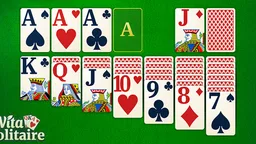
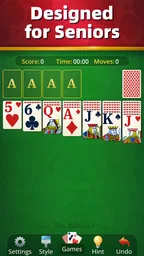
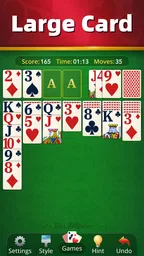
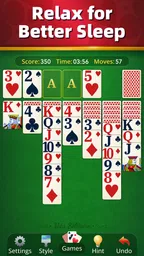
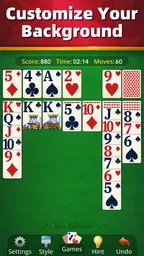
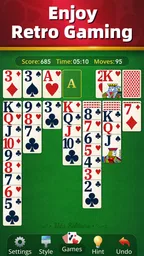
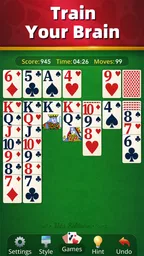
Vita Solitaire is a free card game from Vita Studio, described as a collection of large-card solitaire games. Its central attraction is the enduring solitaire format: look over the cards, consider what moves are available, and work through the layout one decision at a time. The presentation is aimed at making the cards easy to see, which is especially welcome on a phone screen and gives the game an accessible feel.
The app is suitable for Everyone, and its current release is version 1.49.0. It has earned an average rating of 4.9 from around 345,000 ratings, with roughly 10,000 written reviews and over 5 million installs. Those figures suggest that it has found a broad audience, but the real appeal is more personal: solitaire is easy to understand, and the game lets you settle into its rhythm without requiring a lengthy introduction.
Start with the board, not the clock
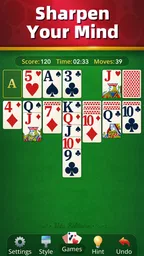
My preferred way to begin a round is to pause long enough to take in the whole layout. Rather than tapping the first card that looks movable, I scan the visible cards and consider how each choice might affect the next one. This small habit is useful in any solitaire game: a move can open a path, but it can also use up an option that would have been more valuable later.
That measured approach suits the large-card concept particularly well. A clear view makes it easier to compare ranks and suits, notice available moves, and keep track of what has changed after a card is moved. Instead of treating every turn as an isolated action, I find it more satisfying to think one or two steps ahead. The game’s familiar rules provide the structure; the player supplies the planning.
There is no need to make every session a test of speed. A calm round can be a pleasant way to fill a few spare minutes, while a more focused session offers room to examine the board carefully. I recommend starting with a simple routine: inspect the layout, make a deliberate move, then pause again to reassess. It keeps the experience relaxed and makes mistakes easier to spot before they become part of a longer chain of decisions.
Build a repeatable rhythm
Solitaire rewards consistency more than frantic tapping. After each move, I take a moment to check whether the board has opened up, whether another useful play has become available, and whether a visible card should be kept in mind for later. These checks may sound modest, but repeating them turns a casual game into a more thoughtful one without adding complexity.
A helpful habit is to distinguish between a move that is available and a move that is useful. When several choices appear, consider which one is most likely to reveal a better follow-up or preserve flexibility. That does not guarantee a successful round; card games always involve uncertainty. It does, however, make decisions feel purposeful and helps me learn from the way a layout develops.
When a round does not go as planned, I treat it as a chance to notice where my thinking became too narrow. Perhaps I focused on a single card and overlooked another route, or moved too quickly before checking the rest of the board. There is value in that reflection even when the outcome cannot be changed. The point is not to turn every game into homework, but to carry one useful observation into the next round.
Settings and comfort
Before settling into longer play, it is sensible to look through the settings available in the app and choose options that make the experience comfortable. I avoid assuming that every solitaire game handles preferences in the same way, so the best approach is simply to explore what is actually presented on your device. A brief check can help you understand the controls and make the game feel more natural to use.
Because the cards are central to every decision, visual comfort matters. Hold your phone at a comfortable distance, give yourself enough light, and take a pause if a long session leaves your eyes tired. These are ordinary habits rather than special game techniques, but they can make a noticeable difference when you are concentrating on card faces and positions.
It is also worth paying attention to how you interact with the board. Deliberate taps are often easier to follow than a string of hurried gestures, especially while you are learning the layout. Once the controls feel familiar, you can develop a steady pace that still leaves time to review the next move. The aim is not to use every possible shortcut; it is to make each action clear enough that you stay in control.
Faster play without guesswork
Experienced solitaire players often become quicker by reducing hesitation, not by skipping thought altogether. I find it useful to scan the board in the same order each time, look for obvious moves, and then check whether a less obvious option might be more valuable. A repeatable scan saves effort because you are not deciding how to inspect the layout on every turn.
Another good pattern is to pause after a change that affects several cards or opens new possibilities. That moment is when it is easiest to miss a newly available move. A quick second look keeps the round flowing while preventing careless taps. Over time, familiar card arrangements become easier to read, and decisions that once took several seconds start to feel more immediate.
Shortcuts are useful only when they support accuracy. If the app presents an action or control that seems designed to speed up play, take a moment to understand what it does before relying on it. I would rather use a clear, deliberate method than assume that an unfamiliar control behaves a certain way. This approach keeps the experience predictable and makes it easier to tell whether a choice was strategic or accidental.
For a relaxed game, it is perfectly fine to play slowly. For a more practiced session, a steady rhythm can make repeated rounds feel smoother: scan, choose, act, and reassess. That sequence is easy to remember and does not depend on any hidden system. It is simply a reliable way to make better use of the information already visible on the screen.
Where mastery has its limits
Planning can improve the quality of your decisions, but it cannot remove the uncertainty built into card games. Some rounds offer a satisfying path forward; others may feel restrictive even when you have considered the options carefully. I think it helps to accept that distinction. A difficult layout is not always evidence of poor play, and a successful round does not mean every choice was perfect.
That is also why I would not judge the game solely by whether a particular session ends well. Its appeal lies in the process: reading the cards, deciding what to prioritize, and seeing how a sequence develops. If you enjoy that kind of small-scale problem solving, an unsuccessful attempt can still be engaging. If you only enjoy a game when every round is smooth, the random nature of solitaire may occasionally test your patience.
Progress comes from recognizing patterns while staying flexible. A routine helps you make sound checks, but it should not become a rigid script. The board changes, so your priorities need to change with it. When an expected route is no longer available, look again rather than repeating the same plan. This balance between habit and adaptation is where experienced play becomes more thoughtful.
Vita Studio offers the game free to play, with optional in-app purchases priced from $0.99 to $10.99 per item. You can enjoy the basic solitaire experience without treating purchases as part of the strategy. If you prefer to keep your sessions simple, it is enough to focus on the cards and make decisions at your own pace.
A comfortable choice for classic card fans
Vita Solitaire is best suited to people who enjoy classic card games and want a familiar solitaire experience on mobile. Its focus on large cards gives the game an approachable direction, while the core appeal remains the one players have returned to for years: examine the layout, choose carefully, and see whether your plan holds together. I find that combination easy to appreciate whether I have a few spare minutes or feel like playing for longer.
The strongest way to enjoy it is to establish a comfortable routine, check the available settings for options that suit you, and use a consistent scan of the board before acting. Faster play can follow naturally as the controls and card patterns become familiar. There is no need to chase speed or invent complicated tactics. Good observation, patience, and a willingness to adjust are enough to make each round feel more deliberate.
Released on May 6, 2023, and compatible with Android 7.1 and later, this card game offers an accessible way to return to solitaire. Its Everyone age rating makes it broadly approachable, and its free price makes trying it an easy decision for fans of the genre. My verdict is simple: if you want a calm, recognizable solitaire game with large cards and room to sharpen your habits, Vita Solitaire is a worthwhile pick. Play at your own pace, stay flexible when a layout changes, and enjoy the thinking as much as the finish.
What we like
- Large cards make suits and ranks easier to see.
- Simple controls are approachable for new players.
- Undo helps correct accidental moves.
- Daily challenges provide a reason to return.
- Adjustable settings can improve comfort during play.
What could be better
- Ads may interrupt play in the free version.
- Some features may require an internet connection.
- The layout may feel crowded on smaller screens.
- Daily challenges can become repetitive over time.
- Options for card designs may be limited.







