
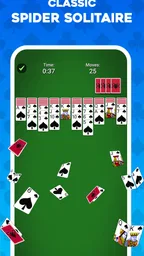
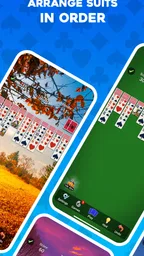


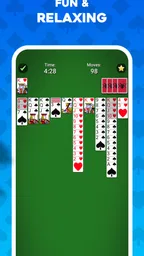



Spider Solitaire: Card Games review
 Analysis by Appsdrops
Some card games demand a long stretch of concentration; Spider Solitaire is easier to fit into the small gaps of an ordinary day. I find its appeal in the familiar task of arranging cards into completed sequences, with enough planning to keep a quiet break engaging. Spider Solitaire: Card Games is a straightforward choice if you want a classic solo card game on your phone, though its fit depends on whether you enjoy patient, deliberate play more than novelty or competition.
A familiar card game, built for short breaks
This is a free card game from MobilityWare, a developer associated with the app, and its central attraction is the Spider Solitaire format rather than a broader collection of unrelated activities. The basic rhythm is easy to understand: look for useful moves, uncover what is hidden, and work toward complete card sequences. That makes it approachable even if you have not played Spider Solitaire on a phone before.
In everyday use, I would reach for it during a commute, while waiting for an appointment, or when I want a low-pressure distraction before bed. A game of this kind works well when I can pause and return to thinking through the board, rather than needing to follow a story or keep pace with other players. It also suits someone who already knows the rules and simply wants the familiar puzzle in a mobile format.
The game has a 4.6 average from around 749,000 ratings, and it has been installed over 50 million times. Those figures suggest that it has found a broad audience, but they do not tell you whether you will enjoy its particular pace. Spider Solitaire can feel satisfying when a sequence opens up after a careful move; it can also feel slow if you prefer quick rounds with a clear burst of action.
Its Everyone age rating makes it suitable for a general audience, and the app is free to install. I would still distinguish “free to start” from “nothing to pay for”: in-app purchases are available, with items priced from $1.99 to $29.99. Those are the confirmed spending details I would use when deciding whether to try it. They do not, by themselves, explain what each purchase includes or whether buying anything changes a particular game.
What makes a move worth thinking through
Spider Solitaire is less about tapping quickly than managing the consequences of a move. A card that looks useful now may block access to a more valuable sequence later, while shifting cards can expose possibilities that were not visible before. I find it helpful to treat each move as a small trade-off: immediate neatness is not always the same thing as progress.
A practical habit is to check the available columns before moving a card into a tidy-looking stack. Ask whether the move will expose a hidden card, preserve a useful run, or leave a column easier to work with. This is not a magic formula for winning; it is a way to avoid making moves simply because they look satisfying. In a game built around sequencing, the order of decisions matters more than speed.
Another useful approach is to pause when the board becomes cluttered rather than continuing to tap at random. I would scan for cards that can be moved in sequence and consider which move opens the most future options. That little reset can make a session feel like a puzzle again instead of a series of guesses. It is especially helpful when you have only a few minutes and do not want to spend them undoing choices you made in a hurry.
The trade-off is that this kind of deliberation may not suit every break. If I have a brief moment and want something immediately lively, a fast arcade game or a short competitive match is a better fit. This title rewards a calmer mood: its satisfaction comes from working through the board, not from dramatic animation or a rapid stream of new challenges.
Progress without turning every session into a test
For me, the strongest everyday use is creating a small routine around a single puzzle. I might play while having a cup of tea, stop when I need to do something else, and come back later when I want another quiet round. That works better than treating every session as a test of skill. The game’s classic format is naturally suited to solo concentration, so I would choose it for personal downtime rather than to fill a social evening.
One subtle benefit of replaying this kind of card layout is that it encourages attention to patterns. Over time, I become more deliberate about preserving sequences and making space for useful moves. The value is not a dramatic progression system; it is the gradual improvement in how carefully I read the board. If you want a game that clearly rewards every session with a new character, level, or story beat, this is not the kind of experience I would point you toward.
It is also worth being realistic about frustration. A promising arrangement can narrow into awkward choices, and a player who expects every round to unfold smoothly may blame themselves when the board feels stuck. I would use difficult moments as a cue to review the sequence of moves, not as proof that I need to spend money or play longer. A patient mindset matters more here than chasing a perfect run.
The current version is 7.8.5.4996, and the minimum operating system requirement is 8.0. If your device meets that requirement, the game is at least within the stated compatibility range; if it does not, this is not the right install to pursue on that device. I would check your phone’s software before downloading, especially if you are using an older handset and want to avoid an unsuccessful install.
Fairness, spending, and what can be judged
Because Spider Solitaire is a solo card game, fairness is a different question here than it is in a head-to-head competitive game. There is no opponent in the basic premise for me to blame or compare myself against. The important personal question is whether the puzzle feels enjoyable on its own terms and whether any optional spending feels worthwhile to you.
The app is free, while in-app purchase items range from $1.99 to $29.99. I would set a simple boundary before playing: try the free experience first, and only consider a purchase if you understand what it offers in the app. The available purchase range is not enough to establish what a specific item does, whether it is necessary, or how it affects a round, so I would not assume that spending improves the quality or fairness of the card game.
That distinction is useful for anyone who is cautious about mobile purchases. The presence of paid items does not automatically mean you need them to enjoy a card puzzle, but the price range does mean it is sensible to review any purchase prompt carefully. If you are choosing a game for a child, remember that the age rating is Everyone while purchases are still part of the app’s commercial setup. I would keep device-level purchase controls in mind if that matters in your household.
Compared with a physical deck, a mobile version is convenient: it keeps the cards together and gives you a puzzle without needing a table. Compared with multiplayer card apps, this is a better fit when you want to play alone and set your own pace. If your priority is direct competition, chat, or the unpredictability of playing against another person, a multiplayer alternative in the card category will serve that purpose more naturally.
Who should try it—and who may prefer something else
I would recommend this game to people who already like Spider Solitaire, anyone looking for a quiet solo card puzzle, and players who enjoy thinking several moves ahead. It is also a reasonable option for someone who wants a familiar activity rather than a complicated new system. The store description calls it a classic Spider game, but my practical recommendation is more specific: choose it when the act of sorting and planning is itself the reward.
I would skip it if you need a strong sense of narrative progress, frequent changes in scenery, or a competitive opponent. I would also look elsewhere if you dislike card games that can require patience when a board becomes difficult to read. A brisk match-based card game may be more satisfying for someone who wants a clear winner and a social element; a different puzzle game may be preferable if you want varied mechanics rather than repeated attention to sequences.
The game was released on September 15, 2011, so it has a long history as a mobile title. That longevity is useful context, but it should not be mistaken for proof that every player will like the current experience. The app has around 85,000 written reviews, yet I still think the best way to judge its style is to ask whether you enjoy the underlying Spider Solitaire decisions. Popularity cannot make a patient puzzle feel fast.
A measured recommendation
My overall view is positive, with a clear caveat: this is best as a calm, focused solo card game, not an all-purpose source of excitement. Its free entry point makes it easy to consider, and its familiar format gives experienced players little to learn before they can begin. The strongest reason to keep it installed is convenience—a Spider Solitaire session is ready when you have a spare moment and want to think without committing to a large game.
I would approach purchases cautiously and judge the app on the play you can access without paying. The confirmed price range tells me that optional spending exists, but not enough to make a claim about specific benefits, so my advice is to read each in-app offer before deciding. If you are content with a simple card puzzle and do not expect social competition or a constant stream of new content, that uncertainty need not prevent you from trying it.
For a friend who enjoys card sorting and wants a low-key phone game, I would say it is worth a try. For someone who gets bored without a story, rapid rounds, or multiplayer stakes, I would recommend a different kind of game instead. That is the honest dividing line: Spider Solitaire is dependable when you want a familiar puzzle and a little quiet concentration, but its appeal is rooted in the patience the format asks of you.
What we like
- Familiar rules make it easy to start playing.
- Several difficulty levels suit different skill levels.
- Undo helps correct accidental moves.
- Hints can help when you feel stuck.
- Sessions work well for short breaks.
What could be better
- Higher difficulties can lead to long games.
- Some deals may require careful planning to solve.
- Hints can reduce the challenge for experienced players.
- Repeated layouts may make play feel less varied.
- Small cards can be difficult to see on compact screens.







