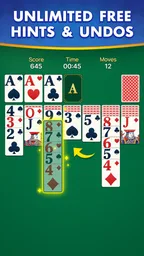
Vigor Solitaire for Seniors review
 Analysis by Appsdrops
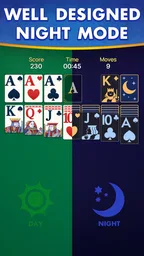
When a familiar card game feels awkward on a phone, the problem is often the small screen rather than the rules. Vigor Solitaire is aimed at making classic solitaire easier to see and play, and that straightforward focus is its main appeal. I’d consider it for relaxed, solo card sessions, especially if tiny cards make other mobile versions tiring. It is less compelling if you want a deep collection of modes, competitive play, or lots of customization.
Getting comfortable with the cards
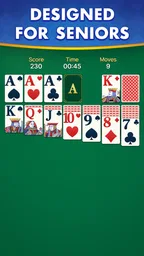
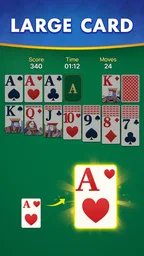
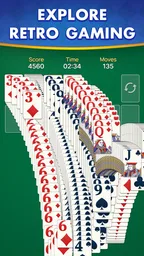
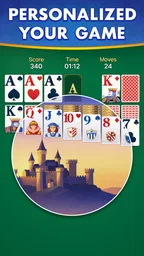
This is a card game from Mouse Games, with a large-card presentation at the center of its identity. That matters most when you are holding a phone at arm’s length, playing during a break, or sharing a quick game with someone who finds standard mobile card layouts too cramped. The point is not to turn solitaire into something new; it is to make the familiar activity more approachable on a touchscreen.
Large cards can reduce squinting, but they do not automatically make every move effortless. On a smaller phone, a larger layout can still leave less room for other on-screen elements, and touch accuracy depends on how comfortably you can reach and distinguish the cards. I’d start a game without rushing, check that the cards are easy to identify, and see whether tapping or moving them feels natural before settling in for a longer session.
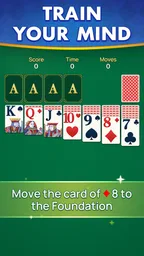
One useful habit is to play the opening moves slowly rather than treating the first deal as a speed test. That gives you a chance to learn where the important card areas sit and whether your fingers cover a card while you interact with it. If a move does not register as expected, try again with a deliberate tap and make sure you are touching the intended card rather than the space beside it. This is a practical adjustment, not a special feature claim.
What to check before a longer session
The game is free, rated for Everyone, and currently at version 2.4. It requires Android 6.0 or later, so checking the device’s Android version is a sensible first step if installation or launch is the immediate obstacle. The game was released on January 27, 2026; its current average is 4.9 from around 4,500 ratings, with about 100,000 installs. Those figures suggest that it has found an audience, but they cannot tell you whether its card size or touch feel will suit your particular device.
If you are helping a relative set it up, keep the first check simple: confirm that the device meets the minimum operating-system requirement, install the game through the app store, and open it once while you are nearby. Then let the player try a few moves themselves. Watching where they hesitate is more useful than assuming that a large-card design will solve every accessibility concern. A comfortable screen position and a steady grip can matter just as much as the cards’ presentation.
For someone with limited dexterity, it is worth testing several interactions before recommending the game as a daily choice. Can they select a card without repeatedly touching neighboring cards? Can they see the card faces clearly at their usual brightness and viewing distance? Do they feel able to recover from a mistaken touch? These are personal fit checks, not guarantees about the game’s controls, and they help avoid mistaking a general accessibility goal for a perfect match for every player.
Recovering a session without making matters worse
When a game seems unresponsive, I would separate a missed touch from a broader app problem. First, pause for a moment and try one clear interaction. Repeated tapping can make it harder to tell what happened and may create extra confusion. If the screen has not reacted, return to the device’s normal app navigation and reopen the game; avoid changing several settings at once, because then it is harder to identify what actually helped.
If a move appears wrong, take a breath before restarting. In solitaire, a card may simply be unavailable for the move you had in mind, or the chosen card may not have been the one under your finger. Recheck the visible arrangement and try a single intentional selection. This small pause is especially useful when playing on a compact phone: it distinguishes a rules misunderstanding or touch slip from a freeze, and it prevents a routine mistake from turning into a frustrating sequence of taps.
I also recommend treating the first game as a learning round rather than a score to protect. That takes the pressure off while you discover how the board responds and where your fingers naturally land. If the app closes or the device becomes sluggish, reopen it after checking that the phone itself is responding normally. I would not assume that a particular game state has been saved or restored; the practical approach is to see what the app presents after reopening and continue only if the current screen is clear.
When the phone, not the game, is the problem
A dim display, smudged glass, cramped hand position, or an overloaded phone can make a card game feel worse than it is. Before concluding that the game is at fault, clean the screen, adjust the device to a comfortable angle, and close other apps if the whole phone is lagging. If other touch-based apps also miss inputs, the cause may be the device or its screen rather than this solitaire game.
Likewise, if installation fails, check the Android version and available device storage through the phone’s settings. If the game opens but the display is difficult to read, try the device’s ordinary brightness and display adjustments. I would make one change at a time and test again. That is a more reliable way to identify a useful fix than reinstalling immediately or altering several system settings without knowing which one mattered.
There is a limit to what general troubleshooting can solve. A player who needs specific visual accommodations, a different control method, or a highly configurable interface should test the game carefully before relying on it. A large-card approach is promising for readability, but it is not the same as a guarantee that every visual or motor need is covered. If the cards still feel hard to distinguish or manipulate, another solitaire app with controls and presentation options that better match the player may be the wiser choice.
How it fits beside other solitaire choices
Compared with a broad solitaire collection, Vigor Solitaire sounds deliberately focused: it centers on a familiar card-game experience rather than asking you to explore a large menu of variations. That can be a strength if you want to open one game and settle into a classic routine. On the other hand, players who enjoy trying different solitaire rules, tracking challenges, or competing with other people may prefer an alternative built around those activities.
It also makes a different trade-off from a highly customizable card app. A simpler presentation can be easier to approach, particularly for a casual player who does not want to configure a lot before starting. But if you need precise control over card size, contrast, gestures, or game rules, do not assume those options are available here. Choose based on what you can confirm while trying it, not on the general promise of large cards alone.
For an everyday example, imagine having a few quiet minutes while waiting for an appointment. A familiar solo card game can suit that short pause better than an online match that expects attention from other players. The best way to use this one is to keep expectations modest: open it for a calm, self-paced round, take time with the first moves, and stop if the screen or touch controls are tiring rather than forcing a longer session.
Who I would recommend it to
I would suggest giving it a try if you already enjoy classic solitaire and want a phone version whose defining idea is easier-to-see cards. It may also suit someone introducing a family member to mobile card games, provided they can test the layout and touch response themselves. With a 4.9 average and 297 written reviews, it has positive reception, though personal comfort remains the deciding factor for a game played through repeated small interactions.
I would steer away from it if your main reason for downloading a card game is variety, social competition, or fine-grained accessibility controls. Those priorities call for a different kind of app, even if the alternative has a more crowded interface. It is also not the right choice if you prefer a game that explains every interaction extensively or if the large-card layout still feels cramped on your device. The simplest test is whether you can comfortably follow the cards and make deliberate moves over a short session.
A practical verdict
My view is that Vigor Solitaire is worth trying for the specific problem it sets out to address: playing familiar solitaire on a phone without having to work around an overly small card presentation. Its free price makes a personal fit check straightforward, while Mouse Games’ focused approach is likely to appeal most to players who want a quiet, uncomplicated card-game routine. I would not treat its strong rating as a substitute for testing it with the person who will actually play.
The most useful decision is to judge the game in context: check device compatibility, try a few moves in comfortable lighting, and notice whether the card faces and touch targets work for you. If they do, it can be a handy choice for short solo breaks. If you want numerous modes or need controls tailored to particular accessibility needs, a more configurable alternative is a better match. For a classic solitaire player who values readable cards over extra features, Vigor Solitaire is a sensible, low-commitment option.
What we like
- Large cards make solitaire easier to read.
- Simple controls suit players who prefer a relaxed pace.
- Short rounds fit conveniently into breaks.
- Familiar rules make it easy to start playing.
- Solo play requires no opponents or matchmaking.
What could be better
- Small screen sizes may still make cards hard to see.
- Frequent play can feel repetitive over time.
- Ads may interrupt the flow of a game.
- Some features may require an internet connection.
- The app may not offer enough challenge for expert players.







