


Spades Ace review
 Analysis by Appsdrops
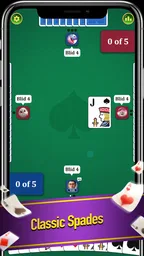
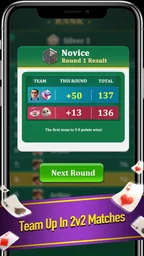
I like card games that leave room for conversation and judgment rather than demanding a long session or a complicated setup. Spades Ace is built around that kind of play: it brings the familiar four-player team format to a phone, where each hand asks you to think about your own cards and your partner’s likely plan. My impression is that it suits players who already know the rhythm of Spades, as well as newcomers willing to learn by playing, but it is less appealing if you want a solo puzzle or a fast, action-heavy game.
What a hand feels like on a phone
The appeal of a team-based trick-taking game is that the cards are only half the decision. You also have to read what has already been played, judge how many tricks your hand can support, and avoid working against your partner. That makes a short session feel more thoughtful than a basic game of matching cards. Spades Ace is at its best when you treat each hand as a shared problem, not a race to play your highest card.
Because it is a classic four-player format, the pace depends on other turns as well as your own. A hand can move briskly when everyone knows the rules, but it naturally slows when players are weighing their choices. That is a useful distinction if you are looking for something to play in a brief break: it is easy to open a card game casually, yet a complete hand still asks you to stay engaged until the partnership’s decisions play out.
I would not judge its speed by how quickly it can display a card. The meaningful pace is the time spent interpreting the table. If you enjoy planning a few moves ahead, that pause is part of the fun. If you prefer a game that rewards instant reactions, even a smooth round of Spades may feel leisurely.
Where the strategy comes from
Spades rewards attention to information that is easy to overlook when you are playing casually. Keep track of which suits have been led, notice when a player can no longer follow suit, and consider whether your partner’s earlier choices suggest a strong or cautious hand. Those observations help you make better decisions without needing to turn every round into a calculation exercise.
One practical habit I recommend is choosing a bid you can explain to yourself. Rather than making an optimistic guess because your hand contains a few attractive cards, consider how many tricks you can reasonably take and how your partner might contribute. This keeps the partnership element in focus and makes a lost hand more instructive: you can review whether the estimate was too ambitious, or whether the play itself changed the outcome.
Another useful approach is to watch the cards that have already left a suit before spending a high card. A strong card can be wasted if a likely winner has already gone, while holding it too long can leave your team without control of an important trick. This kind of card memory is a modest skill, not a requirement for enjoying the game, but it gives experienced players a reason to return beyond simply dealing again.
When a session gets busy
The busiest moments are usually strategic rather than technical: a close hand, a difficult bid, or a trick where your partner’s play changes what you should do next. In those moments I find it helps to slow down mentally, check the cards already on the table, and avoid treating a single high card as an automatic answer. Spades is a game where restraint can matter as much as taking a trick.
That also means the game is not ideal for every kind of multitasking. If you expect to be interrupted repeatedly, it may be harder to keep track of which suits have been exhausted and what your partnership can still achieve. For a quick pause between errands, I would start a hand only when I can give it a little attention. For a longer wait, the same steady pace can be a welcome alternative to scrolling through short, disposable rounds.
When a hand goes badly, the most useful response is to separate the decision from the result. A sensible bid can still lose, and a lucky play does not necessarily make an earlier choice sound. I like that distinction in card games because it gives a player something concrete to improve: estimate the hand more carefully, remember the table better, or think about the team’s position before committing.
Reliability and the feel of play
I cannot infer a phone game’s stability from its card format alone, so I would not promise that every session is flawless. What I can say is that Spades itself is naturally suited to a clear, turn-by-turn presentation: players act in sequence, and the important information is the cards and the current trick. That keeps the mental workload focused on the game rather than on rapid movement or precise timing.
If you are interrupted, the main thing you risk losing is your train of thought. Before stepping away, take a moment to remember the suit that was led and what your partner’s play might mean; that small mental checkpoint makes it easier to return to the hand. I would not build a strategy around assuming that an unfinished round will always resume exactly as expected, so it is wiser to play when you can remain available for the length of a hand.
The game’s audience figures suggest that it has found a modest community: it has passed 50,000 installs, with a 4.6 average from around 3,400 ratings and 189 written reviews. Those figures are a useful sign of interest, not a guarantee that every player will enjoy the pace or the way a particular match unfolds. I would weigh the basic appeal of partnership Spades more heavily than popularity when deciding whether to try it.
Device fit and who should try it
Spades Ace is a free card game from SATORISYS PLAY, and its current release is version 0.0.7. It is marked for Teen audiences and requires Android 9 or later. If you are checking an older phone before installing, the operating-system requirement is the practical detail to consider first. Beyond that, I would avoid guessing about battery use, storage, or performance on a specific model; those can vary from device to device.
At the time of its release on May 22, 2026, the version number indicates an early-stage product rather than a long-established release line. That is a reason to keep expectations measured, not a reason to assume it will run poorly. Players who value a polished, deeply documented suite of modes may prefer a more mature card app, while people mainly looking for a straightforward way to play team Spades may find the focused premise enough.
A realistic use case is a quiet evening when a friend or family member wants a familiar card game but nobody has a deck nearby. You can use the phone version to spend the wait between plans or settle into a casual session, provided everyone is comfortable with a digital table instead of face-to-face play. For a solo commute where you want a puzzle you can pause at any moment, a dedicated single-player card game may be a better fit.
Compared with solitaire, Spades is less about patiently sorting one person’s cards and more about reading a shared contest. Compared with other trick-taking options, its team structure makes partner awareness central; if you dislike relying on another player’s decisions, a competitive solo card game may suit you better. And compared with a physical deck, the app trades the social ease of seeing everyone around the table for the convenience of having a game on your device.
What to expect before installing
The main question for a new player is whether the rules will feel approachable. If you have played Spades before, you can focus on bids, suit tracking, and partnership decisions. If you have not, begin by paying attention to the objective of each trick and the way the team’s estimate shapes the hand. The game’s classic format is understandable, but the strategic choices may take several rounds to become intuitive.
Another question is whether it works for a very short session. It can fit a casual break, but I would not choose it when I know I must leave at any moment. A hand is more satisfying when you can follow the sequence and see how the partnership’s plan develops. Players who enjoy uninterrupted card play will get more from it than people who want a game designed around constant stopping and restarting.
You may also wonder whether it is worth trying if you already own another Spades app. I would compare the experience against what you value most: a familiar team format, a free way to play, and a version that runs on a compatible Android device. If your current choice already gives you the table experience you want, switching may not add much. If you simply want another accessible option, this one is easy to consider without paying to start.
My performance verdict
Spades Ace makes the most sense as a focused way to enjoy partnership card play on Android. Its pace is governed by thought and turn-taking, so I would call it measured rather than instantly gratifying. That is a strength for players who like planning, and a limitation for anyone expecting constant action or a game that can be abandoned mid-hand without losing context.
I would recommend it to people who enjoy reading a table, adjusting a bid to the cards they actually hold, and thinking about how their partner’s choices fit the plan. I would skip it if you want a solo-first experience, a highly reactive game, or the richer social feel of a physical group around one deck. With its free entry point and Teen rating, it is a low-commitment way to see whether this style of Spades suits you, as long as your Android device meets the requirement.
My overall take on Spades Ace is that its appeal lies in the decisions between tricks, not in spectacle or speed. Give it a calm session and pay attention to the partnership, and the familiar format has enough nuance to reward careful play. If you prefer immediate, independent rounds, another kind of card game will probably fit your routine better.
What we like
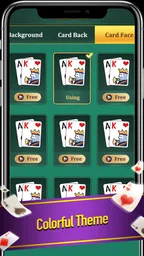
- Clear card graphics make it easy to follow each trick.
- Several play modes offer variety for different skill levels.
- Short rounds suit quick sessions on a phone.
- Spades strategy rewards careful bidding and teamwork.
- The familiar rules make it easy for new players to start.
What could be better
- Online play depends on a stable internet connection.
- Random card deals can make some rounds feel unfair.
- Ads may interrupt play in the free version.
- Finding active opponents may take time during quiet hours.
- A small screen can make it harder to inspect cards quickly.







