
Solitaire Spellbook: Card Game review
 Analysis by Appsdrops
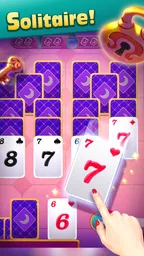
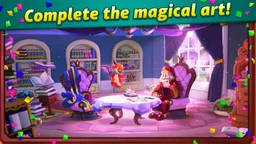
I like a card game that lets me settle into a quiet few minutes without demanding a long commitment, and Solitaire Spellbook is built around that kind of session. It is a mobile TriPeaks solitaire game with a gentle, artwork-collecting theme: clear cards, earn stars, and make progress on illustrations as you play. That gives each hand a small purpose beyond simply clearing the board, though the card puzzle remains the main reason to stay.
My first impression is of a game aimed at people who want familiar solitaire decisions rather than a sprawling adventure. You can pick it up when you have a short break, take a little longer over a tricky layout, and put it aside when you are done. The spellbook framing adds a softer identity than a plain deck-and-score presentation, but it does not change the basic appeal: look for playable cards, plan a few moves ahead, and accept that some layouts leave you weighing risk against patience.
How the pace feels in everyday play
TriPeaks is naturally suited to quick sessions because its central task is easy to understand: choose cards that can be played from the exposed options and work through the layout. In this game, stars and artwork give that repeated loop a sense of accumulation. A hand can feel complete even when I only have time for a brief visit, while a longer session lets me keep chasing the next piece of progress.
I would not treat the relaxing theme as a promise that every round is effortless. Solitaire still asks for attention, and a run of awkward choices can slow the pace while I decide whether to use a move now or preserve an option for later. That pause is part of the game’s appeal for thoughtful players, but anyone expecting a constant stream of fast rewards may find the rhythm more measured than a reflex-based mobile game.
In practical terms, it fits the moments when I am waiting for a kettle, sitting through a quiet commute, or taking a screen break between tasks. The useful habit is to treat one hand as a natural stopping point rather than opening the game expecting a substantial story session. If I have only a minute, I can still make a meaningful start; if I have more time, the star and artwork progression offers a reason to continue without requiring a complicated plan.
Where the artwork and stars help
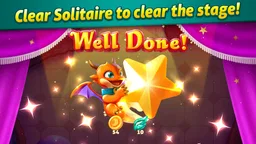
The collectible artwork is more than decorative wording around solitaire: it gives card-clearing a visible longer-term aim. That can be especially welcome if standard solitaire scores feel abstract. I find that a modest goal—finish a little more of an illustration—can make repeated layouts feel less interchangeable, even though the core decisions remain familiar.
There is a trade-off. If you mainly want a bare-bones card table, the themed progression may feel like extra dressing around a game you already know. Conversely, if collecting stars and completing artwork is what keeps you returning, the theme can make a short session feel more satisfying than a conventional solitaire app that simply announces a win or loss.
A helpful approach is to focus on the quality of the decisions rather than rushing to clear cards. Before making an obvious play, I would scan the currently exposed choices and consider whether one move preserves more flexibility for the next turn. That small pause is useful in TriPeaks because an immediately available card is not automatically the best one to play first. It is a simple way to make the puzzle feel more deliberate without turning a relaxing game into homework.
Longer sessions and the points where patience matters
During heavier use, the main demand is attention rather than any known special workload. Repeating hands, pursuing more stars, or trying to finish artwork can turn a quick diversion into a longer stretch of play. The game’s easy-to-grasp format helps, but the same card pattern can become repetitive if you keep playing after the puzzle has stopped feeling fresh.
I would pace longer sessions by setting a personal stopping point: finish the current hand, or stop once I have made the progress I wanted toward the artwork. This is a practical way to enjoy the collection element without letting it turn every spare moment into another round. If I notice that I am choosing cards automatically rather than thinking about them, that is a good cue to close the game and return later.
The purchase model is also worth keeping in mind during extended play. The game is free to start, with optional in-app purchases ranging from $0.99 to $99.99 per item. Those figures describe a broad range, not a reason to spend; I would decide in advance whether I want to make any purchase and keep the core appeal in view. If a player’s enjoyment depends on buying through every slowdown, this is probably not the right style of casual game for them.
Reliability, interruptions, and getting back to play
For a card game, reliability matters less as a dramatic technical feature than as a simple question: can I open it when I want a hand, and does play remain comfortable over a casual session? I would judge that by ordinary use on my own device rather than assume a particular level of speed or stability for every phone. No two devices, background workloads, or network conditions are identical, so I would avoid promising that every player will see the same experience.
Likewise, I would not build a routine around an assumption that a paused hand will always resume exactly as expected after an interruption. If I am about to switch apps, take a call, or lock the screen, I would finish the current decision first when possible. That is a sensible habit for any casual card game, particularly when I care about preserving the flow of a layout. It also means the game is easiest to enjoy when I can give it a few uninterrupted minutes.
For people wondering whether it is suitable for short, occasional visits, the format points in the right direction: each session is centered on a discrete solitaire puzzle rather than a complicated sequence of tasks. For someone who wants a reliable long-form activity with deep systems to manage across many hours, that same compactness may feel limiting. The game’s strength is making a small slice of downtime feel purposeful, not replacing a larger strategy game.
Device fit and who should choose it
Solitaire Spellbook is listed for devices running Android 7.0 or later, which makes it relevant to people who do not have the newest operating system. That compatibility detail does not guarantee identical performance across older and newer hardware. If your phone is already slow with other games, I would keep expectations modest and try a short session before deciding whether it feels comfortable. For a card puzzle, legibility and responsive taps matter more to me than elaborate visual effects.
The game is free, rated for Everyone, and developed by SpadeThree. It has a 4.8 average from around 5,600 ratings, with over 100,000 installs. Those figures suggest that it has found an audience, but they are context rather than a substitute for your own taste: a popular solitaire game can still be the wrong fit if you dislike collecting goals or prefer competitive play.
Compared with the usual alternatives, this is a better match for someone who likes solitaire but wants a light sense of progression. A plain TriPeaks app may suit players who want the cleanest possible card experience and little beyond the board. A more feature-heavy card game is preferable if you are looking for varied modes, deeper rules, or social competition. Here, the appeal is the combination of a familiar solitaire loop and artwork to work toward, not a claim to offer every kind of card-game experience.
What I would check before settling in
The game’s current version is 0.17.2, and it was released on May 23, 2024. I mention those details mainly as practical context: if something feels off on your particular phone, checking that you are using the current available build is a reasonable first step. I would also make sure I have enough uninterrupted time to complete a hand if I care about its outcome, rather than launching it in the middle of a task that may pull my attention away.
One useful way to test whether this is your kind of solitaire is to notice what keeps you interested after the first few rounds. If you enjoy weighing card choices and like seeing stars contribute to artwork, the extra goal may give the familiar format a welcome reason to return. If you only enjoy solitaire when every hand is quick and predictable, the moments where you need to think—or accept an uncertain run—may be less appealing.
My verdict on speed and staying power
I see Solitaire Spellbook as a gentle, focused choice for people who want TriPeaks in manageable bites. Its progress through stars and artwork lends the card puzzle a little more purpose, and its accessible premise makes it easy to recommend to a friend who wants something quieter than a competitive game. I would especially suggest it for a short daily break, provided that the player enjoys repeating a familiar card loop.
Its limitations are clear enough to matter: the central play can become repetitive, the theme will not appeal to everyone, and optional purchases mean it is worth deciding your own spending boundaries. I would choose another solitaire title if I wanted a stripped-back table, more variety, or a different kind of challenge. But if you like the idea of making steady artwork progress while working through TriPeaks hands, Solitaire Spellbook is a pleasant fit. I would give it a try for its calm pace, then keep it only if the card decisions and collection goal continue to feel rewarding. Solitaire Spellbook is at its best when you want a small, thoughtful game—not a demanding commitment.
What we like
- Classic solitaire rules are easy for newcomers to understand
- Short rounds make it suitable for quick play sessions
- The magical theme gives familiar card play a distinctive setting
- Offline play is useful when an internet connection is unavailable
- Card challenges offer goals beyond simply clearing the tableau
What could be better
- Random card deals can leave some games unwinnable
- Progress may feel slow for players who prefer quick rewards
- Small cards can be difficult to read on compact screens
- Repeated layouts may reduce variety over longer sessions
- Optional purchases may appeal to players seeking faster progress







