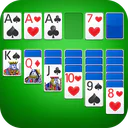
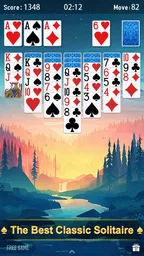

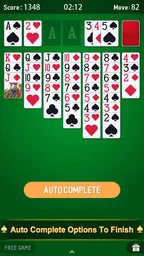
Solitaire: Puzzle Card Games review
 Analysis by Appsdrops
I find a classic solitaire game most useful when it gets out of the way: I can open it for a quick break, focus on the cards, and stop when I’m ready. Solitaire: Puzzle Card Games is aimed at exactly that familiar sort of play. It is a free Android card game from PuzzleMaker - block puzzle, with a general-audience rating. If you want a straightforward way to play solitaire on your phone rather than a more elaborate card-game package, it is worth considering.
Getting comfortable with a familiar card game
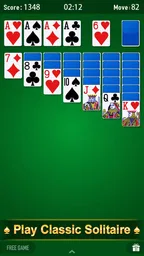
The appeal here is the recognizable solitaire format, not a new twist on the genre. That makes the game approachable if you already know the basic aim: arrange cards through careful moves and work toward clearing the layout. I like this kind of game for short, self-contained sessions because it asks for attention without demanding a long commitment or a group of other players.
Its simplicity also means expectations matter. The game’s short store description is simply “Solitaire,” and that is a fair guide to its central appeal: a classic card-game experience on Android. I would not choose it expecting a broad collection of card games, a deep campaign, or a social competition. If your goal is to have familiar solitaire available for a quiet moment, the focused approach is a plus.
There is a practical difference between playing solitaire on a phone and playing with a physical deck. On a small screen, it can be easy to tap the wrong card or lose track of where a card came from, especially if you are playing quickly. My advice is to slow down when a move changes the shape of the layout. A second to check the available cards can prevent a string of hurried choices that leaves you unsure how the position developed.
Where a session can become frustrating
Most difficulty in a classic solitaire game comes from the puzzle itself: a move may look useful but reveal fewer options later, while a seemingly modest move can open a better route through the cards. That is part of the pleasure for players who enjoy thinking ahead, but it can feel repetitive if you want every round to be easy or fast. I treat an unsuccessful attempt as a reason to reconsider the sequence, not as proof that the game has failed.
Touchscreen control can add another small source of friction. If a card does not seem to move, first check that you tapped the card you intended and that the move is valid in the current layout. On a compact display, a finger can cover nearby cards, so pausing before a tap is more reliable than making several rapid attempts. This is a simple habit, but it makes a phone-based card game feel less fiddly.
It is also worth remembering that solitaire depends on the cards available in a particular deal. A round that stalls may be a consequence of the layout rather than something you can solve by tapping faster. If you enjoy assessing options and accepting that some attempts do not unfold smoothly, that uncertainty is part of the appeal. If you want a game where every session reliably ends in a win, this may not be the best fit.
Before you start: check the basics
The game is listed as version 1.42.305 and requires Android 6.0 or later. Before installing, check that your device runs a compatible version of Android and has enough free space for the app. These are sensible first checks whenever an install or launch does not go as expected; they are more useful than repeatedly tapping an install button without confirming basic compatibility.
If the game is already installed but will not open, try closing it and launching it again. If that does not help, restart the device and check whether the app store offers an update. These are general troubleshooting steps, not special tricks for this title, but they can resolve temporary problems without changing how you play. I would avoid deleting the app as a first response if you care about preserving an ongoing session or local progress.
For a calmer first session, choose a moment when you are not juggling another task. Solitaire is easy to pick up, but a brief distraction can make it harder to remember which cards you were weighing. I find it helps to scan the layout before making the first move, then make deliberate choices rather than treating each tap as an isolated action. That approach is useful whether you have played for years or are returning after a long break.
A steadier way to recover a stalled round
When the layout feels stuck, take a moment to review the cards you can currently use instead of repeating the same move. Look for an option that reveals a card or gives you more flexibility, and consider whether moving a card now will make a later choice harder. The value of this habit is not that it guarantees a win; it helps you understand why the position has become difficult and make a more informed next move.
If you accidentally make a move you did not intend, pause before continuing. Check whether the layout still makes sense and whether you can recover by choosing a different available move. If not, starting a fresh round may be less frustrating than trying to force a position you no longer understand. That is a practical choice for a short-break game: the point is to enjoy a little focused play, not to spend the whole break rescuing one awkward sequence.
For interruptions, it is safest to assume that you should check the current screen when you return rather than rely on memory. A quick glance at the cards can help you reorient yourself before tapping again. I would not make an important decision about uninstalling or clearing app data just because a round seems to have changed after leaving the game; first distinguish a gameplay setback from a technical issue, and use the ordinary restart and update checks if the app itself appears unresponsive.
When the problem may be elsewhere
Not every delay or failed action points to a fault in the game. A device that is busy, low on available storage, or having a temporary system problem can affect how apps behave. If other apps are also slow or refusing to open, restarting the phone and checking its general condition is a reasonable next step. If only this game is affected, updating it through the app store and reopening it is a sensible way to narrow down the issue.
There is also a difference between a move that the game does not accept and a control that is not responding. In the first case, reconsider whether the move fits the current card arrangement. In the second, give the screen a moment, make one deliberate tap, and avoid repeated presses that could trigger an unintended action if the interface catches up. This distinction saves time and prevents normal game rules from being mistaken for a technical problem.
The game has an average rating of 3.9 from around 16,000 ratings, with roughly 1,400 written reviews. It has been installed over 10 million times, which suggests that many Android users have tried it, while the rating indicates that popularity alone should not be taken as a promise that it will suit everyone. I would use those figures as context, then make the decision based on whether a focused, familiar solitaire game is what I want.
How it compares with other ways to play solitaire
Compared with a physical deck, a phone game is easier to carry and quicker to start, but it replaces the tactile feel of moving real cards with taps on a screen. Compared with a larger digital card-game collection, this title’s clear solitaire focus may be more convenient if you already know what you want to play. On the other hand, someone seeking variety across several card games should look for an option built around a broader selection rather than assume this one will provide it.
It is also a different choice from competitive card games that emphasize opponents, rankings, or multiplayer interaction. Solitaire is best suited to playing at your own pace. I recommend it to someone who wants an individual card puzzle during a commute, a quiet pause, or a few minutes between tasks. I would steer away from it if your main motivation is social play, constant novelty, or a complex progression system.
The game was released on March 6, 2019, and its current version is 1.42.305. Those details can help you identify the app when checking compatibility or looking for an available update. Its Everyone content rating makes it suitable for a broad audience, though the best match is still a person who genuinely enjoys the patience and planning that solitaire asks for.
Who should give it a try
I would recommend Solitaire: Puzzle Card Games to someone who wants a familiar card puzzle that can be played alone and in short sessions. It is a particularly reasonable choice if the alternative is carrying a deck or searching through a collection for a single game you already know. Because it is free, trying it does not require paying upfront, though I would still check the app’s current store page for the latest installation details before downloading.
By contrast, I would skip it if I were looking for a fresh take on solitaire, a wide range of card modes, or interaction with other players. The basic concept is its strength and its limit: familiar rules make it easy to begin, but they may not hold the attention of someone who wants a new challenge every time. PuzzleMaker - block puzzle is the developer, and the game’s identity remains centered on the classic solo card format.
My practical verdict
For me, the best way to approach this game is as a simple option for a short, thoughtful break. Check Android compatibility before installing, take a moment to inspect the layout before moving cards, and treat a stalled round as a chance to reconsider rather than rush. If the app seems unresponsive, try ordinary restart and update checks before assuming the card game itself is the cause.
Solitaire: Puzzle Card Games makes sense when what you want is solitaire, without needing a physical deck or another person to play with. Its familiar format is easy to understand, while the need to plan moves gives a round enough substance to occupy a quiet moment. It is not the choice I would make for variety or social competition, but for a free, focused Android card game, I think it is a sensible one to try.
What we like
- Classic solitaire rules are easy to learn.
- Short rounds make it suitable for quick breaks.
- Card layouts offer a familiar and relaxing challenge.
- Undo options can help correct accidental moves.
- It can be played offline for convenient access.
What could be better
- Random card deals can sometimes be unwinnable.
- Ads may interrupt play between rounds.
- Some features may require in-app purchases.
- Small cards can be difficult to read on compact screens.
- Gameplay may feel repetitive for experienced players.







