


Solitaire Oasis review
 Analysis by Appsdrops
I can see the appeal of Solitaire Oasis in a shared home: it offers a card-game option for a quiet break without asking everyone to commit to a long session together. I’d treat it as a casual, skill-based multiplayer challenge rather than a household game that depends on a shared account or carefully coordinated turns. That distinction matters. It can fit around different routines, but anyone sharing a device should decide in advance who is using it and avoid assuming that progress or settings are separated by person.
How it fits into a shared routine
The name points to solitaire, while the game’s description emphasizes multiplayer competition. That combination suggests a useful middle ground for people who like familiar card play but want a challenge with other players. I’d reach for it during a short wait, a quiet evening, or a break between chores—not as the centerpiece of a planned game night. Card games are easy to pick up in small pockets of time, and a skill-based angle gives a session more purpose than simply passing the minutes.
For a realistic household example, imagine one person using the phone after dinner while someone else wants it later. The game may suit the first person’s brief downtime, but I would finish the session and hand over the device rather than leave it open and assume the next player can continue independently. On a shared phone or tablet, that simple habit keeps the experience clear even when an app is designed for individual play.
There is a useful social trade-off here. A multiplayer challenge can make a familiar card format feel more lively, yet it also makes the experience less purely private than classic solo solitaire. If you want complete control over pace and no competition, a straightforward offline solitaire game may be a better fit. If you enjoy testing your decisions against others, this is the more interesting direction to explore.
Keep device sharing simple
I would set a basic boundary before handing the device around: use the game in one person’s turn, close it when finished, and don’t treat a shared screen as a shared account. That is practical advice, not a claim about a particular profile system. It avoids confusion over whose session is active and gives each person a chance to make their own choices without another household member tapping through the game.
This matters especially when a device is used by both adults and children. In-app purchases are available, with individual items priced from $2.99 to $99.99. I would check the device’s purchase settings and make sure the person playing understands that optional spending can be attached to mobile games. A free download does not mean every possible purchase is free, so a quick conversation can prevent an awkward surprise.
The game is free to download, which makes trying it a low-commitment decision, but I would not let “free” stand in for a spending plan. If the device is shared, use the purchase safeguards already available on that device rather than relying on a child or another household member to guess what a purchase prompt means. This is a sensible precaution for any game with optional paid items.
Coordinate without turning play into a chore
Because this is a multiplayer challenge, it makes sense to think about timing. If two people in the same home want to play, they can agree on when each will use the device and avoid interrupting an active session. I would not build a household routine around assumed turn-taking mechanics or account sharing; the reliable approach is simply to communicate and let each player use the game when the device is available.
There’s also a small but helpful way to make the game feel fairer between players with different levels of card-game experience: let the less experienced person explore at their own pace before comparing results. A skill-based format is most enjoyable when people understand what they are doing, rather than feeling rushed by a more practiced player. That is especially relevant if a parent, sibling, or partner introduces the game to someone new.
For a shared device, I’d avoid leaving a session open as a placeholder for someone else. That can blur whose turn it is and can make the next player feel as though they are expected to continue someone else’s attempt. Closing out when you are done and announcing that the device is free is a small coordination habit that works better than inventing a complicated schedule.
What the card-game format does well—and where it may not suit you
As a card game, Solitaire Oasis has a familiar point of entry: people who already enjoy solitaire-style play do not need a completely different genre to understand the appeal. The multiplayer challenge adds a competitive reason to pay attention to decisions, which is more engaging for me than treating every hand as background entertainment. Its appeal is likely strongest for players who enjoy improving through practice and don’t mind having other people involved in the challenge.
The trade-off is that a multiplayer emphasis may not satisfy someone who wants a completely relaxed, self-paced solitaire session every time. Competition can make a short game feel more involving, but it can also add pressure where a solitary alternative would feel calmer. If your priority is no interaction, no contest, and an experience that stays entirely at your own pace, choose a solo-focused card game instead.
One practical tip is to decide what you want from a session before opening the game. If you have only a brief break and want an active challenge, the multiplayer angle is a reason to choose it. If you are tired, distracted, or sharing the room with people who need quiet, a less competitive option may be kinder to your mood. That distinction helps keep the game enjoyable instead of expecting it to serve every kind of downtime.
Another useful trade-off is the difference between competition and convenience. A multiplayer game can make practice feel meaningful, but it is not automatically the best option when connectivity, interruptions, or shared-device handoffs are concerns. I’d use it when I can give a session a little attention, and keep a simple solo alternative in mind for moments when I need to stop at any time without thinking about other players.
Age, trust, and purchase awareness
The game is rated Everyone, so its age classification is broad and suitable for a general audience. I would still use ordinary family judgement: an age rating is not a substitute for explaining how multiplayer competition works or discussing optional purchases. For a younger player, I’d make sure they know to ask before spending and to hand the device back when their turn is over.
FatMan Studio is the developer, and the game has a 4.4 average from around 6,300 ratings, with about 459 written reviews. It has passed 100,000 installs. Those figures show that people have tried it in meaningful numbers, but they do not tell me whether it will suit a particular household’s habits. I’d treat community response as useful context, then judge the actual fit by whether your family enjoys card-based competition and can share a device comfortably.
The age rating also should not be confused with a promise about every household’s preferred boundaries. Some families are comfortable with a child playing a multiplayer card challenge; others prefer games that are strictly solo or keep all play within the room. I’d make that choice based on the player’s maturity and the family’s expectations, rather than assuming that a broad rating settles every question.
Getting started and setting expectations
The game was released on May 29, 2025, and its current version is 2.0.4. It requires Android 7.0 or later, which is useful to check before trying it on an older Android device. The listing identifies it as a mobile game, but I would still confirm compatibility in the app store on the device you intend to use, particularly if that device is shared and has limited storage or an older operating system.
When installing, I’d begin with one person as the main tester. That gives you a chance to see whether the card format and multiplayer challenge suit the household before inviting everyone to take turns. It also avoids several people forming expectations about shared progress or separate play spaces that may not match how the game works. After that first trial, you can decide whether it belongs on the shared device or is better kept as one person’s game.
If you are comparing it with standard solitaire apps, focus on the type of session you actually want. Traditional solo options are often the safer choice for an uninterrupted puzzle or a quiet screen to use at your own pace. Solitaire Oasis is more compelling when the challenge of playing against or alongside other people is part of the fun. Neither approach is universally better; the right choice depends on whether you value calm repetition or a more social contest.
My household verdict
I’d recommend Solitaire Oasis to someone who likes card games, wants a skill-based multiplayer challenge, and is comfortable managing turns on a shared device with simple communication. It is a reasonable candidate for short breaks and casual competition, especially when players already know they enjoy solitaire-style play. The free download makes it easy to consider, while the available in-app purchases are a reason to set clear spending boundaries before a child or another household member uses it.
I would skip it if what you really want is a wholly private, unhurried solitaire experience, or if the device is passed around without anyone keeping track of who is playing. It also may not be the best fit for a household that expects separate player boundaries without needing to coordinate manually. In those situations, a solo card game or a game each person uses on their own device is the simpler choice.
My overall take is that Solitaire Oasis works best as an occasional shared-device option, not as a game that automatically organizes family play for you. Its card focus and multiplayer challenge give it a clear reason to try, but a little care around session handoffs and purchases makes the experience more comfortable. If your household enjoys light competition and can agree on basic device etiquette, it is worth a look; if your ideal card game is quiet, solitary, and entirely at your own pace, choose a more traditional alternative.
What we like
- Quick rounds make it easy to play during short breaks.
- Simple controls suit both new and experienced solitaire players.
- The oasis theme gives the game a relaxing atmosphere.
- Offline play is useful when an internet connection is unavailable.
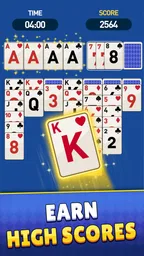
- Card layouts offer variety beyond a single standard deal.
What could be better
- Ads may interrupt play or appear between rounds.
- Some features may require an internet connection.
- The relaxing pace may feel slow to players seeking action.
- Limited game modes can reduce long-term variety.
- Small cards may be difficult to read on compact screens.







