


Solitaire for Seniors Game review
 Analysis by Appsdrops
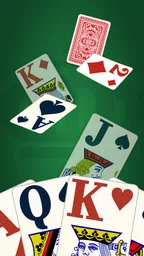
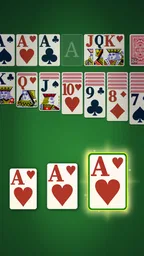
I like solitaire best when it is easy to settle into and doesn’t demand a long stretch of attention. Solitaire for Seniors is aimed at that kind of relaxed card play, and its card-game focus makes it a straightforward option for a quiet break. I would consider it for someone who wants a familiar solo pastime on a phone, especially if they value an approachable presentation over a large collection of game modes.
Getting started without unnecessary guesswork
This is a free card game from Guru Puzzle Game, available for Android devices running version 6.0 or later. It is rated for Everyone, so it is intended for a broad audience. The current version is 5.6.0-26081263. The game has an average rating of 4.9 from around 94,000 ratings, and it has been installed over a million times. Those figures suggest that it has found a substantial audience, though they do not tell you whether its particular style will suit your eyes, habits, or preferred pace.
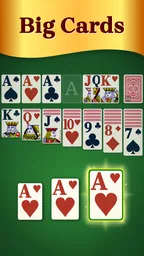
On a first launch, I’d take a moment to check the basics rather than tapping quickly through every screen. Make sure the phone is comfortable to hold, the display is bright enough for cards to stand out, and any system text or display scaling you normally use is still comfortable. Those simple checks matter more in a card game than they might in a fast action game: if the suits or ranks are hard to distinguish, even familiar solitaire can become tiring.
If the game seems slow or does not open cleanly, I would start with ordinary device troubleshooting: close it and reopen it, check that the phone has a stable connection if the screen you are trying to reach requires one, and restart the device if it remains unresponsive. I would also check whether the app store offers an update before assuming the game itself is broken. These are general first steps, not a promise that every interruption has the same cause.
One practical point for older devices is to leave some working room on the phone and avoid running several demanding apps at once. A crowded or low-memory device can make an otherwise simple game feel sluggish. If the cards respond inconsistently, pause and try again after closing background apps; that is a more useful test than repeatedly tapping and accidentally making several moves.
What can make a simple game feel difficult
Solitaire rules are familiar to many players, but familiarity does not remove every source of friction. A move can be easy to misread on a small screen, especially when cards overlap or when the player is unsure whether a tap registered. I recommend making deliberate, single taps and waiting for the board to respond before choosing another card. It sounds obvious, but it helps separate a missed input from a move that the game does not allow.
There is also a difference between a game being designed with older players in mind and being comfortable for every older player. Vision, dexterity, and familiarity with touchscreens vary widely. If a family member is trying it for the first time, sit with them for the opening round and let them handle the phone. That quickly reveals whether the card presentation and touch targets feel manageable in practice, without assuming that age alone predicts what someone will find easy.
I would not treat a stalled board as proof that the app has stopped working. In solitaire, a position can simply leave no move that is obvious at first glance. Look over the exposed cards carefully and avoid rapid repeated taps. If the screen itself is frozen, use the phone’s normal app-switching controls to close and reopen the game. If only the game position is confusing, restarting the round may be more sensible than troubleshooting the whole device.
A calmer way to fit it into the day
The game makes the most sense in short, low-pressure moments: while waiting for an appointment, taking a quiet break at home, or sitting with a cup of tea after lunch. I would avoid starting a round when I only have a few seconds to spare, because interruptions can make it harder to remember what I was considering. A small routine—settle somewhere comfortable, turn down distractions, and play at your own pace—can make the experience more pleasant than trying to squeeze it into a hectic moment.
For someone introducing the game to a parent or grandparent, I’d first help them get comfortable with the phone’s basic touch gestures. Then let them play without coaching every decision. That approach helps distinguish a genuine usability problem from simple unfamiliarity with touchscreen cards. It also makes the game a shared activity rather than a test of whether someone can learn quickly.
A useful habit is to inspect the whole visible layout before making a move, rather than reacting to the first card that appears promising. That reduces hurried choices and makes the game feel more thoughtful. If a player gets frustrated, a short break is often better than repeatedly trying the same move. Solitaire is meant to be a relaxing pastime; there is little value in turning a casual round into an obligation.
How it compares with other solitaire choices
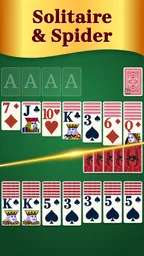
Compared with a general-purpose solitaire collection, this game has a narrower identity: it is presented specifically as solitaire for seniors rather than as a broad card-game hub. That focus may appeal if the person choosing it wants a simple place to begin. If you regularly switch between different solitaire variations or want a wider set of card games, a multi-game alternative may be a better fit. I would choose based on the player’s actual habits, not on the assumption that one style is universally easier.
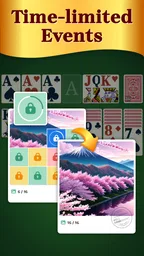
It is also worth separating a simple solo card game from social or competitive alternatives. If the main goal is to play with friends, compare scores, or explore many changing challenges, a more feature-rich option may provide more variety. If the goal is a familiar activity that can be picked up for a quiet spell, a focused solitaire game is easier to recommend. The trade-off is variety: a narrow focus can feel pleasantly uncluttered to one player and repetitive to another.
The title is free to download, with in-app purchases listed at $6.99 per item. I’d keep that in mind when setting up the game for someone else, particularly if the phone is shared or the player is not used to in-app spending. Check the purchase controls on the device before handing it over, and explain that optional purchases can cost money. That small bit of preparation prevents an unexpected purchase from becoming the first memorable part of an otherwise relaxed game.
When a problem may be outside the game
Not every display or response issue originates in the app. A phone set to very low brightness, a smudged screen, an overfilled storage space, or a device that is struggling with several open apps can all make touch play less comfortable. I’d test the screen in another app and check whether touch input behaves normally there. If the problem appears across the phone, it is more useful to address the device than to keep reinstalling a single game.
Likewise, if the game fails to download or update, first check the app store’s connection and the phone’s available storage. A temporary store or network interruption can look like an app problem even when the game has not launched yet. If other downloads are also failing, focus on the connection or device settings. If only this game is affected, retry later and use the app store’s standard support options rather than relying on guesses about what went wrong.
These checks are deliberately basic. They do not require changing unfamiliar settings or granting permissions just to make a card game work. I would be cautious about following advice from random sources that asks a player to install extra software or alter security settings. For a straightforward solitaire game, ordinary restart, update, storage, and connection checks are the sensible place to begin.
Who I would recommend it to
I’d suggest giving it a try to a player who already enjoys solitaire and wants a relaxed phone version, or to a family member who is curious about card games on a touchscreen. Its broad age rating and free entry make it easy to consider, while the senior-focused presentation signals the audience it is trying to serve. Still, the best test is whether the cards are comfortable to see and move on the particular phone being used.
I would skip it if you dislike solitaire, need a game built around multiplayer, or quickly lose interest without lots of modes and changing objectives. I’d also look elsewhere if the card display is uncomfortable on your device after adjusting ordinary screen settings. The game’s intended audience is not a guarantee that it will meet every accessibility need, so a brief hands-on trial is more informative than the label alone.
Overall, I see Solitaire for Seniors as a sensible choice for calm, familiar card play rather than an all-purpose gaming app. Its strongest use is a short, unhurried round when you want something mentally engaging without a complicated setup. The main trade-offs are the limited appeal of a focused solitaire experience and the need to judge screen comfort for yourself. If that balance sounds right, it is worth trying; if you want social play or broad variety, another card game will likely serve you better.
What we like
- Large cards make suits and values easier to see.
- Simple controls suit players who prefer an uncomplicated game.
- Familiar solitaire rules are quick to learn.
- Relaxed pacing allows play without time pressure.
- Short rounds make it easy to play in brief sessions.
What could be better
- Small phone screens can still make cards hard to distinguish.
- Some features may require an internet connection.
- Ads may interrupt play between rounds.
- Limited game variety may feel repetitive over time.
- Touch controls can lead to accidental card moves.







