

Solitaire Classic Games review
 Analysis by Appsdrops
I judge a solitaire game partly by how little effort it asks of me before I can settle into a hand. Solitaire Classic Games is a straightforward card game from Ample Wise Studio, aimed at people who want a familiar solo pastime rather than a large package of modes or a social competition. Its appeal is the simple routine: open a card game, take a few turns, and stop when the moment is over. That simplicity can make it approachable, though it also means the experience depends heavily on whether the cards and controls feel comfortable on your particular device.
Finding your way around the cards
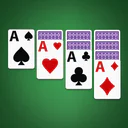
As a classic solitaire title, it gives newcomers a recognizable place to begin. You do not need to learn a collection of unrelated game systems before playing; the card-table format itself provides the basic visual logic. I find that useful for a short break, when I would rather focus on the layout than work through menus or a lengthy tutorial. The game’s short store description calls it “Solitaire Classic,” but what matters in practice is whether the familiar card format suits the way you like to spend a few quiet minutes.
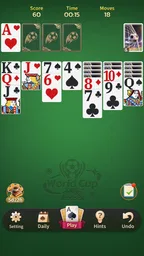
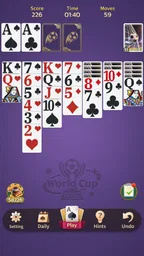
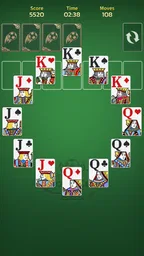
Readability is more than the size of a card. A player needs to tell suits apart, follow the order of the stacks, and notice which cards are available without losing their place. In solitaire, the tableau can become visually busy as cards overlap, so I would pay attention to whether ranks and suit marks remain easy for you to distinguish on your screen. This is especially important on a smaller phone display or when you prefer to play with the device held at a distance.
A useful first-session check is to play slowly rather than tapping through a hand. Look at the card faces in the tableau, then check whether the visible information is comfortable to scan repeatedly. If you find yourself leaning in or second-guessing a suit, that friction will matter more over a longer session. A familiar game is not automatically an accessible one: the most helpful test is whether you can make decisions without straining to read the layout.
For navigation, I recommend learning the game’s interaction rhythm before trying to play quickly. In a card game, a rushed tap can be hard to distinguish from a deliberate move, particularly if you are used to dragging cards in other solitaire apps. Take a few turns at a comfortable pace and notice how the game responds. If the controls feel predictable to you, the familiar rules can make the interface easier to settle into; if they do not, speed will not fix the mismatch.
Comfort matters more than speed
Solitaire is often played one-handed, but that does not mean every phone grip works equally well. A card near the far edge of the display may be less convenient to reach than one near the center, and repeated precise touches can be tiring for some players. I would try a short session in the posture you actually expect to use—sitting on a sofa, standing in a queue, or holding the phone with one hand—before deciding whether the controls suit you.
There is also a difference between a game that is calm and one that is comfortable for every sensory preference. Card movement, screen brightness, and the visual density of a tableau can all affect how a session feels, even when the underlying rules are familiar. If you are sensitive to busy screens, glare, or repeated animation, keep the first session brief and see whether the presentation feels restful. I would not assume that a card game’s simple subject automatically makes its display easy on the eyes.
One practical approach is to use solitaire as a low-pressure attention exercise rather than a race. Pause before moving a card, check the destination, and continue at a pace that feels manageable. That reduces the chance of accidental input and makes it easier to follow the board if you are interrupted. For players who prefer rapid play or constant challenge, this slower rhythm may feel less engaging; for someone looking for a measured mental break, it can be an advantage.
A game for brief pauses, with a few caveats
The clearest everyday use case is a short waiting period: you have a few minutes before an appointment, want a quiet break between tasks, or need something to do without starting a long story-driven game. A hand of solitaire is easy to put down mentally, since it does not ask you to remember a plot or coordinate with other people. I would choose it for that kind of unstructured pause, not as a substitute for a more varied game when I want sustained novelty.
It is listed as free, with an Everyone age rating, so it is easy to consider for a household looking for a simple card game. The game has a 4.4 average from around 2,500 ratings, and has passed 500,000 installs. Those figures suggest that many players have tried it, but they cannot tell you whether the card presentation will work for your eyesight, hand movement, or preferred pace. I would use them as context, not as a replacement for a personal comfort check.
Compared with a physical deck, a phone game avoids shuffling and keeps the cards in one place, which is handy when there is no table available. Compared with a solitaire app built around lots of variants, themed progression, or competitive features, this title is better approached as a focused, familiar card pastime. That is a trade-off, not a flaw for everyone. If you want a quiet default game, a narrow focus may be welcome; if you need variety to stay interested, a broader card collection is probably a better match.
It is also worth deciding what you want from “daily” play. A dependable solitaire routine can be pleasant, but repetition is part of the format. I would not pick this game expecting a deep campaign or a changing set of challenges unless those elements are clearly visible to you in the app itself. Instead, ask whether you enjoy making small decisions from a familiar card layout. If the answer is yes, the basic loop can be satisfying without needing extra layers.
Checking fit for different abilities and settings
For someone with limited dexterity, the key question is not simply whether the game is playable, but whether the required touches feel forgiving and repeatable. Try selecting cards at a relaxed pace and notice whether you can reach the important areas without an uncomfortable grip. If a hand is difficult to control, a larger-screen device or a different solitaire game with controls that better suit your movement may be preferable. I would not recommend pushing through discomfort just because the rules are familiar.
For players who have difficulty distinguishing colors or small symbols, suit visibility deserves special attention. Solitaire depends on reading suits and ranks at a glance, and a layout that looks clear to one person may be tiring to another. Check the cards in both the opening arrangement and a more crowded tableau. If the details blur together, consider a game whose card faces or display options are more comfortable for you rather than relying on memory to compensate.
Sound is another personal consideration, especially when playing in a quiet room, on public transport, or while someone else is nearby. I would start with the device’s sound at a low level and see whether the game’s feedback is helpful or distracting. This is a practical way to avoid surprises without assuming any particular audio controls are available. In a shared setting, playing quietly can also make a casual card break less intrusive to the people around you.
The game’s current version is 1.28.0, and it requires Android 7.0 or later. That gives Android users a concrete compatibility check before they install: compare the minimum requirement with the operating system on the device they intend to use. The release date is July 5, 2025. Those details are useful for deciding whether an older Android phone may be suitable, but they do not answer the more personal question of whether its screen and touch response feel comfortable.
There is a small but important situational trade-off in playing on a phone: the same portability that makes solitaire convenient can make the cards cramped. A tablet may offer more room to inspect the tableau, while a phone is easier to carry and use during a short wait. If you switch between devices, judge the experience on the one you will actually use most often. Comfort on a larger screen does not guarantee the same ease on a compact handset.
What may still get in the way
The main limitation I see is that “classic solitaire” is a specific kind of appeal. Its familiar structure can be relaxing, but it can also feel repetitive if you prefer changing objectives, narrative, multiplayer interaction, or a strong sense of progression. Someone seeking a richer card-game collection should compare it with alternatives that clearly offer those things. This is a better fit for a player who wants a focused solo pastime than for a player hoping one download will cover every card-game mood.
There is also a learning curve that can surprise people who have not played solitaire before. The cards may be familiar, but deciding which move to make is part of the game, and a quiet interface does not remove that thinking. If you are new to the format, give yourself time to understand the board rather than treating a slow first hand as a problem. If you already know the rules, the familiar layout is more likely to feel immediately comfortable.
For accessibility-minded users, I would keep expectations grounded: the app’s identity as a simple card game does not by itself establish that every visual, motor, or sensory need is covered. The most reliable choice is to test the aspects that matter to you—card legibility, touch comfort, and how the presentation feels in your usual environment. If any of those are a persistent barrier, a different solitaire title with controls or display choices that suit you better is the sensible alternative.
Ample Wise Studio’s game is free to try, and its broad audience rating makes it an easy candidate for a casual download, but I would still treat the first few minutes as a fit check. Notice whether you can read the cards naturally, move without strain, and stop or resume at a pace that suits your day. That small test is more useful than assuming that a familiar game will automatically work for everyone.
My inclusive verdict
I would recommend this solitaire game to someone who wants a familiar, self-contained card break and values an uncomplicated format over variety. It makes particular sense for quiet moments when a phone is the only convenient place to play, and its age rating makes it suitable to consider for a broad range of players. The 346 written reviews add another sign that people have spent time with it, though individual experiences will still differ.
I would hesitate to recommend it to someone who needs larger cards, highly adjustable presentation, low-effort controls, or a more varied game loop unless they have personally confirmed those needs are met. For that player, another solitaire app—or a physical deck with a comfortable table and larger cards—may be the more inclusive choice. The right option is the one that lets you focus on the game rather than managing the screen.
My overall view is positive but measured: Solitaire Classic Games is best when you want familiar solitaire without turning a short pause into a project. Its strongest quality is the straightforward card-game premise; its main question mark for any individual is whether the visual layout and touch interaction feel comfortable in real use. Try a calm, short session on your usual device, and let that experience decide whether it earns a place in your everyday routine.
What we like
- Familiar rules make it easy for new players to start.
- Quick games fit well into short breaks.
- Single-player gameplay works without opponents.
- Card movement feels intuitive on touchscreens.
- Classic layouts offer a relaxing pace.
What could be better
- Random deals can feel repetitive over time.
- Small cards may be hard to read on compact screens.
- Undo features can reduce the challenge for some players.
- Ads may interrupt play depending on the version.
- Some deals may be impossible to solve.







