
Solitaire - Classic Card Game review
 Analysis by Appsdrops
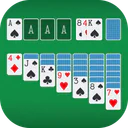
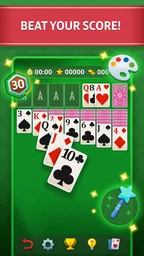
I like solitaire most when it asks very little of me: a few minutes, a clear view of the cards, and no pressure to keep up with anyone else. Solitaire - Classic Card Game is built around that familiar, individual card-game routine. Its focus is Klondike, the version many people simply call solitaire, and the emphasis on large cards makes readability the first thing I would consider when deciding whether it suits my phone and my playing habits.
Reading the cards and finding your way around
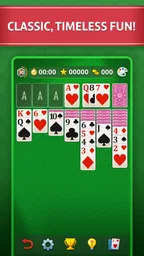
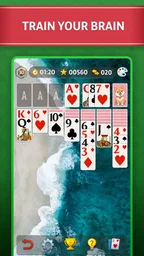
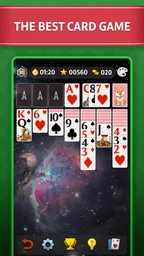
At its best, a solitaire screen lets me scan the tableau quickly instead of making me hunt for ranks and suits. Larger cards are a practical choice here, especially on a smaller phone or when I do not want to concentrate hard just to distinguish a seven from a nine. They also make the game easier to pick up for someone who knows the basic rules but has not played on a touchscreen before.
That does not make every screen equally comfortable for every player. Card faces need to be easy to read, but the spaces between columns and the controls around the board matter too. I would recommend trying a short game on the device you actually plan to use: if the cards feel clear and you can reach the controls without repeatedly adjusting your grip, the basic presentation is likely to work for you. If you regularly enlarge your phone’s display or use a very compact device, check whether the board still feels manageable rather than assuming that “large cards” will solve every visibility issue.
The rules are familiar enough that navigation should not become the main task. You build descending sequences in alternating colors across the tableau, uncover face-down cards when possible, and move completed suit sequences toward the foundations. That predictable structure is helpful for new players: the challenge comes from choosing a move, not learning a complicated interface. I would still take a moment at the start to identify the draw pile, discard area, and foundation spaces. Once those locations become familiar, I can focus on the card order instead of searching the screen.
For a more deliberate game, I try not to move a card simply because the move is available. I first look for a play that reveals a face-down card, since uncovering one can create options that are not visible yet. I also check whether a low card is blocking a useful space before filling an empty column with a king. That small pause makes the game feel less like tapping at random and more like solving a compact puzzle.
Large cards help, but the board still asks for attention
Readable card faces are only one part of accessibility. Klondike relies on recognizing both suit and rank, comparing alternating colors, and tracking which cards are hidden. If distinguishing the suits is difficult for you, larger artwork may help with the numbers while leaving suit recognition as the harder part. I would not treat the card size alone as proof that the game will be comfortable for every player.
There is also a useful trade-off between visibility and overview. Bigger cards are easier to inspect, but a tableau with several columns still requires scanning across the screen. On a narrow display, that can mean shifting attention from one side to the other and keeping the sequence in memory. I find it helps to inspect one column at a time, then compare only the playable cards, rather than trying to absorb the entire board at once.
Touch, pace, and different playing situations
A solitaire game is naturally more forgiving of interruptions than a live card match. Nobody is waiting for my turn, so I can stop to answer a message, put the phone down, or think through a sequence without holding up another player. That makes this a sensible choice for a quiet break between errands or a few minutes in a waiting room. I can play at my own pace instead of having to react quickly.
Touch interaction can still be a barrier. Moving cards calls for accurate taps or drags, and people with limited dexterity, hand tremors, or discomfort from repeated gestures may find a long session tiring. If touch precision is a concern, try moving a card slowly and see whether the game responds in a way that feels dependable. I would avoid assuming that every gesture has an alternative input method unless you have checked it on your device.
For sensory comfort, the appeal is the quiet, turn-based nature of the activity: I can concentrate on the board without coordinating with opponents or keeping pace with a timer. But card movement and repeated visual scanning can still become tiring, particularly during a long session. I prefer treating each round as a small task and taking a break when I start overlooking obvious moves. A familiar game can be relaxing, but it is not automatically restful for every person or in every setting.
One practical way to use it is as a short reset during a commute while seated, or during a break when I want something more engaging than scrolling but do not want to start a demanding game. I would not recommend playing while walking, crossing a street, or doing anything that needs visual attention; the whole point is to inspect the cards. In bright outdoor light, glare can also make a card face harder to read, so a shaded spot is more comfortable than trying to force a game on a reflective screen.
Where it sits among other solitaire choices
Compared with a physical deck, a phone version avoids shuffling and setting up the layout, and it fits into a small pocket of free time. Compared with multiplayer card games, it removes the social pressure and turn-taking, which is a benefit if I want a private puzzle but a drawback if I enjoy conversation or competition. And compared with broader casual-game collections, this one keeps its identity narrow: it is for people who specifically want a classic Klondike session, not a rotating menu of unrelated challenges.
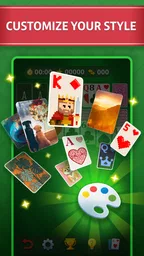
That focus is also why some players may prefer another option. If you want several solitaire variants, guided lessons, extensive customization, or a social layer, look for a game that clearly offers those things rather than expecting this one to become a general card-game hub. The store name and summary point to a straightforward classic experience, so I would choose it for familiar Klondike play, not for novelty or a large collection of modes.
The game is free to install, with in-app purchases listed from $0.99 to $19.99 per item. I would treat those as optional spending rather than a reason to expect a particular feature or benefit; the price range alone does not tell me what each item contains. If you are careful about accidental purchases, check the purchase controls on your device before handing it to a child or letting someone else use it. The game is rated for Everyone, but that rating does not remove the value of sensible purchase settings.
A familiar game with a thoughtful, realistic fit
DNA Mobile Group’s card game has a strong audience signal: it holds a 4.8 average from around 74,000 ratings, and it has passed five million installs. Those figures suggest that many players find the familiar format appealing, though they cannot tell me whether its touch controls or visual presentation will suit a particular person. It was released on April 22, 2018, and version 28.5.9 is the current version. It supports devices running Android 9 or later.
What I value most is the low-pressure structure. I can play one round without committing to a story, a team, or a demanding schedule, and the large-card approach puts readability near the center of the experience. It is especially suitable for someone who already enjoys Klondike, wants a solo game for small breaks, and prefers a familiar board over a stream of new mechanics.
I would be more cautious if precise touch input is difficult, if you need specialized visual or motor accommodations, or if you want a game that explains every possible move and adapts extensively to your needs. The best test is a brief session on your own device: check the card faces, the reach of the controls, and whether scanning the columns feels comfortable. For a straightforward, unhurried round of Klondike, this is a reasonable option; for broader variety or highly tailored accessibility controls, I would compare it with alternatives before settling in.
What we like
- Simple rules make it easy for new players to get started.
- Undo options let you rethink moves without restarting.
- Hints can help when you are unsure which card to move.
- Short rounds work well for quick breaks.
- Familiar solitaire gameplay feels relaxing and approachable.
What could be better
- Some deals may have no winning solution.
- Ads can interrupt play in the free version.
- Random card draws can make progress depend on luck.
- Repeated games may feel less varied over time.
- Small cards may be harder to read on compact screens.







