

Rummy 500 review
 Analysis by Appsdrops
I would recommend Rummy 500 to someone who already enjoys card games but wants a straightforward way to play a familiar style without needing a table or a partner nearby. The appeal is its focus: this is a digital take on Rummy 500, with Jokers and cards designed to be easy to see. In my view, that makes it a calmer choice than games built around tournaments, elaborate progression, or constant social activity.
What a first-time player should expect
Rummy 500 is a free card game from Game Maker Ltd., aimed at Teen players. It has a 4.6 average from around 3,200 ratings, and more than 100,000 installs. Those figures suggest a healthy audience, though I would treat them as a starting point rather than a promise that its style will suit everyone.
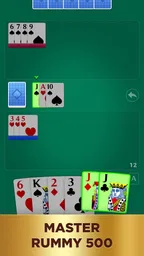
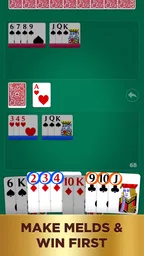
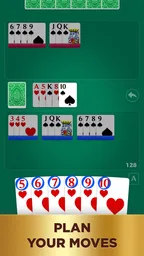
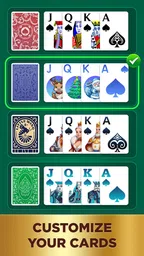
The main draw is a recognizable card-table rhythm: look at your hand, decide what might become useful, and make choices around collecting and laying down combinations. Jokers add flexibility, while the large-card presentation is especially welcome on a phone, where tiny ranks can turn a relaxing game into a squinting exercise. The basic idea is easy to approach even if you have not played this particular version before.
Its other useful distinction is offline play. That makes it a sensible option for a commute, a quiet break, or a place where connectivity is unreliable. I would think of it as a self-contained way to spend a few minutes with a familiar card format, not as a substitute for a lively multiplayer room or a social game night.
Compared with many card apps, the pitch here is deliberately modest. Some alternatives lean on online opponents, competitive ladders, or a wide collection of game modes. This one is better suited to a player who wants to settle into Rummy 500 itself. If your priority is chatting with friends or competing against a large online field, a multiplayer-focused card app will likely be a better fit.
Getting started without overthinking it
After installing, I would start by opening a game and treating the first round as a tutorial in practice, rather than expecting to make perfect decisions. The version is 1.0.5, and it runs on Android 6.0 or later. Those are useful compatibility details to check before downloading, especially if you keep an older phone in service.
The game is free to download, with in-app purchases ranging from $1.99 to $59.99 per item. I would begin without buying anything and see whether the core card play is enough for you. The listed purchase range is broad, so it is worth being deliberate around any purchase prompt; a free starting point does not mean every optional item has the same cost.
For your first session, focus on reading the cards and getting comfortable with the flow of a turn. Large cards help, but the more important habit is to pause before discarding: a card that seems unhelpful to you could be exactly what another player needs, depending on the situation. That small check is a practical way to feel less reactive and more in control.
A useful everyday scenario is a short wait at a station. Start a round when you have enough time to concentrate, and avoid beginning one if you know you will need to put the phone away immediately. Card games reward attention to what has already appeared, so even a relaxed game can become frustrating if you keep losing your place. Offline availability is convenient, but it does not make a half-played round automatically easier to resume.
How to reach a first satisfying result
For a beginner, a meaningful success is not necessarily winning right away. I would count it as a good first session if you can identify a useful combination, make a discard with a reason behind it, and understand why a later card changed your plan. That is a more encouraging target than trying to memorize every strategic wrinkle before the first hand is over.
One practical approach is to keep your hand flexible early on. Avoid becoming attached to a single hoped-for combination if the cards you draw point elsewhere. Jokers can help complete combinations, but using one as soon as it looks convenient may not be the best move; consider whether holding it could rescue a more valuable plan later. This is a judgment call, not a rule to follow blindly.
Also pay attention to what has already been discarded. Even a rough mental note can help you avoid waiting for a card that is unlikely to arrive, or alert you to a card that might be risky to pass along. You do not need to track every move like a tournament player. A simple habit—remembering a few recent discards—can make your decisions feel more intentional without taking the relaxation out of the game.
When you do complete a useful set or run, take a moment to notice what made it work: the cards you kept, the ones you let go, or the way a Joker changed your options. That reflection gives you something to carry into the next hand. It is a more reliable path to improvement than changing strategy after every unlucky draw.
Where newcomers can get confused
Rummy 500 can feel familiar and unfamiliar at the same time. Players who know another rummy variant may bring assumptions about how combinations, discards, or scoring work. I would resist relying on memory alone: check the in-game instructions and pay attention to how this version handles a turn. The name points to a recognizable family of games, but small rule differences can change the right move.
Jokers are another common source of second-guessing. Their flexibility makes them valuable, yet that can tempt a new player to treat every hand as a puzzle that must be solved immediately. Sometimes the better choice is to keep options open and wait for more information. If a move seems unclear, use the next turn to observe what changes rather than forcing a clever play just to use a Joker.
There is also a difference between a bad decision and a bad draw. A hand may not develop the way you hoped, even when your choices were reasonable. I find it helpful to judge a move by what was known at the time, not by the card that happened to appear afterward. That keeps a casual game enjoyable and makes learning less punishing.
The large cards are a practical advantage, but visual clarity does not remove the need to track the hand. If you usually play while distracted, you may find that the game feels less relaxing than expected. I would save it for moments when you can give each turn a little attention, rather than trying to play while juggling messages or conversation.
Who will enjoy it, and who may want another option
I think this is a good match for someone who likes traditional card play, prefers a clear view of the hand, and wants the option to play without a connection. It can also suit newcomers who are willing to learn through a few rounds instead of looking for a long tutorial or a competitive training environment. The best reason to try it is that you want Rummy 500, not simply any card game on your phone.
I would skip it if you are mainly looking for real-time social play, a broad catalogue of card games, or a deep competitive scene. A dedicated multiplayer app is a more natural choice for arranging games with friends, while a multi-game collection makes more sense if you want variety rather than one central format. Likewise, if you dislike thinking through discards or adapting to changing hands, the familiar theme may not make the turn-by-turn decisions enjoyable.
The game’s Teen content rating is worth keeping in mind when choosing an app for a younger player. For adult players, the more immediate consideration is whether the optional purchases fit your own preferences. I would keep the first few sessions focused on learning the game and decide later whether anything beyond the free experience adds value for you.
From a first hand to a better routine
Once the rules feel comfortable, try changing just one habit at a time. In one session, pay closer attention to discards; in another, be more patient with a Joker. Keeping the experiment small makes it easier to understand whether a choice helped, instead of blaming every outcome on several changes at once. This is a simple way to build confidence without turning a relaxing card game into homework.
It also helps to choose the right moment to play. A brief break is ideal when you can finish a hand without rushing, while offline play can be handy during travel or in areas with a patchy connection. If you are likely to be interrupted, play when you can give the round a little continuity. The game’s relaxed appeal depends partly on being able to follow what has happened.
Rummy 500 is not trying to be every kind of card app, and I see that as both its strength and its limit. Its focused format, readable cards, Jokers, and offline option make it approachable for a specific kind of player. The version 1.0.5 experience is worth trying if you want a familiar solo-friendly card pastime, but I would choose a more social or varied alternative if those are the features that keep you coming back to games.
My advice is to begin with a no-pressure round, learn how this version handles the rules, and aim first for a thoughtful turn rather than a win. If that pace feels satisfying, it is easy to see this becoming a handy way to fill a quiet stretch of the day. If you find yourself wanting opponents, conversation, or more modes, you will know early that another card game is a better match. Its best quality is that it lets the cards—not a pile of extra systems—hold your attention.
What we like
- Easy to learn for players familiar with standard rummy.
- Flexible play supports different group sizes.
- Wild cards add variety to each round.
- Discard tracking rewards attentive play.
- Short rounds make it easy to play in spare moments.
What could be better
- Scoring rules can vary between versions.
- Luck of the draw can outweigh careful planning.
- Keeping track of several melds can feel demanding.
- Games may take longer with more players.
- Some players may find repeated rounds monotonous.







