Nostal Solitaire: Classic Card review
 Analysis by Appsdrops
I like solitaire best when I can settle into a familiar rhythm: scan the layout, make a few deliberate moves, and let the game occupy a quiet moment without demanding a long session. Nostal Solitaire: Classic Card is aimed squarely at that kind of play. It is a free card game from Infinite Joy Ltd., with a nostalgic take on solitaire rather than a collection of elaborate modes or competitive distractions. After spending time with it, I see its appeal in its straightforward focus—and in the fact that the same simplicity can feel limiting if you want more variety.
A familiar solitaire routine, without much ceremony
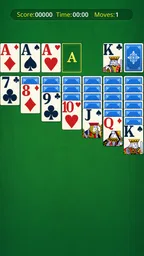
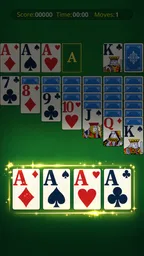
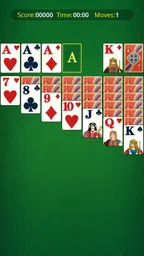
The useful starting point is to treat each deal as a small, self-contained puzzle. I begin by checking the face-up cards in the columns, looking for moves that uncover a hidden card or create room for a useful sequence. It is tempting to move every available card immediately, but pausing for a moment often makes the next step clearer. In a classic solitaire game, exposing a covered card can be more valuable than making a move that only tidies the board.
Nostal Solitaire: Classic Card keeps the focus on this recognizable card-table routine. You can pick it up for a brief break, then put it down when the deal is finished; it does not ask you to learn a large cast of characters or a complicated progression system. That makes it approachable for people returning to solitaire after years away, as well as for anyone who simply wants a quiet game on a phone or tablet.
My most practical advice is to keep the first few moves measured. Before shifting a card, check whether it will uncover a face-down card, help build a descending alternating-color sequence, or use a column that may be needed later. A move can be legal and still be unhelpful. Thinking one or two steps ahead turns a casual shuffle of cards into a more satisfying decision-making exercise.
This matters especially in a short everyday session. Imagine waiting for a kettle to boil or sitting through a quiet stretch of a commute: a deal gives your attention something small to work on, without requiring a commitment to a long campaign. If you have only a minute, you can still inspect the layout and make a few considered moves. If you have longer, you can stay with the same puzzle until you reach a result.
Small habits that make each deal easier to read
I find it helpful to scan the tableau in a consistent order rather than jumping between whichever cards catch my eye. First, identify face-down cards that can potentially be uncovered. Next, note any empty columns and whether you have a suitable king to use one. Then check the available cards and consider what they might unlock. This simple routine reduces impulsive moves and makes it easier to notice when the board has changed in a meaningful way.
When a column becomes empty, I treat that space as a resource, not an invitation to fill it immediately. A king may be able to start a new sequence there, but moving one without considering what it frees elsewhere can leave the rest of the tableau awkwardly arranged. Likewise, building a long sequence is not automatically progress if it traps a card you need. These are useful habits for solitaire generally, and they suit this game’s uncluttered, traditional focus.
Another sensible practice is to pause after uncovering a card and reassess the whole layout. The newly visible card may open a better route than the one you were following. Rather than continuing a plan just because you started it, look again for newly available moves. That brief reset is particularly useful when a deal seems to stall: sometimes the answer is not a faster sequence of taps but noticing that the board now offers a different priority.
What to check before settling into a routine
With card games, comfort and legibility matter as much as the rules. I recommend taking a moment at the start to look through the available settings and see what the game lets you adjust. I would not assume a particular control, display option, or convenience feature without checking the version on your own device. If the cards feel small or the controls do not suit the way you hold your phone, finding the relevant options early is better than discovering the friction after several deals.
The game is listed for Android devices running version 8.0 or later, so it is worth checking your operating system before trying to install it. Its age rating is Everyone, which makes the subject matter suitable for a broad audience. That rating describes the content; it does not mean every player will find the interface equally comfortable. Anyone who relies on larger text, stronger visual contrast, or particular accessibility controls should judge the actual on-screen presentation on their own device.
There is also a useful distinction between settings that improve comfort and settings that change how you like to play. If a game offers a choice that affects the pace or challenge, decide whether you want a more relaxed session or a stricter test of planning. I would keep a consistent approach for a few deals before changing several options at once. That way, if the experience becomes easier or more frustrating, you can tell which adjustment made the difference.
For an older relative or a friend who is new to mobile card games, I would introduce the game by playing a deal together and explaining the logic of a move rather than simply tapping quickly for them. Solitaire’s appeal is partly in understanding why a card should move. A calm, repeatable routine can help someone learn at their own pace, while the familiar card format makes the game less intimidating than a screen full of unfamiliar icons and menus.
Using shortcuts without losing the thread
Experienced players often develop a faster rhythm by using available controls efficiently, but speed only helps when it preserves awareness of the board. Check which actions the current version actually supports, then use them selectively. If a control moves a card automatically, for example, it may save time on an obvious move; it should not replace checking whether that move blocks a more useful sequence. I would rather make a few deliberate taps than rush into a layout that is harder to solve.
A repeatable habit is to separate obvious housekeeping from strategic choices. Handle a clearly useful move, then stop and rescan before making a move that changes the shape of a column or uses an empty space. If you have a preferred way to manage the available cards, stick with it long enough to understand its consequences. The key is not to claim a special shortcut exists, but to build consistency around the controls the game actually presents.
For a quick session, I would also decide in advance what counts as a satisfying stopping point. You might play one deal while waiting for a meeting, or stop when you have made a meaningful move rather than trying to squeeze in another full game. That small boundary keeps a simple pastime from turning into an unplanned time sink. It also makes the game easier to recommend to people who want occasional relaxation rather than a new daily obligation.
Where the classic format reaches its limits
The same focus that makes Nostal Solitaire easy to approach also narrows its appeal. If you want several distinct card games, a story, social competition, or a deep progression system, this is not the choice I would make first. It is a solitaire game, and its central pleasure comes from working through familiar card layouts. Players who already find that loop repetitive may not get enough novelty here to change their minds.
There is a trade-off between a relaxed presentation and a serious test of skill, too. Solitaire involves chance as well as planning, so a careful player cannot guarantee that every deal will be winnable. When a layout refuses to open, it can be frustrating to feel that a good decision has not produced a path forward. I try to judge a session by the quality of my choices rather than treating every unfinished deal as a personal failure.
Compared with a physical deck, a phone game is quicker to start and easier to carry, but it cannot reproduce the feel of handling cards or the social ease of playing across a table. Compared with broader digital card collections, this game offers a more focused reason to open it, while giving up the variety those collections provide. The better option depends on what you want: a familiar solo puzzle, a shared tabletop activity, or a rotating selection of games.
It is also sensible to keep expectations grounded about what a casual card game can do. Solitaire can give your attention a modest workout by asking you to compare options, remember what has been revealed, and think about the consequences of a move. I would describe that as an engaging mental routine, not as a guaranteed way to improve memory or produce a measurable health benefit. If your main goal is structured cognitive training, a dedicated program may fit better.
Who I would recommend it to
I would suggest it to people who already enjoy classic solitaire and want a familiar game they can open for a few minutes. It may suit seniors who appreciate card-based play, provided the display and controls feel comfortable on their device. It is also a reasonable option for a newcomer who wants to learn the basic rhythm of planning moves without first mastering a complex game system.
I would steer away from it if your main motivation is multiplayer competition, frequent new modes, or a strong sense of long-term progression. In those cases, a card game built around social play or a more varied collection is likely to hold your interest better. And if you prefer physical cards, a real deck remains the more tactile choice. Knowing those distinctions before downloading is more useful than expecting one small solitaire game to meet every kind of card-playing mood.
The game is free, and its audience is substantial: it has more than one million installs, an average rating of 4.3 from around sixteen thousand ratings, and roughly 1,700 written reviews. Those figures suggest that many players have found a place for it, but they cannot tell you whether its presentation and pace suit your own preferences. The current version is 3.6.0, so checking that your installation is up to date is a practical step if you encounter an issue or want the latest available build.
A simple game best approached with patience
My overall view is that Nostal Solitaire: Classic Card works best when you want one familiar activity and do not need it to be more than that. I like its direct appeal: open a deal, scan for useful moves, and take the puzzle at your own pace. The small discipline of checking what a move reveals, preserving useful space, and reassessing after uncovering a card gives the classic format more depth than a run of hurried taps.
Its limits are just as clear. It is not a replacement for a varied card library, a social game, or a physical deck, and players who need constant novelty may tire of the same basic loop. For me, that is a reasonable trade-off when the aim is a quiet pause rather than a full evening’s entertainment. If that matches what you want, try a few deals with a patient routine and see whether the familiar decisions feel relaxing or repetitive. That is the most honest test of whether this particular solitaire game belongs on your device.
What we like
- Classic solitaire rules are easy to learn and play.
- Quick rounds make it suitable for short breaks.
- Familiar card gameplay offers a relaxing pace.
- A simple format keeps the focus on the cards.
- The classic theme suits fans of traditional solitaire.
What could be better
- Gameplay may feel repetitive over time.
- There is little variety for players seeking new mechanics.
- Solitaire relies heavily on luck as well as strategy.
- The classic presentation may seem dated to some players.
- It may not appeal to people who prefer multiplayer games.







