


My Sticker Room - Decor Game review
 Analysis by Appsdrops
I can see My Sticker Room working best as a small shared-device activity: one person chooses a room, another suggests a sticker, and the fun comes from arranging a scene together rather than chasing a score. That makes it an easy game to hand to a child for a brief creative break, or to pick up yourself when you want something lighter than a full decorating simulator. My main reservation is that the appeal depends on enjoying sticker-based decorating; anyone looking for deep design tools or a substantial simulation may find the format too simple.
A decorating game that suits a shared screen
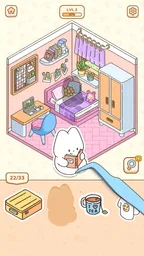
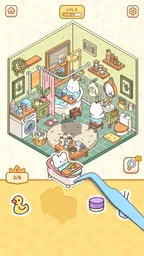
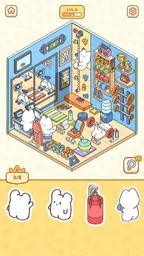
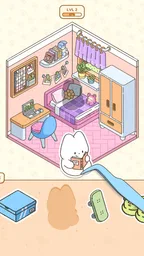
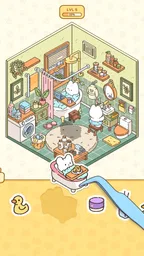
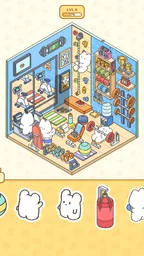
This is a simulation game from SayGames Ltd, built around decorating rooms with stickers. The premise is immediately understandable: there is no complicated setup to learn before you can start thinking about how a room should look. In practice, that clarity is useful when a device is passed between people. A younger player can make choices without needing a long explanation, while an adult can join in by offering ideas rather than taking over the controls.
One everyday use is a short wait at home: a child can work on a room while dinner is being prepared, then show someone else the finished arrangement. That small hand-off gives the activity a social side, even if each person takes a turn independently. I would treat it as a shared creative toy, not as a collaborative project with guaranteed ways to save, exchange, or merge separate work. If several people use one device, agree on whose turn it is and whether anyone is allowed to change a room someone else has arranged.
The game’s sticker premise also makes it less demanding than many traditional home-design games. Those often ask players to manage budgets, complete objectives, or make choices within a larger progression system. Here, the obvious draw is visual play: deciding what belongs in a room and where it should go. That can be a strength for a casual session, but it also means players who want realistic furniture planning or a long chain of strategic decisions should look elsewhere.
Set expectations before passing the device
Because the game is free to download and includes in-app purchases ranging from $0.99 to $49.99 per item, I would check purchase settings on a shared device before handing it over. That is a practical precaution, not a claim about how the game presents purchases or whether a particular item is required. An adult can decide whether purchases need approval, and explain that the game can be tried without treating every appealing option as something to buy.
For a household with more than one player, it helps to make a simple boundary around ownership. If a child has spent time arranging a room, another player should ask before rearranging it. This is especially useful in sticker games, where a small change can undo a carefully considered look. It is also a good way to keep the experience friendly: take turns making suggestions, but let the person currently playing choose which ones to use.
A useful decorating habit is to decide on one idea before placing stickers. For example, choose a calm color mood, a playful theme, or one focal spot, then build around it. This gives a child a manageable creative prompt without turning play into a test. If the room starts feeling crowded, pause and remove or rethink a few choices rather than adding more simply because there is space. That kind of constraint makes the activity more satisfying and helps players notice how placement affects the overall scene.
Coordination without turning play into a chore
Sticker decorating naturally invites conversation: one person can suggest a theme, while the player decides how to interpret it. I would keep those suggestions open-ended—“make this corner feel cozy” is more useful than dictating every placement. The goal is to make the game a shared pastime, not a negotiation over who gets the final say. For siblings or friends using the same device, alternating short turns can work better than letting one person direct the entire session.
There is also a practical distinction between coordinating around the screen and expecting the game to coordinate for you. I would not assume that different household members have separate profiles, that progress can be transferred between devices, or that one player can protect another’s arrangements through a special sharing feature. The safest approach is to treat the device itself as the shared space and agree on how it will be used. If individual ownership or separate saved projects are essential, a game with clearly documented profile and save options may be a better fit.
For a quiet activity, a parent can invite a child to explain why they chose particular stickers. That turns a few minutes of play into a low-pressure conversation about color, balance, and personal taste. It does not require the adult to judge whether the room is “right.” I find this approach more fitting than using the game as a design lesson with strict rules: its value is in trying combinations and making a room feel personally chosen.
Age suitability and household trust
The content rating is Everyone, which makes the game broadly appropriate from an age-label perspective. That can help adults decide whether it belongs on a family device, but it is not a substitute for checking how a particular child uses a shared tablet or phone. Younger players may need help understanding purchase prompts or device-level controls, while older children may simply want room to experiment without constant supervision.
I would present it as a creative game rather than as a promise of a full interior-design toolkit. That framing avoids disappointment for children expecting a detailed house-building simulator, and it helps adults judge whether the activity suits a short break. The game’s straightforward sticker focus can be appealing to players who enjoy arranging visual details, but it may not hold the attention of someone who prefers competition, narrative, or complex goals.
For households that keep one device for several people, the usual trust questions matter more than elaborate rules: who may download games, whether purchases need permission, and whether another person can alter a room in progress. The game’s Everyone rating is reassuring as a content category, but adults should still use the device’s own settings and household expectations to manage access. I would avoid assuming that the age label automatically answers questions about purchases or shared progress.
What its popularity and release tell me
My Sticker Room has an average rating of 4.3 from around 97,000 ratings, with roughly 1,800 written reviews and more than 10 million installs. Those figures suggest that the simple decorating idea has reached a broad audience, though popularity alone does not tell me whether it matches a particular player’s taste. It was released on March 27, 2025, and version 1.5.5 is the current version. It is free, rated Everyone, and requires Android 8.0 or later.
Those details make it easy to consider as a low-commitment download, especially if the intended player already enjoys stickers and room decoration. The paid-item range is worth remembering in a family setting, and the game is not the right choice if you want a purchase with no in-app spending at all. I would also compare it with other casual decorating games before choosing it for someone who needs extensive customization: the central appeal here is arranging stickers, not necessarily managing every aspect of a home.
Where it fits among decorating games
Compared with a full interior-design simulator, this game appears aimed at quick visual choices rather than detailed planning. That difference matters. A simulator may be better for someone who wants to coordinate furniture, room layouts, and a sense of progression; a sticker-focused game is a better match when the desired activity is simply to make a scene feel cute or personal. It also differs from puzzle games, where every move is judged against a fixed solution. Here, the player’s taste is the point.
The trade-off is that a light format can run out of appeal for players who want a strong reason to return every day. If you need long-term goals, demanding challenges, or realistic design constraints, I would choose a more involved alternative. If you want a relaxed activity that can be understood quickly and shared through conversation, the narrow focus is an advantage rather than a flaw.
One way to get more from a short session is to give it a theme: make a room feel peaceful, choose a playful look, or ask each person to place one sticker that changes the mood. Another is to take turns proposing a single adjustment instead of rebuilding the whole scene. These small prompts add variety without requiring extra game systems, and they keep the experience accessible for mixed ages and skill levels.
My household verdict
I would recommend this game to families and casual players who enjoy visual creativity and want something that is easy to share for a few minutes at a time. Its sticker-based decorating gives people a natural reason to talk and make choices together, while its Everyone rating makes it a reasonable option to consider for younger players. The best results come when expectations are clear: it is a casual decorating game, not a deep home-design simulator or a guaranteed multi-profile family workspace.
I would skip it for someone who dislikes arranging decorative details, wants extensive design controls, or needs strong separation between multiple players’ work. For a shared device, set purchase boundaries and agree on how turns and room changes should work. With those simple expectations, My Sticker Room can make a pleasant little group activity—especially when the aim is to create, compare ideas, and enjoy the process rather than chase a complicated objective.
What we like
- Easy controls make decorating accessible to casual players.
- A cozy theme suits short relaxing play sessions.
- Sticker placement encourages creative room designs.
- The game is suitable for players who enjoy interior decor.
- Its simple premise is easy to understand.
What could be better
- Decorating options may feel limited for experienced design fans.
- Gameplay may become repetitive after several rooms.
- Progress can depend on completing tasks in a set order.
- The game may include ads or optional in-app purchases.
- Players seeking action or complex challenges may not enjoy it.







