




Home Design Makeover review
 Analysis by Appsdrops
I like a decorating game best when it lets me experiment without turning every choice into a design exam. Home Design Makeover is built around that relaxed appeal: it’s a simulation game from Storm8 Studios where the main pleasure is shaping rooms and seeing a design come together. It is free to start, rated for Everyone, and has attracted a 4.5 average from around 232,000 ratings. That scale suggests a familiar, accessible game, though the right fit depends on whether you enjoy making visual choices at a measured pace.
What designing feels like here
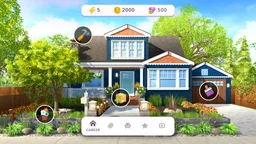
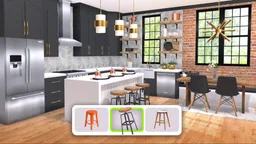
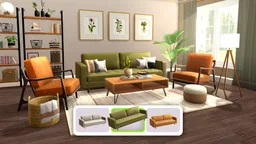
The appeal is less about mastering a complicated building tool and more about making a series of choices that change the mood of a home. I find that kind of structure satisfying in short sessions: look at a space, decide what style you want, and make choices that bring it closer to that vision. The game’s focus is clear, which helps it feel approachable even if you have never played a home-design title before.
That simplicity has a trade-off. If you want a deep architectural sandbox with precise room dimensions, unrestricted object placement, or a professional floor-planning workflow, this is not the same kind of tool. It is entertainment first, not a substitute for interior-design software. I would approach it as a way to enjoy styling decisions rather than as a serious simulation of renovating a real home.
Its popularity is substantial, with more than 10 million installs, but a large audience does not make the style universal. I’d recommend it to someone who enjoys visual makeovers and wants a low-pressure creative pastime. If you mainly want action, competitive play, or a game that asks for constant attention, the decorating focus may feel too quiet.
Why a little planning makes choices more satisfying
One useful habit is to decide on a room’s overall mood before committing to individual details. I might think “warm and relaxed” or “clean and modern,” then use that idea to judge each choice. This makes the process feel intentional instead of like selecting whichever option catches my eye first. It also helps when several appealing styles compete for attention.
I’d also treat each redesign as a chance to try a look I would hesitate to use at home. A game is a good place to test bold combinations, and the consequences are limited to the screen. That makes the experience enjoyable for casual players who like browsing ideas but don’t want to research real materials, measure furniture, or manage a renovation budget.
How it compares with other design games
Compared with open-ended decorating games, this one is better suited to players who appreciate a guided task and a clear sense of completion. A fully open sandbox can offer more freedom, but it can also leave you staring at an empty room without knowing where to begin. Here, the appeal is the compact decision-making: you can focus on the makeover rather than inventing every part of the project yourself.
On the other hand, players who want unrestricted creativity may prefer a game that gives them more control over placement and layout. The distinction matters: a guided makeover game is relaxing when you want direction, but limiting when you have a very specific design in mind. I would choose this for quick visual projects, and a more open building game for long sessions spent constructing a personal space from scratch.
Session pace and what to expect from play
Because the core activity is visual selection, I would expect the game to suit short check-ins better than a player’s demand for nonstop action. A natural everyday use is opening it during a break, making progress on a design, and putting it aside when the moment is over. That rhythm is part of the attraction for me: decorating can be a calm change of pace rather than another task that needs a long, uninterrupted evening.
The game is free to download, while optional in-app purchases range from $0.99 to $109.99 per item. That wide spread is worth keeping in mind before starting. I would first see whether the normal pace and design choices are enjoyable without spending. If you are sensitive to in-app purchase prompts or prefer to pay once and have everything included, check how the current version handles purchases before investing much time.
A practical tip is to avoid treating every attractive option as something you must acquire immediately. When a game centers on visual choices, it is easy to feel that the best-looking result requires spending. I recommend deciding in advance whether you want to keep the experience entirely free, and then sticking to that boundary. The game’s free entry point makes trying it straightforward, but the optional purchase range means it is sensible to be deliberate.
Busy moments, stability, and recovery
Decorating games can feel more demanding when a player is switching repeatedly between decisions, checking a design, and trying to finish a session in a hurry. I would avoid starting a project when I have only a few seconds to spare, especially if I care about getting the look just right. A calmer session makes it easier to compare choices and reduces the chance of tapping through a decision I later wish I had reconsidered.
I can’t responsibly promise how smoothly it will run on every device or claim that it never freezes; performance depends on the phone or tablet and its software environment. The sensible expectation is to judge it on your own device rather than assume that a popular game will behave identically everywhere. If the app feels sluggish, closing other demanding apps and restarting the game are reasonable first steps, though they are general troubleshooting habits rather than a guarantee.
For reliability, I’d make sure the device has a stable connection when I want to play and avoid force-closing the app while a change is being processed. If an interruption happens, reopening the game is the obvious first check; I would not assume that every unfinished action has been saved until I can see the room again. That cautious approach is useful for any mobile game, particularly when you are midway through a design you care about.
Device fit and practical limits
The listed minimum operating-system requirement is version 7.1, and the current release is 6.9.6g. That gives you a useful compatibility check before installing, but it does not by itself tell you how fast the game will feel on an older device. An operating system can meet a minimum while the phone still has limited memory, an aging processor, or little storage available. I would leave some breathing room on a device that already struggles with other games.
Since the experience revolves around seeing rooms and décor clearly, a larger screen can make browsing visual choices more comfortable than a small display. That is a practical preference, not a requirement. On a compact phone, I’d take my time with selections rather than rushing through them, while a tablet may feel more relaxed for players who like studying the whole room at once.
If your device is older, try a brief session before deciding whether to keep the game. Notice whether screens respond promptly and whether the visual presentation stays comfortable for you. This is more useful than relying on broad assumptions about performance, because the same version can feel different across devices and background workloads.
Who will enjoy it, and who may not
I think this is a good match for people who enjoy home décor, like making aesthetic decisions, or want a gentle mobile activity that can be picked up between other things. The Everyone age rating makes it broadly accessible, and the focused theme gives it an easy entry point. Someone who enjoys browsing room inspiration but wants a more game-like way to explore design ideas may find its guided approach particularly appealing.
I would skip it if you need a highly technical design tool, dislike optional in-app purchases, or become frustrated when a game limits how freely you can shape a space. It is also not my first recommendation for someone seeking a fast-paced challenge or a strong competitive element. The enjoyment comes from the makeover itself, so a player uninterested in décor is unlikely to be won over by the format.
My performance verdict
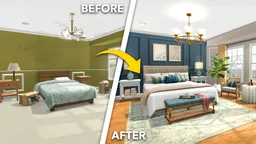
My overall impression is that Home Design Makeover is best judged as a lightweight, visually focused pastime, not as a demanding construction simulator. Its appeal lies in turning a design prompt into a room that feels more polished, while its limitations are the usual ones for a guided mobile decorating game: less freedom than an open sandbox and a need to be thoughtful about optional spending. Storm8 Studios has made a clear, approachable simulation, and its 4.5 average reflects broad appeal without guaranteeing that every player will share it.
I would install it if I wanted a calm design game for short sessions and was happy to work within a guided makeover format. I would test it briefly on an older device, keep purchase choices intentional, and save longer sessions for moments when I can pay attention to the room rather than rush. If you want deep layout control, choose a more open design alternative; if you want a friendly way to play with home styling, this is a reasonable place to start.
What we like
- Easy-to-follow puzzles make the game accessible to casual players.
- Room designs provide a satisfying sense of visual progress.
- A broad furniture catalog supports varied decorating styles.
- Clients and renovation goals give each project a clear theme.
- Regular events offer fresh challenges beyond the main levels.
What could be better
- Decorating choices are limited to the options offered for each item.
- Puzzle difficulty can rise sharply in later stages.
- Limited moves may require repeated attempts to clear a level.
- Energy limits can interrupt longer play sessions.
- Progress may feel slow without optional purchases.







