
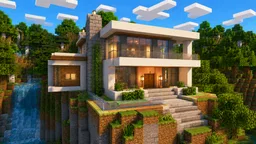
Craft Explore: Block Builder review
 Analysis by Appsdrops
I judge a block-building game not only by what it lets me create, but by how comfortably I can understand and control it. Craft Explore: Block Builder has an inviting premise: make a three-dimensional world from blocks, explore it, and keep expanding. That can suit a quick, low-pressure play session, but the experience is only welcoming if its presentation and controls work for the person holding the device. My overall impression is of a game with an easy-to-grasp creative idea and a broad potential audience, alongside practical questions about comfort and clarity that matter before settling in for a long build.
How easily the world reads
The game belongs to the simulation genre, but its appeal is more hands-on than technical: the player shapes a block world rather than managing a complicated real-world system. That simple visual language can make the basic goal approachable. Blocks are familiar building pieces, and a three-dimensional landscape gives creative players room to think in height as well as width. I can see it working well for someone who wants to experiment with a small scene without first learning a dense set of rules.
There is a difference, though, between understanding the idea and navigating the actual play space. In any 3D block builder, a player needs to keep track of where they are looking, what they are targeting, and how a change will affect the scene. Those tasks can become less intuitive when the view is crowded or when the player is still learning how movement and building fit together. I would recommend taking a moment to orient yourself before attempting a detailed structure, rather than treating the first minutes as a race to finish something impressive.
The game’s compact framing may be a plus for casual players: there is no need to approach it like a long campaign with a fixed story to follow. You can instead treat a session as a chance to shape one corner of a world, then return with another idea later. That makes it easier to set a personal goal, such as making a recognizable little house or arranging a landscape around a central feature. It also means the experience depends heavily on whether the basic view and building interactions feel clear to you.
LogicLabs Limited is the developer, and the game is free to download. Its broad reach is reflected in over ten million installs, while its average rating sits at 3.6 from around eleven thousand ratings. I treat that rating as a reason to approach it with measured expectations, not as a verdict on whether it will suit me: creative games are particularly sensitive to personal preferences about controls, pace, and presentation. The game is currently version 0.6.5, so I would also keep in mind that the experience may not feel as settled as a long-established building favorite.
Small builds are a useful first test
My practical advice is to begin with a build that has a clear outline and only a few levels of height. A small project lets you learn how the camera and block placement work without making every adjustment feel costly. If the world is easy to read for you, you can add detail gradually; if you find yourself losing your bearings, you will discover that early, before investing a long session in a complicated structure. This is a better test than judging the game from its premise alone.
Controls, comfort, and sensory load
Block building can ask for repeated taps, careful aiming, and frequent changes in viewpoint. That combination may feel natural to players who are comfortable with touchscreen games, but less comfortable to someone who finds precise touch interaction tiring or difficult. I would pay attention to whether you can make the same kind of placement reliably and whether moving around the scene feels manageable. If control effort begins to outweigh the fun of designing, a shorter session or a simpler project is a sensible adjustment.
Visual simplicity can be helpful, but it does not automatically make a game comfortable for every player. Three-dimensional scenes require spatial interpretation, and a player may need time to distinguish the intended building area from the surrounding view. Someone who is sensitive to busy motion or who prefers a steady, uncluttered visual experience should try a brief session first and notice how the camera movement feels. I would avoid assuming that a block-based style alone guarantees an easy sensory experience.
A useful workflow is to work in stages rather than constantly switching between exploration and construction. First, look around and decide where the next part of the build should go. Then focus on placing or shaping that part before moving the view again. This can reduce the mental load of juggling orientation and construction at the same time. It is especially helpful when returning to a project after a break: taking a quick look around before changing anything can help you reconnect with the layout.
For players who enjoy open-ended creative play, that freedom is a strength. There is room to make a personal goal instead of following a strict sequence, and that can suit different energy levels. On a busy day, I might make one small change and stop; when I have more time, I can explore a larger idea. But players who want frequent prompts, a clearly guided progression, or a strong sense of direction may find an open building premise less satisfying. Creative freedom is not the same as built-in guidance.
When and where it fits
As a free game with an Everyone 10+ content rating, it can be a reasonable candidate for a family device, while the age label is not a substitute for a parent or guardian checking whether the style and controls fit a particular child. The block-building premise is easy to explain, and adults can help a younger player set a simple goal before starting. For example, asking them to make a compact shelter or a recognizable shape gives the session a friendly focus without turning it into a test of speed or precision.
It also suits short gaps in the day better than a game that demands a continuous story session. I can imagine opening it while waiting for an appointment and making one small improvement to a world, then putting it down. That approach works best when I already have a clear next step. If I open a creative sandbox without an idea, I may spend more time deciding what to do than enjoying the building itself. Keeping a small mental list of possible projects—a path, a tower, a courtyard—can make those brief visits more rewarding.
For play in a shared room, the visual nature of building makes it easy for another person to understand what you are trying to create just by looking at the screen. That can make it pleasant as a casual, conversation-friendly activity. It is less suited to a setting where you need to pay attention to people or surroundings continuously, since navigating a three-dimensional scene naturally asks for visual focus. I would choose a calm moment for careful construction and save quick check-ins for simple edits.
What it offers compared with other builders
Compared with the usual alternatives in the block-building category, this game’s strongest draw is the directness of its premise: explore a 3D space and shape it with blocks. That is appealing if you want a straightforward creative activity rather than a more elaborate simulation with layers of management or a structured adventure. On the other hand, players who value deep progression, a large set of guided objectives, or elaborate building tools should compare it with games that make those priorities central. I would choose based on the kind of attention I want to give the game, not just on the fact that both options involve blocks.
The trade-off is important: an open-ended format lets you decide what counts as a successful session, but it may leave you to supply the motivation yourself. If you enjoy testing ideas and seeing a shape take form, that can feel liberating. If you need a steady stream of goals to keep momentum, a mission-led building game may be a better fit. This is not a flaw unique to this title so much as a practical difference between free-form creation and guided play, and it should shape expectations before downloading.
Version 0.6.5 is another reason I would approach it as a game to sample rather than an automatic long-term pick. I would first check that the core building loop feels comfortable, then decide whether I want to invest more time. The current average rating of 3.6 suggests that reactions are mixed enough to make personal fit especially relevant. With 79 written reviews, there are opinions to browse in the app store, but my decision would still come down to whether I enjoy the controls and the freedom to set my own projects.
Who may find it difficult
Players who rely on very precise, low-effort touch controls may want to test the game before planning an intricate build. The same goes for anyone who finds three-dimensional navigation tiring: even a simple building task can become frustrating if it takes too much effort to stay oriented. I would also steer players who prefer a clear tutorial-like route or a strong narrative toward a more guided alternative. A free-form world can be relaxing, but it can also feel aimless when you want the game to tell you what to do next.
For someone who prefers a steady, predictable screen, I would not assume that the visual style will automatically be comfortable. Try it in a quiet setting, keep the first project small, and stop if the viewpoint or repeated interaction becomes unpleasant. Those are practical ways to assess personal fit without expecting the game to solve every access need. The right choice is the one that lets you enjoy making things without having to work around the interface more than you want to.
A measured, inclusive recommendation
I see Craft Explore: Block Builder as worth trying for players who like open-ended, three-dimensional creativity and are happy to invent their own goals. Its free entry point lowers the commitment, and its Everyone 10+ rating gives families a useful starting reference. I would recommend beginning with a small, clearly defined build and paying attention to camera comfort, placement accuracy, and how much guidance you personally need. Those details will tell you more than the broad promise of a block world.
For inclusive play, the important point is not to assume that one simple visual style works equally well for everyone. The game’s premise is easy to understand, yet navigation, repeated touch input, and visual orientation can still create barriers depending on a player’s needs and context. If those interactions feel manageable, the open format can be a pleasant way to unwind and make something personal. If they do not—or if you want structured goals and a more guided experience—I would choose another builder. My verdict is cautiously positive: a promising casual creative option, best enjoyed when its hands-on approach matches your comfort and the kind of play you want.
What we like
- Creative mode lets players build freely without survival pressure.
- Block placement is easy to learn for younger players.
- Open-ended worlds encourage imaginative construction.
- A broad selection of blocks supports varied building styles.
- Short play sessions work well for casual gameplay.
What could be better
- The gameplay may feel repetitive after extended play.
- Limited objectives provide little direction for some players.
- Large builds can require considerable time and patience.
- Touch controls may make precise placement challenging.
- Performance can vary on older devices.







