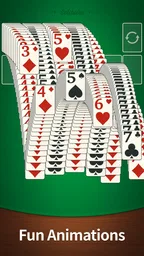
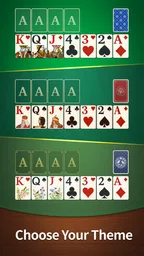
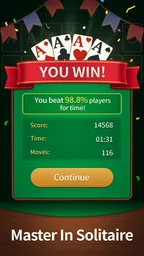
Calm Solitaire: Classic Card review
 Analysis by Appsdrops
I find solitaire most useful in the small gaps of a day: while waiting for someone, taking a quiet break, or settling in after a busy stretch. Calm Solitaire: Classic Card is aimed squarely at that sort of low-pressure play. It is a free card game from Puzzle Brain Games, built around a familiar solitaire routine rather than a sprawling collection of modes. That focus makes it easy to understand, though it also means it will not satisfy everyone looking for a deeper or more social card experience.
A simple game that fits short breaks
The appeal here is how little commitment solitaire asks of you. I can open a game, think through a few moves, and stop when the moment is over. There is no need to coordinate with opponents or remember a long campaign. For a shared household device, that makes the game easy to pass along informally: one person can play during a pause, then someone else can use the device later without needing to learn a complicated set of rules.
The store summary promises a relaxing take on classic solitaire, and the short description calls it “Calm Solitaire.” I would treat that as an intended mood, not a guarantee that every session will feel peaceful. Solitaire still asks you to make choices, and a run of awkward cards can be frustrating. The calm comes more from the familiar, self-paced format than from any special relaxation system.
That distinction matters if you are choosing a game for a quiet moment. This is a better fit for someone who enjoys planning a few moves and accepting that a deal may not unfold perfectly than for someone who wants constant rewards, fast action, or a story to follow. Its card-game identity is clear, and the straightforward premise is the main reason it can work as a small daily ritual.
Sharing one device without sharing a game plan
On a household tablet or phone that people take turns using, solitaire has a practical advantage over multiplayer card games: each session can be personal and self-contained. A child or adult can pick it up when the device is free, then hand the device back without waiting for a match to finish. In a real-life scenario, I can imagine using it during a family member’s appointment or while waiting for food, then letting another person take a turn during the next lull.
There is a trade-off, though. A shared device does not automatically make a shared game history useful. If different people take turns, they may have different preferences for how they play, and one person’s ongoing session may not be the right starting point for the next. I would avoid treating the app as a household scoreboard or a coordinated activity unless the people using it already enjoy taking turns with the same game. Its strongest shared-use case is simply that it is easy to pass the device along.
For a more social evening, I would choose a game designed around multiple players. Solitaire is a solo pastime, so it will not create conversation or shared competition by itself. It can sit alongside family time without demanding everyone’s attention, but it is not a substitute for a card game where players interact.
Keep expectations clear on a shared phone
Before installing any game on a device used by several people, I like to agree on a few basics: who is allowed to use the device, whether play is limited to certain times, and whether anyone should ask before changing what is on screen. Those are household decisions rather than features I would assume this app provides. Calm Solitaire should be understood as a game people can take turns opening, not as a tool for managing different users or setting family rules.
This matters especially if a parent is installing it for a younger player. A shared phone may contain personal messages, saved accounts, or other apps, and the game itself does not replace the device’s own user or parental settings. I would set expectations on the device first, then let the player use the game within those boundaries. That is a sensible approach whether the game is being used by one person or passed among several.
There is also a simple coordination tip: if several people use the same device, make a habit of finishing or leaving a session in a state that the next person can easily understand. Solitaire is naturally suited to brief visits, but an unfinished board can still feel like someone else’s business. A quick handoff avoids confusion and prevents the next player from assuming that the game is meant to be continued in a particular way.
Who it suits, and what to expect from the numbers
The game is rated for Everyone, which makes its general content appropriate for a broad audience. That label is useful context for families, but it does not tell me whether a particular child will enjoy the patience and attention solitaire can require. I would introduce it to a younger player by explaining the basic goal and checking that the pace feels comfortable, rather than assuming that an age label alone means it is a perfect fit.
Calm Solitaire: Classic Card has a 4.3 average from around 1,300 ratings, and it has passed over a million installs. Those figures suggest that it has reached a sizeable audience and that many players find the basic idea appealing. They do not tell me whether its style will suit a person who prefers lively animations, strategic depth, or frequent new challenges, so I would use them as background rather than as a promise of a particular experience.
The game is free, which makes trying it a low-commitment choice. I would still make the usual distinction between a free download and the experience a person wants from a game: if someone is looking for a carefully guided tutorial, extensive customization, or a broad suite of card variants, they should compare alternatives before settling in. I would not choose this solely because it costs nothing; I would choose it if a familiar solo card game is what the household actually wants.
How it compares with other solitaire choices
Compared with a general-purpose card-game collection, a focused solitaire title can be easier to approach because there is less to sort through before playing. That simplicity is a strength when I want one recognizable activity and do not want to browse a menu of unrelated games. A larger collection is the better choice for a household whose members have different tastes or who want to switch between several card formats.
Compared with competitive card apps, this game’s solo format is also a better match for people who want to play at their own pace. There is no need to synchronize with another player or make a session fit someone else’s schedule. The flip side is that it offers less built-in social energy: if a player is motivated by head-to-head matches, shared goals, or chatting during a game, a multiplayer alternative will likely feel more rewarding.
My practical tip is to decide what you want before opening it. If the goal is to occupy a short break with a familiar puzzle, a simple solitaire app makes sense. If the goal is to learn a new card game, explore several rule sets, or improve through detailed coaching, a more feature-rich option may serve better. That is not a flaw in a focused title; it is a boundary worth recognizing before downloading.
Version, device fit, and everyday friction
The current version is 1.14.265, and the listed minimum operating system is Android 7.0. That gives Android users a basic compatibility check to make before installing. If the device runs an older system, I would confirm compatibility in the app store rather than assume it will work. The release date is Mar 11, 2026, so people comparing older reviews with the present version should keep in mind that app versions can change over time.
For household use, the most likely friction is not learning the concept but agreeing on when the device is available and who is using it. A solo card game cannot resolve that. Nor should a family assume that the app creates separate experiences for different people; it is safer to treat it as a game opened on the device, with any account or access boundaries handled through the device’s own settings and household rules.
Another small but useful consideration is attention. Solitaire can feel like a harmless filler, yet it is easy to keep playing longer than intended when a session is going well. I find it helps to decide whether I am playing one quick round or simply passing time without a limit. That is a personal routine, not a feature of the game, but it makes the app easier to fit around chores, shared-device turns, and family plans.
My household verdict
I would recommend Calm Solitaire: Classic Card to someone who wants a familiar, individual card game that can be picked up during spare moments. Its free price, broad age rating, and simple premise make it approachable for a mixed-age household, while its solo nature keeps it from interrupting everyone else. Puzzle Brain Games has a clear audience here: players who value an uncomplicated solitaire break more than a large collection or a competitive scene.
I would skip it if the main goal is family interaction, a broad set of card games, or a highly guided experience for someone new to solitaire. Those needs point toward a multiplayer game, a card-game bundle, or a title with more teaching support. I would also avoid presenting it as a family-management solution; the useful household arrangement comes from clear device boundaries and considerate turn-taking, not from assuming the game handles those things.
Overall, I see this as a modest, focused choice rather than an all-purpose card destination. Its best quality is that it can occupy a quiet pocket of time without requiring a group or a big commitment. If that is what you want, it is worth a try. If you expect depth, variety, or social play, I would look elsewhere and choose an app that makes those priorities central.
What we like
- Familiar solitaire rules make it easy to start playing.
- Short rounds suit quick breaks.
- A calm presentation keeps the focus on the cards.
- Undo options can help correct accidental moves.
- Daily challenges offer a reason to return.
What could be better
- Solitaire deals can feel repetitive over time.
- Some deals may be impossible to win.
- Hints can reduce the challenge for experienced players.
- Ads may interrupt play depending on the version.
- Card suits may be hard to distinguish on small screens.







