





Avatar World ® review
 Analysis by Appsdrops
I can see why Avatar World catches a child’s attention quickly: it turns make-believe into the main activity, rather than asking players to master a complicated set of rules first. In my view, that easy start is also the key to judging its staying power. A lively first visit is appealing, but the better question is whether a child can keep finding their own reasons to return once the newness wears off.
From first visit to familiar play
This is a role-playing game from Pazu Games, built around the idea of choosing a character and imagining who they might be. The store summary is brief, but the experience is best understood as an invitation to create scenes and play them out. It is aimed at open-ended pretend play, not a campaign with a fixed objective or a competitive challenge to beat.
That distinction matters when deciding whether it suits your household. A child who enjoys inventing characters, giving them roles, and making up little stories is likely to understand the appeal straight away. Someone who wants levels, clearly defined missions, or a strong sense of measurable progress may find it too loose. I would treat it as a digital toy box, rather than as a conventional role-playing game with quests and character statistics.
The opening appeal is easy to picture in ordinary life: a child has a short stretch of downtime before dinner and wants something they can pick up without a long explanation. They can start imagining a scene rather than spending that time learning a complex system. For younger players especially, being able to make the story their own can be more rewarding than following a plot written for them.
Its broad audience is reflected in its Everyone age rating. That makes it an option to consider for shared family devices, though the rating alone does not tell a parent whether the app fits a particular child’s habits or spending boundaries. I would still try it together at first, both to see what holds the child’s interest and to make sure any in-app purchase prompts are understood before play becomes routine.
There is also a practical difference between an imaginative game and a story-led one. In a story-led alternative, the developer supplies much of the momentum: the next scene or objective gives the player a reason to continue. Here, the child supplies more of that momentum. That can make each session feel personal, but it can also mean the game works best when a player already likes inventing scenarios.
Why the first week can work
For a new player, the main draw is the freedom to decide what kind of character or scene to make. Rather than treating role-play as a reward after completing tasks, the game makes the act of pretending the point. I find that a useful fit for children who like to narrate what they are doing, play different roles, or turn small visual choices into a larger story.
A good way to help a child get started is to offer a simple prompt instead of taking over the play: “Who is visiting today?” or “What happens next?” That gives a hesitant player a starting point while leaving the story in their hands. It also helps a parent see whether the child enjoys open-ended play or would rather have clearer direction. If they repeatedly ask what they are meant to do, that may be a sign that a more goal-driven game is a better match.
The first few sessions can also benefit from being short and intentional. A child might choose a character, settle on a pretend situation, and return to it later rather than trying to explore everything in one sitting. That approach makes the experience feel less like browsing and more like building a small story over time. It is a practical way to test whether the game supports a genuine play habit or only a burst of initial curiosity.
For families, I would be cautious about presenting it as an automatic substitute for every kind of play. Its strongest use is as a screen-based outlet for imagination, especially when a child wants to make up scenes independently or alongside a sibling. It is not the same as a physical toy, drawing activity, or shared conversation, and it does not need to displace those things to be worthwhile.
What keeps it useful month to month
Open-ended play has a different kind of replay value from a game built around finishing chapters. The value comes from how the player approaches it on a given day. A child may return with a new role, a different story idea, or a desire to continue a scene they already started. That flexibility can make the app feel less disposable than a short novelty, provided the child enjoys supplying their own ideas.
One useful habit is to let the child explain the story they are making before putting the device away. That small routine can make the session feel complete without relying on an in-game endpoint. Another is to suggest a theme only when the child seems stuck, then let them decide the details. These approaches are not hidden game mechanics; they are practical ways to get more imaginative play out of a sandbox-style experience without turning it into a parent-directed assignment.
The game has a 4.7 average from around 6.7 million ratings, and it has passed 100 million installs. Those figures suggest that it has broad appeal, but popularity does not guarantee a lasting fit for an individual child. I would put more weight on whether the player returns voluntarily after the first burst of exploration than on how many other people have installed it.
Compared with a puzzle or action game, Avatar World asks less of a child’s reflexes and more of their imagination. Compared with a narrative role-playing game, it offers less externally guided momentum. That is a meaningful trade-off, not a flaw by itself. It can be a better choice for a child who likes to direct play, while a quest-based alternative may suit one who wants the game to keep setting goals and explaining what comes next.
Families should also consider the difference between free access and a fully cost-free experience. The game is free to download, with in-app purchases ranging from $0.99 to $59.99 per item. I would set expectations before handing it over: explain that some purchases cost money, decide who is allowed to approve them, and avoid treating a purchase prompt as a routine part of play. That conversation is more useful than assuming “free” means there can be no spending decisions.
Keeping the game manageable
Maintenance here is less about mastering a complex system and more about keeping play purposeful. If a child opens the app, wanders without settling on an idea, and quickly loses interest, try starting with a simple story prompt on the next visit. If that still does not help, the issue may be the open-ended format rather than a lack of guidance. There is no need to insist that every child should enjoy this kind of play.
The current version is 1.226, and the game was released on December 12, 2022. For a parent, the practical takeaway is to keep the app updated through the usual app-store process and revisit the purchase rules as the child becomes more independent. I would not build a family routine around assumptions about how often new content arrives; the more reliable measure of value is whether the child can make satisfying use of what is available to them.
It runs on operating systems beginning with version 7.0, which gives it a broad compatibility baseline. Still, a compatible device is not the only consideration: a child’s comfort with touch controls, attention span, and preference for self-directed play matter just as much. If they are easily frustrated when a game does not tell them what to do, an adult may need to help them decide on a scene at first—or choose a more structured game instead.
A low-friction family setup can prevent avoidable hassle. I would check the device’s purchase controls before letting a child play unsupervised, explain that they should ask before buying anything, and agree on when the app is put away. Those steps are useful because the game’s open-ended nature can encourage a player to linger, while purchase decisions are a separate issue that should not be left to guesswork.
Where the novelty can wear off
The same freedom that makes the game approachable can also be its main source of fatigue. A child who has no new story idea may feel that there is little to do, especially if they expect a game to reveal fresh objectives automatically. In my view, this is the central question to ask before downloading: does the player enjoy making up the activity, or do they mainly enjoy being guided through one?
Another possible sticking point is repetition. Even when a child changes the story, they may eventually feel that their pretend scenarios are becoming similar. Adults can offer a new premise, but if every enjoyable session depends on a parent supplying ideas, the app may not be delivering the independent play the family hoped for. That is a fair reason to use it occasionally rather than expecting it to become a daily fixture.
There is also a difference between collecting interest and sustaining interest. A child may be excited by the chance to shape a character at first, then move on once that initial exploration is familiar. I would watch what happens after several sessions: do they return to continue their own stories, or do they open the game only when prompted? The answer gives a better sense of long-term value than a single enthusiastic first day.
It may not be the best choice for a player who prefers clear achievements, tactical decisions, or a story that unfolds in a definite order. A conventional role-playing game can offer stronger progression and a more obvious sense of completion. A creative app centered on drawing may be a better fit for a child whose main interest is making pictures rather than acting out scenes. Choosing between them depends less on age alone and more on what kind of play the child naturally seeks.
Who should keep it installed
I would recommend giving Avatar World a try if the child enjoys pretend play and can make their own fun from a flexible starting point. Its free entry makes it relatively easy to assess, while the Everyone rating broadens its potential audience. Pazu Games has reached a large audience with it, but the best reason to keep it is personal: the child returns to create, not merely because the icon is available.
I would be more hesitant if the child quickly asks for instructions, loses interest without a goal, or becomes frustrated by the need to invent a scenario. In those cases, a guided story game or a more structured role-playing option is likely to provide a better experience. I would also skip making it a regular choice if purchase prompts create tension at home or if screen time is already difficult to manage; the app is optional entertainment, not a necessary part of a child’s play routine.
After the novelty fades, its lasting value depends on whether it continues to give a child room to imagine without needing constant adult direction. I see it as a worthwhile, occasional digital play space for the right kind of player, rather than a game every child will revisit indefinitely. If your child likes inventing characters and scenes, start with a short shared session, set purchase expectations, then see whether they come back with ideas of their own. That is the clearest test of whether it has earned a lasting place on the device.
At no charge to download, the game is easy to sample, but the in-app purchase range means it is sensible to treat spending as a separate family decision. Its appeal is strongest when the child’s imagination—not a parent’s prompts or the promise of buying more—keeps the play going. For families who value self-directed make-believe, that can be enough to justify keeping it around, even if it is not opened every day.
What we like
- Frequent updates add fresh activities and items.
- The colorful interface is easy for young children to navigate.
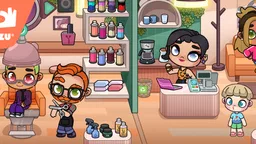
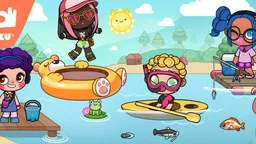
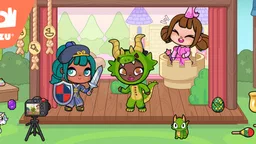
- Players can create characters with varied looks and outfits.
- Open-ended play encourages imaginative storytelling.
- Many locations offer interactive objects to explore.
What could be better
- Some locations and items require in-app purchases.
- Advertisements may appear in the free version.
- The large collection of content can feel overwhelming.
- Progress may not transfer between devices reliably.
- Some activities offer limited goals for older players.







