



Angry Birds Friends review
 Analysis by Appsdrops
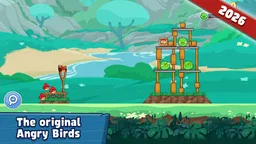
I keep coming back to Angry Birds Friends when I want a game I can understand in seconds but still think about after a level goes wrong. The basic appeal is wonderfully direct: pull back a bird, judge the angle, and try to knock down a structure full of pigs. Yet a small change in aim or timing can turn a promising shot into a wasted one, which gives the familiar slingshot idea more bite than its simple controls suggest.
This is an arcade game from Rovio Entertainment Oy, released on May 2, 2013. It remains free to install, and its Everyone age rating makes it an easy fit for a broad audience. The current version is 14.9.0, with Android support starting at version 10. In my view, its strongest selling point is not novelty; it is how quickly it turns a spare moment into a compact puzzle with a clear goal.
What you get without paying
You can start playing without an upfront purchase, which makes it easy to try the game before deciding whether it belongs on your phone. That matters for a puzzle game built around short attempts: you can see whether aiming, experimenting and retrying suit you without first paying for access. The app has a 4.4 average from around 1.3 million ratings, while its 100 million-plus installs suggest that this familiar format has reached a very large audience.
Free entry should not be mistaken for a promise that every optional purchase is trivial. In-app purchases range from $0.19 to $239.99 per item, a span wide enough that I would check the price shown in the app before confirming anything. Those figures describe the available purchase range, not a requirement to spend. I would treat spending as optional and decide in advance whether I want to keep the game entirely free.
That distinction is the most useful way to judge its cost: the initial commitment is zero, while the optional spending range reaches a much higher ceiling. If you are choosing a game for a child, the Everyone rating is reassuring about the intended audience, but it does not remove the need to discuss purchases. I would make sure the device’s purchase controls are set in a way that matches your household’s expectations.
Why the slingshot still works
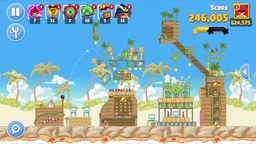
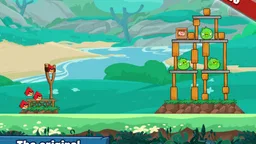
The central pleasure is reading a structure before firing. I look for a weak support, a stack that might collapse if one piece shifts, or a pig positioned where a well-placed hit could cause wider damage. A direct shot is not always the best one. Sometimes the satisfying solution is to hit a lower section and let the structure do the work, rather than spend a bird trying to reach a target head-on.
That makes each attempt a small exercise in cause and effect. The controls are easy to grasp, but the decisions are not purely automatic: angle, force and the point of impact all matter. When a shot misses, I can usually identify what I misjudged and adjust instead of feeling that the game is asking me to learn an elaborate control scheme. That quick feedback is a big reason it works well in short sessions.
My practical tip is to pause for a moment before the first shot. Trace the structure from the ground upward and ask what is actually holding it together. Then use an early attempt to test a useful weak point rather than simply aiming at the nearest pig. A shot that reveals how the construction reacts can be more valuable than one that looks impressive but leaves the puzzle largely unchanged.
Another useful habit is to change one thing at a time after a failed attempt. If I alter both the angle and the impact point, I cannot tell which adjustment helped. Keeping the next shot focused makes the puzzle easier to learn and avoids repeating the same hopeful fling. This is a small discipline, but it makes the game feel more thoughtful and less like trial and error.
There is also a good reason not to rush for a perfect result every time. If I am playing casually, a workable solution can be more satisfying than repeatedly chasing an ideal shot. If I am in a competitive mood, by contrast, careful retries make sense because tiny improvements are part of the fun. The game suits both approaches, though anyone who dislikes replaying a puzzle after a near miss may find the second style tiring.
How it fits into everyday play
A realistic use case is a short wait: I have a few minutes before leaving, open a level, make a couple of considered shots and put the phone away. The slingshot format gives each attempt a natural stopping point, so I do not need to remember a complicated sequence when I return later. That makes it more convenient for scattered downtime than a game that expects a long, uninterrupted session.
It also works as a low-pressure game to share with someone nearby. One person can suggest where to aim, while the other takes the shot; the result gives you something immediate to discuss without either player needing to learn a large set of rules. I would not choose it for a group looking for deep strategy or a long shared campaign, but it is well suited to quick back-and-forth problem solving.
Compared with other arcade puzzle games, its emphasis is unusually tactile. Instead of matching symbols or navigating a character through a course, you make a single physical gesture and watch a structure respond. If you enjoy predicting how objects will fall, that focus is a strength. If you prefer puzzles with a fixed grid, explicit clues or a guaranteed path to the answer, a more traditional logic game may be a better fit.
The trade-off is that the basic loop stays very recognizable. The pleasure comes from finding a better shot, not from mastering a sprawling control system or uncovering a wholly different kind of game. That clarity is excellent for quick access, but it can also feel repetitive if you want every session to introduce a new style of play. I would think of it as a dependable puzzle snack rather than a game that needs to occupy every evening.
Its long-running appeal is easy to understand: a failed shot is quick to process, and a successful collapse is immediately legible. Still, familiarity cuts both ways. Players who already know this slingshot formula may find that the core action feels comfortable rather than surprising. I recommend trying it for the precision and physics-driven problem solving, not expecting a radical departure from the genre it helped make familiar.
Where the friction shows
The game rewards patience, but the same retry loop can become its main irritation. If I keep firing without studying the result, I can burn through attempts while learning very little. Anyone who wants a puzzle game to reveal an obvious correct answer may find the experimentation frustrating. I enjoy working out why a shot failed, but I would skip this one when I am too tired to think through angles and structure.
There is a second trade-off around optional spending. A free starting point is useful, but the broad purchase range means I would not treat every in-app offer as an automatic bargain. Decide whether you are comfortable spending at all before getting drawn into a moment of impatience. If your goal is a completely purchase-free experience, you can approach it that way, but it is sensible to keep an eye on purchase controls and confirmation screens.
It is also not the right choice if what you really want is a deep, story-led game or a substantial world to explore. The appeal here is immediate puzzle solving, not a promise of long-form narrative. I would choose a different arcade title if I wanted constant movement and reflex tests, or a dedicated logic puzzler if I wanted carefully staged clues rather than physical knock-on effects.
Who is likely to get the most out of it?
I would recommend it to casual players who like learning through attempts, fans of physics puzzles and anyone who wants something easy to pick up during a break. It is especially good for people who enjoy refining a small decision: shifting the launch angle, aiming at a different support, or noticing that a structure may topple more effectively from below than from the side.
Parents may appreciate that it is rated Everyone, but I would still talk about optional purchases rather than assuming an age rating settles every household concern. For a player who wants to avoid spending, the sensible approach is simple: enjoy the free access, ignore purchases unless there is a clear reason to choose one, and check the amount before any confirmation. The app’s minimum Android requirement is version 10, so an older Android device may not meet its stated system requirement.
For someone deciding between this and another quick phone game, I would ask one question: do you enjoy pausing to predict a physical result? If yes, the slingshot puzzles offer more thought than their simple controls first suggest. If you mainly want speed, constant new mechanics or a story to follow, another option will probably hold your interest better.
My verdict on the value
For a free-to-install arcade game, Angry Birds Friends offers a clear, practical kind of value: a familiar action that can fill a brief pause, plus enough room for careful aiming to keep a level from feeling entirely automatic. I like that I can begin without paying and decide based on the actual puzzle loop whether it is for me. The broad optional purchase range is the main reason I would be deliberate about spending rather than treating every prompt as part of the cost of playing.
My recommendation is to try it if you enjoy compact physics challenges and do not mind retrying a shot to understand what went wrong. Go in expecting focused slingshot puzzles, not a large adventure or endless variety. If that sounds like the right use of your spare minutes, it is an easy game to give a chance; if you want a purchase-free environment with no spending decisions at all, set clear limits before you start or choose a game without in-app purchases.
What we like
- Quick matches make it easy to play during short breaks.
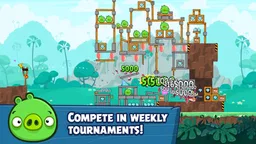
- Weekly tournaments add a competitive reason to return.
- Familiar slingshot gameplay is simple to learn.
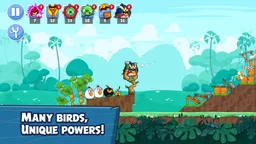
- Bird abilities reward thoughtful shot planning.
- Leaderboards let players compare scores with friends.
What could be better
- Tournament results can depend on how often you play.
- Some upgrades and extra turns may require in-app purchases.
- A stable internet connection is needed for online features.
- Repeated tournament layouts can feel predictable.
- Frequent events may make casual play feel competitive.







