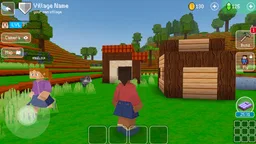
Block Craft 3D:Building Game review
 Analysis by Appsdrops
I like city-building games most when they give me room to make something personal without demanding a long, focused session. Block Craft 3D: Building Game aims at that relaxed end of the arcade genre: its appeal is the pleasure of shaping a little block-built place, rather than chasing a complicated simulation. It is an easy game to understand, but whether it keeps your attention depends on how much you enjoy making your own goals.
Small building goals make a gentle start
The first attraction is the clear, hands-on idea: put blocks together and turn an open space into a city that feels like yours. I find that approachable because a new player does not need to understand a maze of management systems before getting started. You can think in simple projects—a home, a street, or a landmark—and decide what to tackle next.
That freedom is also the game’s first test. Players who like setting their own creative targets will find plenty of reasons to return to a build and improve it. If you prefer a game that constantly assigns precise objectives and spells out the next step, this open-ended style may feel less motivating. The satisfaction comes mainly from seeing your idea take shape, not from being pushed through a tightly scripted campaign.
As a 3D building game from Wildlife Studios, it sits between a conventional arcade diversion and a lightweight city simulator. Its block-based presentation makes construction feel approachable rather than technical. I would recommend it to someone who wants a creative activity they can dip into, especially if the thought of designing a small town sounds more appealing than managing a dense spreadsheet of resources and residents.
Progress you can see at a glance
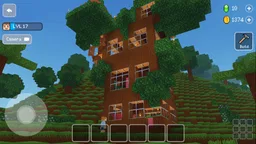
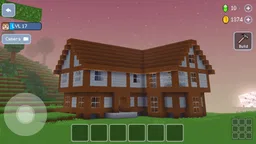
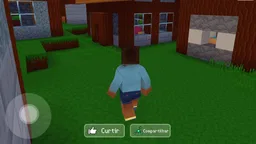
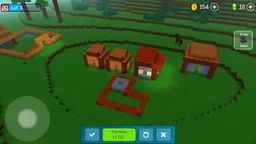
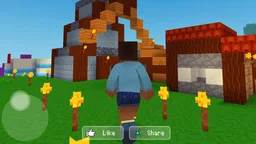
The strongest progress signal is visual: a bare patch becomes a recognizable structure, and a collection of structures can start to read as a place. That makes short sessions feel worthwhile. Even if I only work on one part of a build, I can judge the result with my eyes instead of waiting for a distant milestone or a complicated score to tell me that I have improved.
For a more satisfying workflow, I would choose one small design problem at a time. Sketching a simple outline in your head before placing blocks helps prevent a build from becoming a pile of disconnected details. It is also useful to pause and look at the whole scene occasionally; a structure that seems interesting close up may need a clearer shape or more breathing room when viewed as part of the city. These are small habits, but they make a creative game feel less like random placement.
There is a trade-off here. Visible construction gives you immediate ownership, but it does not automatically create a strong sense of advancement. If you need frequent, explicit rewards to feel that a game is moving forward, the satisfaction of improving a design may not be enough. I see this as a title for players who enjoy the process of making, not only the moment when a task is marked complete.
Challenge without a demanding pace
The difficulty is best understood as creative rather than reflex-based. The central question is what to build and how to make it look coherent, not whether I can execute a complicated move under pressure. That makes the game a comfortable option when I want something calmer than a fast arcade challenge, and it gives younger players an accessible way to experiment with spatial ideas.
At the same time, a relaxed pace can become a limitation. Players who want rising mechanical difficulty, carefully staged challenges, or a strong sense of urgency may find that self-directed building does not provide enough tension. I would choose a more objective-driven arcade game when I want clear tests of skill; I would choose Block Craft 3D when I want to work at my own speed and enjoy a visible result.
A practical way to keep the challenge fresh is to give each session a constraint of your own: focus on one building, make a street feel more complete, or revisit an older section and improve its layout. This does not turn the game into a different kind of experience, but it gives an open-ended session a useful shape. It also helps answer a common question: what should I do when I have no assigned objective? Pick a modest design goal and stop when it feels finished.
When the open-ended loop holds—and when it doesn’t
Its retention comes from returning to a place that is still yours to change. That can suit a quick break after school or work: I can make a little progress without needing to remember a complicated chain of missions. It also works for someone who likes showing friends a construction project or simply enjoys having a creative game available on a phone.
But the same freedom can make it easy to lose momentum. Without a personal plan, I may open the game, look at the city, and be unsure what would make the next session feel meaningful. The remedy is not to build bigger every time; a small, specific improvement is often more satisfying than starting an ambitious project without a clear idea. If you tend to abandon sandbox games when they stop telling you what to do, this is an important point to weigh before installing.
It is free to download, with optional in-app purchases ranging from $0.99 to $119.99 per item. That range makes it sensible to treat purchases as optional rather than part of the basic promise: decide what you want from the game before spending, and do not assume that buying something will make the creative loop more engaging. If you are choosing it for a child, its Everyone age rating is reassuring as a content label, while any purchase decisions are still worth discussing together.
The game has a 4.5 average from around 3.1 million ratings, with about 77,000 written reviews and over 500 million installs. Those figures suggest that its simple building appeal has reached a broad audience, but popularity does not settle the personal question of whether you like open-ended play. I would use the ratings as context, then decide based on whether making your own goals sounds relaxing or frustrating.
How it compares with other arcade choices
Many arcade games lean on quick reactions, repeated rounds, or clearly defined win conditions. Block Craft 3D takes a quieter route: the central reward is a city you have shaped yourself. Compared with a more structured builder, that can feel less demanding and easier to pick up casually, but it may offer less direction to someone who wants every session organized around a specific objective.
It is also different from a pure creative toy. The city-building frame gives your projects a sense of place, which can make decorating and planning feel more purposeful than placing objects on a blank canvas. Still, players who want a deep simulation should look for a game built around more involved planning, while those seeking intense competition will likely be happier with a faster arcade alternative. This one’s best fit is the middle ground: creative construction with a low-pressure rhythm.
For everyday use, I would keep expectations modest and sessions self-contained. For example, after dinner you might open the game with the aim of improving one small area, then leave once that piece feels complete. That approach avoids the vague feeling that you need to finish an entire city before you have accomplished anything. It is also a useful way to tell whether the game suits you: if even a small build feels rewarding, the open format is working; if you keep waiting for a more explicit challenge, another style may be a better match.
A good fit for patient, self-directed builders
Block Craft 3D is a free arcade game for people who enjoy turning a simple idea into a visible construction and do not need constant instructions to keep playing. Wildlife Studios released it on August 24, 2016, and version 4.9.1 supports Android 7.0 and later. Its accessible premise, relaxed building rhythm, and broad audience make it easy to try, while its optional purchases are worth keeping in mind if you prefer games with no spending prompts at all.
My verdict is positive, with one clear qualification: the game’s appeal depends on whether you enjoy supplying your own momentum. I would recommend it to casual players, young builders, and anyone who finds satisfaction in small visual improvements. I would skip it if I need demanding objectives, a pronounced difficulty curve, or a tightly directed progression system. For the right player, though, its best achievement is simple: it gives you a place to build at your own pace, and lets the finished city—not a timer or a score—show what you have done.
What we like
- Easy controls make building accessible to younger players.
- Creative mode lets players shape towns without strict objectives.
- A wide range of blocks supports varied building styles.
- Visiting other players' creations can provide fresh ideas.
- Offline play is available for building at your own pace.
What could be better
- Ads can interrupt play and encourage in-app purchases.
- Some blocks and features require gems or other resources.
- Large builds may take considerable time to complete.
- The game offers limited guidance for ambitious projects.
- Online visits depend on a stable internet connection.







