



Fruit Ninja® review
 Analysis by Appsdrops
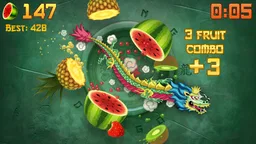
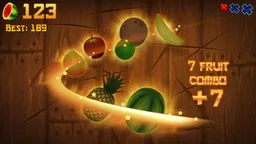
When I want a game that gets going without a long tutorial or a complicated plan, Fruit Ninja® is an easy one to reach for. Its basic pleasure is immediate: swipe through fruit, avoid hazards, and try to keep a good run alive. I find that simple setup works especially well in short gaps—while waiting for a ride, taking a break, or passing a phone around for a quick challenge. It is an arcade game from Halfbrick Studios, and its long-running appeal comes from making one finger feel like enough to get started.
Quick to start, simple to understand
The opening seconds set the pace. Fruit appears, I swipe, and the score gives me a clear reason to try again. There is little mental overhead, which makes the game friendly to newcomers and convenient when I only have a minute or two. That accessibility is a strength, though it also means the core action is easy to understand before it has much room to surprise you.
The controls suit a touchscreen naturally: a swipe is both the action and the skill to refine. I get more out of deliberate, controlled cuts than frantic movements. Broad swipes can catch several pieces, but hurrying can make it harder to judge what I am cutting and what I should avoid. That small tension is what gives a familiar action some bite: speed helps, but accuracy matters.
On a compatible device, the simple visual presentation and direct touch input make it feel like a game designed for quick response rather than elaborate setup. I would still avoid promising identical smoothness on every phone; performance depends on the device and its condition. The useful expectation is modest: this is a lightweight-feeling arcade concept, not a sprawling game that asks for a long session before it becomes enjoyable.
Where the pace becomes demanding
The first few moments are easy to follow, but a longer run asks for better attention. As fruit and hazards compete for the same screen space, I find myself needing to distinguish a safe cut from a risky one quickly. That makes the challenge less about swiping as fast as possible and more about reading the screen without losing composure. A calm, well-placed motion can be more valuable than several rushed ones.
For a practical everyday approach, I treat each attempt as a small focus exercise. I keep my finger movements compact, watch the full play area rather than fixating on one piece, and resist swiping automatically when several objects appear together. Those habits are useful because they make mistakes easier to understand: if I lose a run, I can often tell whether I reacted late or overreached, instead of blaming the controls.
Repeated attempts can make the game feel intense, especially when I am chasing a personal best and keep restarting immediately. That is a real trade-off for a score-focused arcade game: the short rounds are convenient, but they can encourage “one more try” until a quick break becomes longer than planned. I recommend setting a stopping point before starting if I am using it during a work break or between other tasks.
Reliability and the feel of a session
Fruit Ninja is built around a compact loop, so there is little to learn before I can judge whether a session is working for me. I can pick it up, make a few attempts, and put it away without needing to remember a long chain of instructions. That makes it a comfortable option for casual play, including for someone who does not usually spend much time with mobile games.
I would not confuse a simple game with a guarantee that every session will be identical on every device. Apps can behave differently across phones, operating-system versions, and background conditions. If a session feels interrupted or sluggish, closing other demanding apps and reopening the game is a sensible first step; it is a general troubleshooting habit, not a special recovery feature I would promise here. I also find it wise to avoid starting a score attempt when the phone is already busy with downloads or other intensive tasks.
There is a useful distinction between recovering from a bad run and recovering from a technical interruption. A failed attempt is part of the arcade loop: I can simply try again. If the app itself stops responding, the sensible response is to relaunch it and check whether the device has enough breathing room. I would not rely on an unfinished run being preserved after an interruption, so I treat each attempt as disposable rather than as a long session that must be protected.
Choosing a device and a comfortable setup
The game supports Android devices running version 6.0 or later, which gives many older phones a chance to run it. That minimum does not mean every device at that level will feel equally responsive, particularly if storage is tight or several apps are competing for resources. If a phone is aging, I would test a brief session before expecting consistently crisp touch response. The game’s core action depends on timing, so even a small feeling of input delay can matter more here than in a turn-based game.
On a smaller screen, the action remains easy to understand, but my finger can cover part of the play area. I find it helps to swipe with a lighter touch and avoid starting a cut directly over a cluster I have not read yet. On a larger display, there is more room to see what is happening, though it can also take a broader movement to cover the same distance. Neither setup is automatically better; comfort and accurate control matter more than screen size alone.
Fruit Ninja is free to download, with in-app purchases ranging from $0.99 to $179.99 per item. I would approach those purchases deliberately rather than assuming they are necessary to enjoy the basic arcade idea. If you are setting up a device for a child, it is sensible to review purchase controls in the app store or device settings before handing it over. The game is rated Everyone, but an age rating does not remove the need for a parent or guardian to decide what fits their household.
What it offers beside other arcade games
Compared with arcade games built around a long level, a complex character build, or precise platforming, Fruit Ninja is easier to sample and easier to leave. Its appeal is tactile: the swipe itself is the central action. That makes it a better fit when I want something I can understand instantly than when I want a rich story, exploration, or a sense of progress built over a long campaign.
It also differs from endless runners, where a player is usually steering through a route and reacting to obstacles ahead. Here, the screen is a field of opportunities and risks, and the challenge is deciding what to cut. If you enjoy testing reflexes and hand control, that distinction is satisfying. If you prefer to plan moves slowly or dislike losing a run because of one rushed gesture, a puzzle game or a more forgiving arcade alternative may suit you better.
One non-obvious way to get more from it is to use short sessions as a personal consistency test rather than always chasing a higher score. I pay attention to whether my swipes stay controlled when the screen becomes busier. Another useful habit is to stop after a clear mistake, identify what caused it, and begin again with that lesson in mind. This turns repetition into practice instead of an automatic string of retries.
Who should play, and who may want something else
I recommend it to people who want a quick, readable game with touch controls that feel connected to the action. It is especially handy for filling a short wait, letting a friend try a round, or giving a younger player a straightforward arcade activity. Its staying power is also reflected in its broad reach: it has more than 500 million installs, and its average rating is 4.4 from around 5.3 million ratings. Those figures suggest a widely enjoyed game, not a guarantee that its repetitive loop will suit every player.
The game has been available since July 20, 2011, and its current version is 3.97.9. That history helps explain why the basic idea feels familiar: this is a well-established style of mobile arcade play, not an experimental format. Still, anyone choosing it today should judge it by the experience they want now. If you like quick rounds and improving a reflex-based score, it remains easy to recommend; if you need constant novelty, a deep progression system, or a carefully paced narrative, it is not the right pick.
My overall view is that Fruit Ninja succeeds by keeping its promise narrow. It is quick to learn, responsive in concept, and satisfying when I make a clean decision under pressure. Its limitations are equally clear: repeated runs can feel samey, a busy screen can punish impatient swipes, and performance will depend on the phone rather than on the game’s simplicity alone. For a short arcade break, I would happily keep it installed; for a longer, more varied gaming session, I would choose something with a broader set of activities.
My practical recommendation: try a few brief rounds, use measured swipes, and see whether improving your timing feels rewarding rather than repetitive. If it does, the free download makes it an easy game to revisit. If you find yourself swiping on autopilot or resenting a lost attempt, there is no need to force it—the best alternative is a game whose pace and goals fit the way you want to play.
What we like
- Quick swipe controls are easy to learn.
- Short rounds make it convenient for quick play.
- Fruit slicing delivers satisfying visual feedback.
- Multiple modes offer variety beyond classic play.
- It works well as a casual game for all ages.
What could be better
- Frequent ads can interrupt play in the free version.
- Some modes and items may require in-app purchases.
- Fast action can feel repetitive over longer sessions.
- Precision swipes may be tricky on smaller screens.
- Progress can depend on completing repeated challenges.







