
Zepp review
 Analysis by Appsdrops
Choosing a health app is easier when it has a clear purpose, and Zepp’s is right there in its description: it aims to be a personal digital health management platform. That gives the app a more practical identity than a simple step counter. I see its appeal in having a place to engage with personal health information and make everyday activity feel easier to keep in view, rather than treating fitness as a one-off challenge.
A personal hub for digital health
Zepp is a sports and health app built around personal digital health management. That focus matters because health routines are rarely limited to one workout. They are made up of small choices repeated over time, and a digital platform can help make those choices feel connected. The value is less about turning every day into a competition and more about giving users a dedicated place to approach their wellbeing.
In my view, the strongest way to think about Zepp is as a companion for people who want a more organized relationship with their health. Instead of opening an app only when they are ready to exercise, users can approach it as part of a broader routine. That framing can be motivating without demanding an athlete’s schedule: the point is to stay engaged with personal health management in a way that fits ordinary life.
The app has a substantial audience, with more than ten million installs and an average rating of 4.4 from around 1.4 million ratings. Those figures suggest that many people have made it part of their mobile health routine. They do not mean every user will find the same experience, of course, but they do make Zepp a familiar option for anyone comparing sports and health apps.
What the health-platform approach changes
A single-purpose tracker can be useful, but a personal health platform sets a different expectation. It invites users to return regularly and treat health information as something to follow over time. That can make the app feel more relevant between workouts, when there is no immediate goal to chase but the larger habit still matters.
I like this emphasis because it keeps the idea of fitness grounded. A useful health routine does not have to begin with an ambitious training plan. It can begin with paying attention, deciding what matters, and returning to the process. Zepp’s identity as a personal digital health management platform suits that kind of steady engagement better than an app positioned only around short bursts of effort.
It is also a sensible fit for people who prefer having a dedicated digital space for health-related activity. A phone can already be crowded with messages, entertainment, and work tools. Giving wellbeing its own place may help users mentally separate it from the rest of the day. That distinction is modest, but routines often benefit from small cues that make it easier to start.
How it fits into everyday use
In practice, I would approach Zepp as a regular companion rather than something to open once and forget. The platform concept works best when a user returns to it consistently and makes health management part of a normal rhythm. A quick check-in can be more useful over the long term than an occasional deep dive, especially for someone trying to build a habit without making fitness feel like another demanding obligation.
The everyday challenge with any health app is not simply finding one with a polished idea. It is making the app relevant enough to revisit. Zepp’s broad health-management framing gives it room to be useful across different routines: someone may be focused on staying active, while another person may simply want a more deliberate way to engage with personal wellbeing. The shared thread is ongoing attention, not a single type of workout.
I would keep expectations practical. A digital platform can support personal organization and engagement, but it cannot make lifestyle decisions on a user’s behalf. The app is most compelling when treated as a tool that accompanies a routine, not a substitute for one. That distinction keeps the experience realistic and helps prevent the familiar cycle of downloading a health app, expecting instant transformation, and abandoning it when daily life gets busy.
Where the approach works best
Zepp seems particularly well suited to people who want a steady, low-pressure way to keep health on their radar. If you are trying to become more consistent, the platform’s central idea gives you a reason to return even when you are not preparing for a major event. That can be valuable for beginners, casual exercisers, and anyone who wants a digital health companion without making sport the whole story.
It may also suit users who enjoy managing routines through an app. Some people find that a dedicated mobile space makes a goal feel more concrete; others would rather keep health habits offline and uncomplicated. Neither approach is automatically better. The important question is whether returning to a digital platform makes your own routine easier to maintain. If it does, Zepp’s central concept is a natural match.
For someone exploring sports apps, Zepp’s focus offers a broad starting point rather than a narrowly defined identity. It can be considered by people who care about health management as well as exercise, which makes it more approachable than a tool that assumes advanced training ambitions. I appreciate that distinction: plenty of users want to feel more engaged with their wellbeing without needing to think of themselves as serious athletes.
The tradeoffs to keep in mind
The broad platform idea is also where expectations need a little care. “Health management” can mean different things to different people. One user may expect a simple place to support a routine, while another may be looking for a highly specialized coaching experience. Before relying on any app as the center of a personal plan, it helps to consider what role you actually want it to play and whether its approach suits that role.
There is also a personal preference question. Not everyone wants to bring another app into their daily routine, and some people find that constant digital attention makes health feel more complicated rather than less. Zepp is most likely to click with users who enjoy using their phone as a practical organizer. If you prefer a completely analog approach, a digital platform may add friction instead of removing it.
Zepp is free to download, with optional in-app purchases listed from a few cents to just under ninety dollars per item. That makes it accessible to try, while also giving users a reason to pay attention to purchase choices inside the app. I would approach any optional spending deliberately: first decide whether the core experience fits your routine, then consider whether an extra purchase genuinely adds value for you.
Compatibility is another sensible part of the decision. The app supports Android devices running version 7.0 or later, so users should check their device’s software before installing. On iOS, as with any app, it is worth checking the current app-store requirements for the particular device. A good health tool is only useful if it runs comfortably on the phone you already use.
Who is most likely to benefit
I would recommend considering Zepp if you want a health-focused app with a broad, personal-management identity and you are willing to make it part of a routine. It should be especially appealing to people who like having a dedicated digital companion for staying engaged with wellbeing, rather than opening a sports app only for a specific training session.
It may be less compelling for someone who wants one narrowly defined function and has no interest in a wider health-management experience. That is not a flaw so much as a matter of fit. Apps work best when their purpose lines up with the user’s real habits, and Zepp’s purpose is broad enough to appeal to routine-builders but may feel less focused to people who want a single, specialized tool.
The app is rated for everyone, which gives it a general-audience profile, and it has been available since December 2016. Its current Android release is version 10.10.5-play. I mention those details as practical context, not as a reason to install it by themselves. What matters more is whether the platform’s approach feels useful enough that you will return to it.
My overall impression
Zepp makes the most sense as a steady health companion, not a shortcut to better habits. Its defining idea is personal digital health management, and that focus gives the app a clear role for people who want to bring more structure to their relationship with wellbeing. I find that angle more appealing than promises of instant change, because it leaves room for a routine to develop at the user’s pace.
For me, the deciding factor would be whether the app feels natural to revisit. If you enjoy using digital tools to support everyday goals, Zepp is worth exploring as a sports and health platform. If you want a highly specialized experience or prefer to keep health tracking away from your phone, it may not become part of your routine. Either way, the app’s value comes down to the same practical question: does it help you stay engaged with your own health in a way that feels sustainable?
What we like
- Tracks workouts and daily activity across many compatible devices.
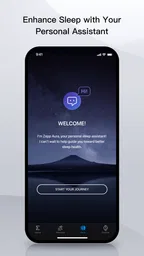
- Sleep insights make overnight patterns easy to review.
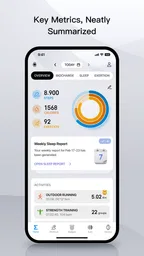
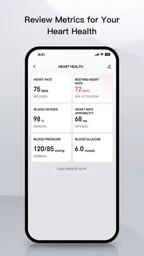
- Health data is presented in clear charts and summaries.
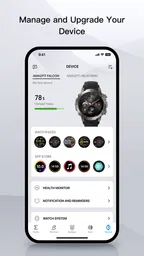
- Customizable watch faces add options for compatible wearables.
- The app can sync notifications and calls to supported devices.
What could be better
- Some features require a compatible Zepp or Amazfit device.
- Background syncing can drain battery on some phones.
- Health readings may vary and should not replace medical advice.
- Certain features require location or other sensitive permissions.
- Data sharing and account settings may take time to review.





