


Wonder: Food Delivery review
 Analysis by Appsdrops
Wonder: Food Delivery is most appealing when you want more than the usual takeout routine: it brings restaurant meals into one delivery-focused app, giving you another way to decide what to eat without bouncing between separate restaurant apps. My overall view is favorable, with an important caveat: Wonder is worth trying if its restaurant selection suits your area, but it should not be treated as a guaranteed replacement for every local delivery option. The value is in having a convenient place to explore and order; the practical limit is that any delivery app is only as useful as the choices available when and where you need it.
Restaurant choice is the main reason to open it
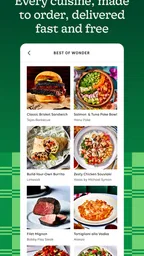
Wonder is a free food and drink app developed by Wonder Group, Inc. Its purpose is straightforward: help you find restaurant food and arrange delivery. That focus makes it easiest to judge by a simple question: does it make choosing dinner feel more convenient than your usual routine? If you already rely on a familiar delivery service, this app is most compelling when it gives you a different restaurant option or makes browsing feel less scattered.
I would approach the app as a place to start a meal decision, rather than assume it has every restaurant I might want. Open it when you are undecided, look through the available choices, and compare the menus that fit your appetite. If you have a specific restaurant in mind, check whether it appears before building your plans around the app. That small habit avoids the frustration of settling on a meal first and discovering that it is not available to order through Wonder.
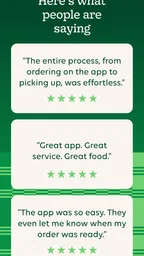
The app has a 4.3 average from around 7,500 ratings, with roughly 1,100 written reviews, and it has passed 500,000 installs. Those figures suggest that plenty of people have tried it, but they do not tell me whether a particular neighborhood has the right selection or whether an individual delivery will meet expectations. I would use them as context, not as a substitute for checking the app’s choices in my own area.
A useful alternative to juggling restaurant apps
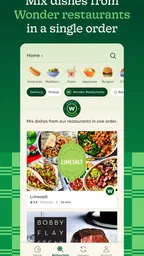
The everyday advantage of a delivery app is not simply that it puts food on a screen. It can make the decision process less tedious: browse, compare, and place an order in one place instead of starting over in a different restaurant’s app each time. Wonder is useful in that role when its restaurant lineup gives you credible choices. I especially like this kind of service for a low-energy evening, when I want to see what is available before committing to a meal.
That does not mean it automatically beats the usual alternatives. Ordering directly from a restaurant can be a better fit if you already know exactly what you want and that restaurant has a straightforward ordering option. A broader delivery marketplace may be more practical if you are trying to compare a large number of familiar places. Wonder’s appeal is narrower and more situational: it earns a place in your routine when its own selection makes the decision easier, not because one app is inherently best for every order.
A practical way to compare is to check the same meal across the options you already use before paying. Look at the menu, the displayed order details, and the delivery terms shown for that order. This is more useful than assuming that a familiar restaurant, a low-looking menu price, or a convenient interface guarantees the best overall choice. Delivery arrangements and availability can vary, so I would make the comparison at the moment I plan to order.
How I would use it on a busy evening
Picture getting home late, with no appetite for grocery shopping and no clear dinner plan. I would open Wonder, browse for a few plausible meals, and narrow the choice by what sounds satisfying rather than scrolling indefinitely. Before placing the order, I would check the selected items and the final details presented on screen. This gives the app a useful job: it helps turn “I don’t know what to eat” into a decision without pretending that delivery removes every bit of planning.
For a shared meal, I would settle on the group’s preferences before building the order. One person may want a lighter option while another is looking for something filling; agreeing on the general direction first makes browsing faster and reduces last-minute changes. I would also review the order carefully before confirming it, especially when several dishes or custom choices are involved. That is a simple but valuable workflow in any delivery app: resolve the group’s decision outside the checkout screen, then use the app to place a clear order.
Wonder can also serve as a backup rather than a daily default. If your usual choice does not offer the kind of meal you want, checking a second service can reveal an alternative without requiring you to abandon your normal routine. I would keep expectations flexible: treat the app as another source of restaurant choices, not a promise that a particular meal will always be available at a particular time.
Where the convenience has limits
The main limitation is the one I would watch most closely: selection is only valuable when it matches your location and appetite. A well-organized browsing experience cannot help much if the restaurants shown are not the ones you want, or if the available menu does not suit the occasion. That is why I would test the app before relying on it for a planned dinner or a time-sensitive meal. Browse early enough to switch to another option if the selection does not work for you.
Delivery itself also adds steps and uncertainty that eating at a restaurant or picking up food can avoid. You have to make choices through a screen, provide the details needed to complete the order, and wait for the meal to arrive. If timing is critical, or if you would rather speak directly with a restaurant about a request, ordering directly or collecting the food may be the more comfortable choice. Wonder is best for convenience, not for situations where you need complete control over every part of the meal.
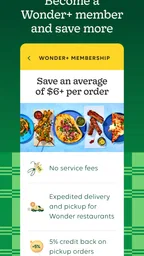
I would not choose a delivery app solely because it is free to download. The useful comparison is the full order you see before confirming, alongside the convenience of the available restaurants. A meal that looks appealing in a menu still needs to make sense for your budget and plans once the order details are clear. For that reason, I recommend pausing at checkout rather than treating the first tempting option as an automatic yes.
There is also a difference between an app being easy to try and it becoming a dependable habit. A few successful browsing sessions may show that Wonder is worth keeping installed, but your own routine is the real test. If you repeatedly find suitable choices, it can be a handy addition. If you often reach the app and then switch elsewhere, it may be better as an occasional backup than as your main way to order.
Who is most likely to appreciate it
I would recommend Wonder to someone who likes discovering restaurant options through a delivery app and wants another place to check before deciding what to eat. It is especially plausible for people who order at home and value a simple browse-and-choose routine. The app is rated for Everyone, so its content rating is not a barrier for general audiences; the more important question is whether its available restaurants fit the user’s location and tastes.
It is also a sensible trial for anyone who feels tired of opening the same service every time. You do not need to make it your sole option to get value from it. Compare it with the services you already use, and keep it if it adds a restaurant or a useful choice that you would otherwise miss. That approach is less likely to disappoint than expecting it to replace every direct restaurant order or every competitor from day one.
On the other hand, I would skip it as a primary solution if your routine depends on one specific restaurant and you prefer ordering directly from that business. I would also look elsewhere when broad selection, a particular delivery arrangement, or direct communication matters more than having another browsing option. For pickup, eating out, or cooking at home, the app is not a substitute for those alternatives; it serves the narrower purpose of helping you order restaurant food for delivery.
Getting started without overcommitting
Because Wonder is free, trying it does not require paying to install the app. It was released on September 16, 2020, and the current version is 6.23.0, with Android support from version 8.0. I would still check compatibility on the device I plan to use, then browse the restaurant choices before counting on the app for a particular meal. The most useful first session is not necessarily an order: it is seeing whether the available choices are relevant to you.
As you browse, pay attention to the meal options you would genuinely order, rather than judging the app by how many items you can scroll past. Save your decision-making energy by checking the dishes that suit your needs, considering whether the order is for one person or a group, and confirming the final details before committing. These small steps make a delivery app more useful and help prevent a convenient browse from turning into a rushed or poorly considered order.
My recommendation is to treat Wonder as a practical extra in your food-ordering toolkit. It can make discovering and ordering restaurant meals easier when its selection lines up with what you want, but it cannot guarantee that match every time. If you enjoy having another place to browse and are comfortable comparing options before checkout, it is worth a try. If you prefer direct restaurant orders or need a very specific choice every time, your existing method may serve you better.
Final verdict: a useful option, not an automatic default
Wonder: Food Delivery has a clear role: help people explore restaurant meals and order delivery from a single app. I like it best as a convenient alternative for undecided evenings, a backup when the usual service falls short, or a way to see whether another restaurant choice fits the moment. Its strongest point is the possibility of making the meal search simpler; its clearest weakness is that convenience depends on the selection available to you.
I would install it, take a few minutes to see what is actually offered in my area, and keep it only if those options earn a place in my routine. That is a more honest recommendation than calling any delivery app essential. Wonder is a free, accessible choice for exploring delivered restaurant food, and a useful addition for the right diner, but direct ordering, another delivery service, pickup, or cooking can be better when those options fit the meal more closely.
What we like
- Browse restaurant menus and prices before placing an order.
- Save delivery details to make future checkouts quicker.
- Track an order as it progresses toward delivery.
- View order history to revisit previous purchases.
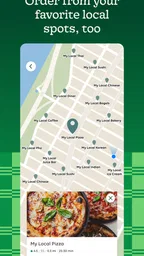
- Discover nearby restaurants through the app.
What could be better
- Restaurant availability can vary by location.
- Delivery fees may increase the final order cost.
- Busy periods can lead to longer delivery times.
- Menu prices and offers may differ between restaurants.
- Order changes may be difficult after checkout.





