Wingstop review
 Analysis by Appsdrops
When a craving for wings hits, the choice is often less about discovering a restaurant and more about getting an order from idea to table without unnecessary fuss. Wingstop is built around that straightforward job: it’s the restaurant’s app for arranging wings for delivery or carryout. I find the appeal easy to understand. Rather than treating the app as a general food guide, it keeps the focus on getting a Wingstop meal ordered and choosing how to receive it.
From craving to order
The starting point is refreshingly specific. This is a food ordering app for people who already have Wingstop in mind, whether they’re planning a meal at home or expect to pick it up. That narrow purpose can be a plus: there’s no need to sift through unrelated restaurants to get to the kind of food you want. The app’s brief promise, wings for delivery or carryout, sets a clear expectation from the outset.
I’d approach the experience as a small chain of decisions: settle on Wingstop, decide whether delivery or carryout suits the moment, work through the ordering process, and then wait for the meal to arrive or be ready to collect. That framing matters because an ordering app isn’t useful just because it puts a menu on a screen. It needs to make the transition between wanting dinner and actually receiving it feel manageable.
Wingstop has been available since November 11, 2011, and the current app version is 2026.10.0. Those details place it as an established restaurant companion rather than a short-lived experiment. Its scale is notable too: it has more than five million installs, with an average rating of 4.8 from around 189,000 ratings. Those numbers suggest that plenty of diners use it, though an individual order still depends on the choices and circumstances involved in that particular visit.
Choosing how the meal gets to you
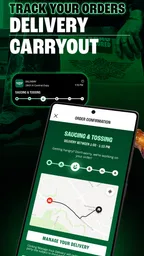
The first practical handoff is deciding between delivery and carryout. It sounds simple, but it shapes the whole evening. Delivery is the natural fit when staying in is the point; carryout makes more sense when picking up the meal works better. Having both options at the center of the app’s purpose gives the ordering task a useful direction instead of leaving the user to guess what the service is meant to handle.
That choice also sets expectations. With delivery, the desired outcome is food brought to you. With carryout, the app is part of a plan that still involves a trip to collect the order. I like that distinction because it encourages users to think about the last stage before they begin: the meal is not complete when the order is submitted, but when it reaches the person who is going to eat it.
From there, the basic workflow is easy to picture without dressing it up. You use the app to arrange a Wingstop order, select the way you want to receive it, and move toward the handoff. The app’s role is to connect the decision to the restaurant’s ordering process. That’s a focused job, and for someone who already knows what they’re after, focus can be more valuable than a long list of extra tools.
The ordering flow in everyday use
For me, the best way to judge a restaurant app is to follow the task in the order a real diner would. First comes the craving: wings sound good, and Wingstop is the chosen stop. Next comes the practical question of delivery or pickup. Then the user works through the order and proceeds toward receiving it. The less mental effort that sequence demands, the more the app feels like a useful shortcut rather than another thing to manage.
Wingstop’s identity helps keep that journey coherent. The app isn’t trying to be a broad marketplace where the user compares dozens of unrelated kitchens. It points toward one restaurant and one kind of meal, which makes the intention clear. If I’ve already decided on Wingstop, opening its dedicated app is a direct route to the task. If I’m still deciding what I want to eat, the experience is naturally less about exploration and more about carrying out a decision I’ve already made.
The distinction between browsing and ordering is important. A restaurant app can be most valuable when it reduces the distance between a familiar favorite and a completed order. It doesn’t have to turn dinner into a complicated project. In this case, the promise is practical: arrange wings for delivery or carryout. I’d regard that as the app’s central strength, especially for repeat customers who want a direct way to get to their meal.
Wingstop is free to download, and its content rating is Everyone. It is listed for devices running Android 7.0 or later. Those details make the basic starting point straightforward for compatible Android users: there’s no app purchase to factor into the decision, and the stated age rating is broad. The important distinction is that a free app is not the same thing as a free meal; the app is the ordering tool, while the food order is a separate part of the experience.
Where the handoffs happen
A smooth restaurant order depends on more than tapping through an app. The process passes from the customer’s intention to the digital order, then to the restaurant, and finally back to the customer through delivery or pickup. Thinking in terms of these handoffs helps explain why even a simple ordering task can feel effortless on one occasion and less convenient on another.
The first handoff is from the user to the app: a person has to turn “I want wings” into an actual order. The second is from the app to the restaurant, where the order becomes something to prepare. The final handoff is the meal reaching its destination, either through delivery or through the customer collecting it. Wingstop’s stated role is to support those delivery and carryout paths, so the experience is ultimately judged by how well the whole chain fits the diner’s plans.
That makes timing and expectations part of the human experience, even when they aren’t the app’s only concern. If I choose carryout, I need to remember that I’m responsible for getting to the restaurant. If I choose delivery, I’m relying on the delivery path to complete the plan. Neither option is automatically better; the useful one is the option that matches the situation. A good ordering routine starts by being honest about what will be convenient later, not just what looks easy at the first screen.
The app also sits inside a larger restaurant relationship. Wingstop Restaurants, Incorporated is the developer, so the product is directly tied to the brand it represents. That connection gives the app a clear purpose: it is not a generic service with a Wingstop label added on, but a dedicated way to engage with Wingstop’s ordering experience. For fans of the restaurant, that directness can make the app feel like the natural place to begin.
What the result feels like
The payoff is simple: the user wants a Wingstop meal without turning the ordering process into a chore. When the steps line up with the plan, the app serves as a bridge between deciding what to eat and having the food in hand. I appreciate that kind of practical usefulness. Not every app needs to entertain, educate, or keep me browsing; sometimes it only needs to help me complete one familiar task with a clear outcome.
That makes Wingstop most appealing to people who already know the restaurant and want a dedicated route for wings delivery or carryout. For them, the app’s focused identity is a feature in itself. It puts the restaurant at the center and keeps the user’s attention on the meal and how to receive it. The app is less compelling as a discovery tool for someone who hasn’t decided what restaurant or food they want, because its purpose is clearly tied to Wingstop.
The response around the app is substantial: it has about 32,000 written reviews in addition to its rating history. I wouldn’t treat popularity as a guarantee that every order will go exactly as planned, but it does show that the app is part of many customers’ routine. The rating and adoption give potential users some context, while the most meaningful test remains whether the app fits their own ordering habits.
For returning customers, convenience often comes from repetition. Once a person knows the restaurant and has a general idea of what they want, the central decision may simply be how the food should reach them. A dedicated app can make that routine feel more direct than starting the whole search from scratch each time. In that sense, Wingstop’s value is not only the order itself; it is the shorter path from a familiar craving to the next step.
Where the flow can feel less seamless
The same focus that helps regular customers can narrow the app’s appeal. If I’m undecided, comparing restaurants, or hoping for a broad catalogue of food choices, a Wingstop-specific app isn’t designed to answer that larger question. It is for people who have already chosen the restaurant or are close to doing so. That’s not a flaw so much as a boundary worth understanding before downloading it.
There is also a real-world friction point between selecting an option and completing the plan. Carryout still requires the customer to make the pickup trip, while delivery depends on the delivery handoff. The app can help organize the order, but the overall convenience is shaped by what the diner needs at that moment. I’d choose the route based on the evening’s logistics, rather than assuming one method will always be smoother.
Another consideration is that the app is only one link in the experience. A clear interface can make placing an order feel easy, but the meal still has to move through the restaurant and reach the customer. That’s why I prefer to evaluate restaurant apps by the whole journey, not simply by how quickly the first decision is made. The useful question is whether the app supports the handoffs well enough for the order to fit naturally into the user’s day.
Its established presence and strong average rating may make the first download feel like a reasonable choice for a Wingstop fan, but I’d still keep expectations grounded. The app’s purpose is specific and practical, not a promise that every circumstance will be friction-free. Users who want a straightforward way to arrange wings for delivery or carryout are the ones most likely to find the proposition appealing.
A practical pick for Wingstop regulars
Overall, Wingstop makes sense as a dedicated ordering companion for people who already enjoy the restaurant and want a direct way to plan their next meal. Its central workflow is easy to grasp: choose the restaurant, decide between delivery and carryout, place an order, and follow through to the handoff. That focused route is the main reason I’d consider installing it.
I’d recommend it most readily to repeat customers who value having a restaurant-specific option on their phone. If the goal is to order Wingstop wings without first searching across a broad selection of restaurants, the app’s purpose is clear and relevant. If the goal is to discover a variety of places or compare entirely different food options, it’s simply not aimed at that kind of outing.
In the end, the app works best when the user’s starting point and desired result already match: a Wingstop craving at one end, wings for delivery or carryout at the other. That complete journey is uncomplicated in concept, and its usefulness comes from helping connect those two moments. For anyone who orders from the restaurant regularly, it’s a sensible tool to have ready when dinner plans call for wings.
What we like
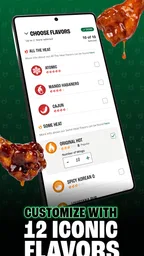
- The menu makes it easy to compare wing flavors and sides.
- Flavor choices range from mild to notably spicy.
- Customizable orders suit different group preferences.
- Pickup ordering can save time at busy locations.
- The app provides a convenient way to reorder favorites.
What could be better
- Menu options and prices can vary by location.
- Delivery fees may increase the total order cost.
- Popular flavors or items may be unavailable at times.
- The app experience can differ between restaurant locations.
- Some orders may take longer during peak hours.





