

Wendy’s review
 Analysis by Appsdrops
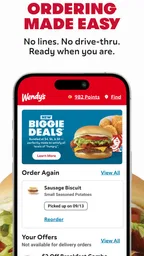
Ordering fast food is usually simple until I am trying to compare a deal, place an order while on the move, and make sure I have picked the right restaurant. Wendy’s brings those tasks into one free Food & Drink app, with ordering and rewards at its center. I see its strongest use as a handy companion for people who already eat at Wendy’s and want to plan a visit before reaching the counter. It is less compelling if you only need a one-off meal or prefer to choose among many restaurants in one place.
How the app fits a Wendy’s visit
Wendy’s is the mobile app from Wendy’s Int’l., LLC, built specifically around the chain rather than as a general delivery marketplace. That focus can make the steps feel more direct: you are looking for Wendy’s food, offers and ordering options, not browsing unrelated restaurants. The trade-off is equally clear. If the nearest Wendy’s does not suit your route or menu preferences, the app cannot solve that problem by offering alternatives from other brands.
The app is free, rated for Everyone, and its 4.7 average across around 717,000 ratings suggests that many users find it useful. It has over 10 million installs, so it is an established option rather than a new experiment. Those numbers are reassuring, but they do not tell me whether a particular location is convenient or whether the app’s ordering flow matches how you like to buy food. I would judge it by how often Wendy’s is already part of your routine.
In practical terms, I would open it before leaving home or during a break, rather than waiting until I am at the restaurant with a queue behind me. That gives me time to look through the available choices and any offers, then decide whether placing an order makes sense. For someone who knows what they want, that can cut down on counter-side decision-making. For someone who enjoys browsing a broad range of restaurants, it is naturally a narrower experience.
Useful when you already have a Wendy’s in mind
The best everyday scenario is a planned stop: I am driving past a familiar Wendy’s, want lunch, and would rather sort out the choice before pulling in. A dedicated chain app can be more focused than a third-party ordering service because the whole experience is organized around one restaurant brand. That does not automatically mean every step will be faster or every option will be available at every location, so I would still check the selected restaurant and review the order before confirming it.
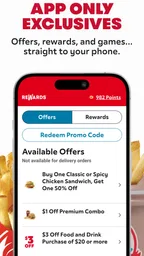
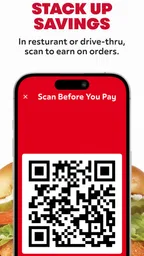
Rewards and exclusive offers are part of the app’s appeal, but I would treat them as a reason to check before ordering, not as a guarantee that every meal will be cheaper. A useful habit is to look at the offers first, then compare them with what you were already planning to buy. That prevents a promotion from nudging you into adding food you did not want. It also helps you decide whether using the app is worthwhile for a small purchase or whether ordering in person is simpler.
What has changed—and what that means now
The current version is 11.63.1, and the app has been available since June 29, 2012. That long history tells me Wendy’s has had years to maintain and revise its mobile ordering experience, while the current version gives users the present-day release to install. I would not infer a particular feature change from the version number alone. What matters to a new user is whether the current app works smoothly on their device and at the restaurant they intend to use.
For existing users, a newer version can mean the experience has continued to be maintained, but it is sensible to approach updates as practical changes rather than assume they will transform the app. After installing or updating, I would check that my usual location is still selected and take a moment to review the order details before sending anything through. These are small checks, but they help avoid the common mismatch of preparing an order for the wrong stop or overlooking a choice during a familiar routine.
The minimum operating system is version 9. That makes compatibility worth checking before downloading, especially on an older phone that may not be able to run a current app comfortably. If the app is available for your device through its app store, the latest release is the sensible place to start; if your phone is below the minimum, relying on the app for an urgent meal plan is unwise. The restaurant’s in-person ordering remains the straightforward fallback.
A more deliberate ordering routine
One useful way to approach a chain-specific app is to separate deciding from collecting. I would browse and build the order while I have a few quiet minutes, then verify the chosen location and the final contents before placing it. This is particularly helpful when ordering for more than one person: it gives me a chance to check each item rather than trying to remember a group’s requests at the counter. It is a workflow tip, not a promise that every location offers the same fulfillment choices.
Another practical trade-off is how to use rewards without letting them drive the whole meal. I would first choose what I actually want, then see whether an offer or reward fits that order. If nothing relevant appears, I can still decide whether the convenience of app ordering is enough to justify using it. This keeps the app useful as a tool rather than turning a deal into a reason to spend more than planned.
When I am in a hurry, I would avoid assuming that tapping through an app removes every source of delay. The restaurant still has to prepare the food, and my visit depends on the selected location and the conditions there. I would leave a little flexibility in my schedule and check the order carefully. If I am already at the counter, the simplest route may be to order with the staff rather than pause to set up or navigate the app.
Where it falls short of broader alternatives
Compared with a multi-restaurant delivery or ordering app, Wendy’s gives up variety in exchange for a more focused relationship with one chain. That is a good trade if Wendy’s is the destination; it is a poor one if I am still deciding what kind of food I want or need to compare nearby restaurants. A general marketplace is better for cross-brand browsing, while this app makes more sense when the restaurant choice is already settled.
There is also a difference between using an app for convenience and using it as the only way to order. I would not recommend depending on a mobile flow if you are uncomfortable entering an order on a phone, if your device is incompatible, or if you simply prefer to clarify choices face to face. The app should make a familiar Wendy’s visit easier, not create pressure to abandon a method that works better for you.
Its narrow focus also means that the value of rewards and offers depends on your own habits. A frequent customer has more reason to check for benefits than someone who visits rarely. If your route seldom passes a Wendy’s, installing a dedicated app may add little; a general food app or an occasional in-person visit may fit better. I would not keep it merely because it has a strong overall rating—its usefulness is personal and location-dependent.
Small checks that make the experience more reliable
Before placing an order, I would confirm the restaurant shown in the app, especially if I am traveling or have more than one Wendy’s within reach. Then I would scan the full order and any offer conditions displayed during the process. This double-check matters more than rushing through familiar screens: a carefully reviewed order is more useful than one submitted quickly with the wrong location or an unintended item.
If I am ordering for a group, I would gather everyone’s choices first and enter them together rather than repeatedly changing the order while people are deciding. That reduces the chance of forgetting a request and makes it easier to judge whether an available offer fits the group’s actual meal. If plans change, I would review the order status in the app and use the options presented there rather than assuming an edit or cancellation is always possible.
For a first visit to the app, I would try a low-pressure order before relying on it during a tight lunch break. That lets me learn where the location selection and offer details appear without feeling rushed. If the flow suits me, I can make it part of my routine. If not, I have lost little by trying a free app and can return to ordering directly at the restaurant.
Who should give it a try
I would recommend Wendy’s to regular customers who like checking chain-specific offers and want to make a meal decision before arriving. It is also a sensible option for someone who has a dependable nearby location and prefers handling a familiar order on a phone. The app’s high average rating and broad adoption make it an easy one to consider, though neither substitutes for checking how well it fits your own device and routine.
I would skip it if you rarely eat at Wendy’s, need to compare several restaurant brands, or would rather order in person. Those are not flaws so much as limits of a focused app. A broader service can be more useful when variety is the priority; the counter can be more convenient when you are already inside and know what you want. The right choice depends on whether the app removes a step you actually find inconvenient.
My verdict and what to watch
Overall, I find the app most convincing as a practical Wendy’s companion: it brings ordering, rewards and offers together for people who already choose the chain. Its long-running presence and current release show an ongoing product, but I would separate that history from expectations about what might arrive next. I would watch for how well future updates preserve a clear ordering flow, keep location checks easy to spot, and make offers understandable before checkout.
My advice is to install it if Wendy’s is a regular stop, check the current version against your phone’s operating system, and test the ordering routine when you are not in a rush. Look at offers only after deciding what you want, verify the selected restaurant, and review the order before submitting. Used that way, it can make a planned visit more convenient without turning a simple meal into a search for a deal. If Wendy’s is only an occasional choice, ordering directly or using a broader food app may suit you better.
What we like
- Mobile ordering lets you skip the counter at participating locations.
- The menu is easy to browse before placing an order.
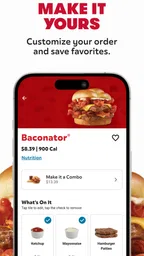
- Order customization helps match meals to personal preferences.
- Rewards offer points on eligible purchases.
- Store details can help locate nearby Wendy’s restaurants.
What could be better
- Mobile ordering availability varies by location.
- Some menu items may be unavailable at busy times.
- Rewards require an account to access.
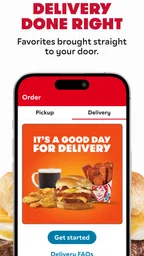
- Delivery may add fees and depend on third-party services.
- App deals and offers can change or expire.





