
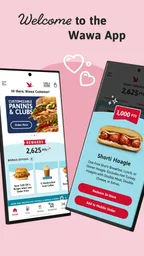

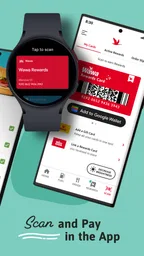
Wawa review
 Analysis by Appsdrops
When I’m deciding whether to install a food-ordering app, I care less about a polished pitch than about whether it saves effort during an ordinary stop. Wawa’s app is free to download and is built around ordering, paying, and earning rewards at Wawa. That makes its appeal straightforward: it can be useful if Wawa is already part of your routine, but it is much less compelling if you rarely visit or want one app for several restaurants.
What the free app is meant to do
Developed by Wawa, Inc, this Food & Drink app puts a digital route to Wawa orders and rewards in your pocket. Its price is free, so trying it does not require an upfront purchase. That is a clear advantage for someone who wants to see whether mobile ordering fits their habits without paying for access first.
Free access is not the same as a guarantee that every order will be cheaper or faster. The practical value depends on whether you have a Wawa nearby, whether its menu suits what you want, and whether placing an order through the app fits the way you shop. I’d treat it as a convenience tool for Wawa customers, not as a general-purpose meal planner or a promise of savings.
The app’s focus is narrow in a useful way. Rather than asking it to compare restaurants or organize meals from different chains, I’d use it when I already know Wawa is where I want to go. The central tasks—ordering, paying, and collecting rewards—are all tied to that choice.
Where the value comes from
The strongest potential benefit is reducing small bits of friction around a familiar purchase. If you know what you want before reaching the store, ordering on your phone can make the trip feel more deliberate. It also gives rewards a place in the same workflow as the order, rather than leaving you to remember a separate step at checkout.
That combination matters most for repeat visits. A single occasional order may not make an app essential, but regular customers have more chances to appreciate a consistent way to place and pay for their Wawa purchases. I would judge the rewards element by whether it naturally fits orders I was going to make anyway, rather than changing my spending just to chase a reward.
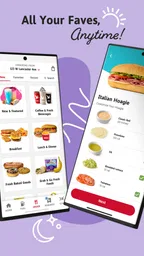
One useful habit is to make the order before you are rushed. If I’m choosing while walking out the door or already standing in a busy shop, I’m more likely to overlook a customization or pick the wrong item. Using the app when I have a moment to review the order can make the phone-based process more valuable than simply tapping through as quickly as possible.
Another practical point is to think of the app as a Wawa-specific shortcut, not an alternative to every way of buying food. For a quick stop where I want to decide in person, the ordinary counter or in-store process may be simpler. For an order I’ve already settled on, the app’s order-and-pay focus is a better match.
A realistic day-to-day use
Imagine I’m heading out in the morning and want to pick up something from Wawa along the way. If I already know what I’m ordering, I can use the app to prepare that purchase and keep the payment and rewards steps connected to it. The useful part is not a dramatic transformation; it is having fewer decisions to make at the last minute.
There is a tradeoff in that scenario. I need to be confident about the order before placing it, and I should check the details rather than assume I can fix a mistake without friction. If I’m still deciding what sounds good, ordering face-to-face gives me more room to change my mind naturally. Mobile ordering is most helpful when the choice is already clear.
I’d also make a quick check of the selected order before completing it, especially when customizing food or buying for someone else. That is a broadly sensible workflow for any ordering app, but it matters here because convenience can encourage people to move quickly. A few seconds spent reviewing the basket can prevent the familiar annoyance of arriving with an order that does not match what you intended.
How it compares with other ways to order
Compared with ordering in person, Wawa’s app can make sense when I want to get the ordering and payment steps out of the way on my phone. In-store ordering is still the more flexible-feeling choice if I’m browsing, asking questions, or changing my mind. Neither approach is automatically better; the right one depends on whether I value preparation or spontaneity on that visit.
Compared with delivery or restaurant-aggregator apps, this is a more focused option: it serves Wawa rather than presenting a broad range of places. That focus can be an advantage if Wawa is exactly where I want to order. It is a limitation if I’m comparing nearby restaurants, trying to combine orders from different businesses, or looking for a single app that covers many dining choices.
It also differs from simply paying at the register because it brings rewards into the same digital routine as ordering and paying. That is appealing to someone who remembers to use the app consistently. If I only visit now and then, or prefer not to manage an account-based routine for a few occasional purchases, the ordinary in-store option may feel more natural.
Limits worth considering before you rely on it
The biggest limitation is its dependence on your relationship with Wawa. A dedicated app has little value if the chain is not convenient for your regular routes or its food is not what you want. It does not replace the need to choose a place that suits your location, schedule, and appetite.
The app also asks you to move part of the purchase process onto your phone. Some people prefer to see the available choices in person, talk through a request, or keep food orders out of their mobile routine. If those preferences describe you, installing it may add a step rather than remove one.
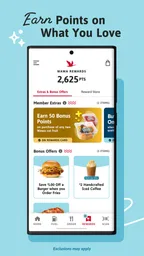
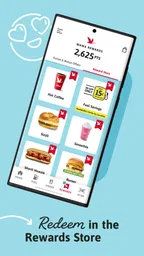
Rewards can be a nice extra, but I would not treat them as the main reason to buy something. The better test is whether the app makes a purchase you already wanted easier to manage. If you find yourself adding items or visiting more often only to pursue rewards, the value calculation has turned around: the program is no longer simply helping with your routine.
There is also a learning curve whenever an app becomes part of a repeated task. On a first visit, I’d take time to understand how the order is assembled and where payment and rewards fit before relying on it during a hurried stop. That small trial run is more useful than discovering the workflow when I’m short on time.
Who is likely to get the most from it?
I’d recommend giving Wawa’s app a try if you already visit Wawa regularly, often know what you want before you arrive, and like keeping ordering and rewards together. It is especially suited to people who value having a prepared option for familiar purchases and are comfortable using a phone to manage them.
It may also suit someone who wants to test mobile ordering without a download fee. The app is free, has an Everyone content rating, and has been available since June 21, 2017. Those details make it approachable to a broad audience, though they do not by themselves tell you whether its ordering style will suit your habits.
I’d be less inclined to recommend it to someone who rarely shops at Wawa, wants a multi-restaurant service, or prefers to make every choice at the counter. It is also not the obvious pick if rewards have little appeal and the phone-based ordering step feels like extra work. In those cases, sticking with in-person ordering—or using a broader service when comparing restaurants—may be the more practical choice.
What its track record suggests
The app has an average rating of 3.6 from around 42,000 ratings, alongside roughly 18,000 written reviews and over 5 million installs. I see that as a reason to approach it with balanced expectations: many people have tried it, but popularity alone cannot tell me whether the current experience will be smooth for every order or every user.
Its current version is 26.3.0, and it requires Android 8.0 or later. For anyone considering an older Android phone, checking that requirement before installing is a practical first step. The app is also available as a free option in its category, but that should be understood as free access—not proof that every purchase offers the best value compared with alternatives.
My verdict for Wawa regulars
Wawa makes the most sense as a convenient companion to an existing Wawa habit. I like the idea of bringing ordering, payment, and rewards into one place, particularly when I know what I want and want to make a familiar stop more organized. Its free price makes trying it a low-commitment decision, while its single-chain focus keeps expectations grounded.
My advice is to start with one ordinary order rather than rebuilding your routine around the app. Check that the order is right, see whether the process genuinely feels easier than paying in person, and decide whether rewards add value without influencing you to spend more. If that workflow suits your regular visits, keep it; if you prefer browsing or seldom choose Wawa, there is little reason to force it.
Overall, I’d recommend it to frequent Wawa customers who appreciate a phone-based way to place and pay for orders. I would skip it if you want a broad restaurant marketplace or if your visits are too infrequent for a dedicated chain app to earn a place on your phone. Its value is not universal, but for the right routine, it offers a practical free option rather than a paid commitment.
What we like
- Find nearby stores and fuel stations through the app.
- Use mobile ordering to skip the in-store checkout line.
- Pay in the app for a quicker pickup experience.
- Browse food and drink options before placing an order.
- Manage Wawa rewards and track available offers.
What could be better
- Mobile ordering may be unavailable at some locations.
- Store hours and services can vary by location.
- Fuel prices and availability may change before arrival.
- Rewards and offers can have terms or expiration dates.
- App features depend on a reliable internet connection.





