
Vibecode - AI App Builder review
 Analysis by Appsdrops
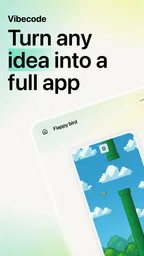
Turning an idea into an app usually means dealing with a long list of unfamiliar decisions before anything useful takes shape. Vibecode presents itself as an AI app builder aimed at shortening that distance: its pitch is simple, create your app in minutes. I see the appeal, especially for someone who wants to explore an app concept without beginning with a traditional development workflow. The important question is how well that promise supports the journey from a first thought to something a person can actually use.
From an idea to a first attempt
Vibecode is a free app from Vibecode in the Libraries & Demo space, and its central idea is easy to grasp: use an AI-focused approach to help make an app. That makes it interesting to curious beginners, people testing a concept, and anyone who wants to see what app creation might feel like before committing to a more involved process. The app has an Everyone content rating, so its general audience is broad.
The starting point is not a finished specification but an intention. Maybe you have a small tool in mind, a service concept, or simply a question about what an app-building process looks like. An AI app builder sounds useful here because it can make the first step feel less intimidating. Instead of treating development as a wall of technical choices, Vibecode frames the experience around creating an app quickly.
That framing is also where I would keep expectations sensible. “Create your app in minutes” is a memorable promise, but speed at the beginning is not the same as a complete, polished product. A first result can help clarify an idea; it does not automatically settle every decision about how an app should behave, who it serves, or what needs improvement. I would approach Vibecode as a way to start exploring, not as a guarantee that one quick session will finish the whole job.
Getting the workflow moving
The natural first move is to arrive with a reasonably clear idea. A broad thought such as “I want an app for my community” leaves a lot open, while a more focused goal gives an AI builder a clearer direction to work with. Thinking about the main purpose, the intended user, and the one problem the app should address can make the creation process more productive. That preparation comes from the user, though; an app builder cannot decide what matters to you unless the goal is clear enough to guide it.
From there, the appeal is the possibility of moving from that idea into an app-creation experience without starting from a conventional coding setup. For a first-time creator, that can make experimentation feel approachable. You can think about the shape of the product and whether the concept makes sense before treating development as a major technical project. That is a useful role for an AI app builder: helping a person get past the blank-page moment and into a concrete attempt.
At this stage, I would focus on whether the result follows the original intention. Does the app concept still serve the problem you had in mind? Is the direction clear enough to explain to another person? These are practical checks, even when the creation process feels fast. A quick first pass is most valuable when it gives you something to evaluate, rather than when you mistake speed for proof that every detail is already right.
The handoff from creator to reviewer
Once an initial app direction exists, the workflow changes. The creator stops being only the person with an idea and becomes the person responsible for judging the outcome. That handoff matters because AI assistance can help move a project forward, but the user still has to decide whether the result is useful. I would take a moment to compare the app’s direction with the original goal and identify what feels clear, what seems off, and what deserves another pass.
This is also where a second person can help. Showing an early concept to a friend, colleague, or intended user can reveal whether the purpose is understandable without a long explanation. A creator may know what they meant to build; someone seeing it for the first time can respond to what is actually communicated. That feedback does not need to be formal. Even a simple conversation can help distinguish a promising starting point from an idea that needs sharper focus.
For a lightweight experiment, this handoff can be the useful outcome in itself. You may learn that the concept is worth pursuing, or discover that it needs to be simplified before spending more time on it. Either way, the app-building attempt gives the idea a more concrete form to discuss. I find that a helpful way to judge a tool like Vibecode: not only by whether it creates something quickly, but by whether it helps you make a better next decision.
What counts as a result
For some users, success will mean reaching a first app concept they can examine. For others, it may mean learning whether an idea is practical enough to develop further. Those are modest but real outcomes, and they fit the product’s quick-creation pitch better than assuming every project will emerge fully finished. A useful first result should give you a clearer view of the app you want, even if it leaves room for more work.
The experience is likely to be most appealing when the project is exploratory and the creator is comfortable learning by trying. If you have never considered app development before, seeing an idea take shape can make the subject feel less abstract. If you already have a detailed product in mind, you may judge the experience more critically, since your expectations will include more than just getting started. In either case, it helps to define what you want from the first session before you begin.
Vibecode has attracted more than ten thousand installs, and its average rating is 3.6 from 892 ratings, alongside 42 written reviews. Those figures suggest that people are trying it, while the rating is a reminder that experiences can vary. I would treat them as context rather than as a substitute for deciding whether this style of app creation suits your own needs. A new user’s priorities, project, and tolerance for experimentation can make a big difference.
Where momentum can slow down
The biggest source of friction in a fast app-building workflow is often the idea itself. If the goal is vague, the process can feel less satisfying because there is no firm standard for judging what comes back. A useful habit is to write down the central purpose in plain language and keep returning to it. That small amount of preparation can make a quick creation experience feel more directed, even without turning the project into a lengthy planning exercise.
Another potential sticking point is the difference between an initial concept and a dependable finished app. People may hear “in minutes” and expect every stage, from idea to ready-to-use product, to happen on that schedule. I would not make that assumption. The promise speaks to speed of creation, while evaluating a result, improving the idea, and deciding what to do next are separate parts of the workflow. Keeping those stages distinct makes it easier to appreciate what the app offers without expecting it to remove every challenge.
There is also a practical consideration around cost. Vibecode is free to download, with in-app purchases priced from $19.99 to $49.99 per item. I would check the purchase details in the app store before deciding to spend, and think about whether the available experience matches the project you want to pursue. That is especially sensible if you are only experimenting or comparing different ways to turn an idea into an app.
Compatibility is worth checking before you install. The current version is 0.0.17, and the minimum operating system requirement is version 9. The app was released on February 27, 2026. Those details give prospective users a quick way to judge whether it fits their device and whether they are looking at the right stage of the product. As with any evolving app, an early version number can also encourage a measured approach: try it with a clear, manageable goal and decide from your own experience.
Who may enjoy trying Vibecode
I can see Vibecode appealing most to people who are curious about app creation but do not want the first step to feel like a major commitment. It is also a reasonable option for someone who wants to explore a product idea and see whether the basic direction is understandable. The AI app builder framing gives the experience a clear purpose, while the free entry point lowers the barrier to trying it. That combination makes it easy to consider as an exploratory tool.
It may be less compelling for someone who expects a short session to handle every part of product development. A creator with strict requirements or a highly detailed plan should approach the experience with patience and evaluate each result carefully. The better the original idea is defined, the easier it will be to judge whether the app is helping. In that sense, Vibecode does not remove the need for thought; it gives that thought a place to begin.
For a Libraries & Demo app, the best way to assess it is to treat the first attempt as a learning step. Start with one focused idea, pay attention to whether the resulting direction makes sense, and decide what you would change before treating it as a finished solution. That keeps the experience grounded and gives the creation process a practical purpose beyond novelty.
A measured verdict
My overall impression is that Vibecode is most promising as a quick starting point for app ideas. Its central appeal is straightforward: make the leap from thinking about an app to trying to create one feel more accessible. For a beginner or an experimental creator, that can be enough to make the first attempt worthwhile. The value is in turning a loose concept into something you can consider, discuss, and potentially refine.
Vibecode is not a reason to skip planning or assume that a rapid first result is a finished product. The most satisfying workflow is to bring a clear goal, review what comes out, and make a deliberate decision about the next step. With an average rating of 3.6 and a free download option, it is a plausible app to explore if AI-assisted app creation interests you. I would try it with realistic expectations: use the quick start to test an idea, then judge the experience by how much clearer that idea feels afterward.
What we like
- Turns written prompts into working app prototypes.
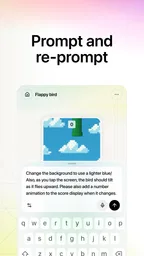
- Lets users refine projects through conversational instructions.
- Offers a convenient way to experiment without coding experience.
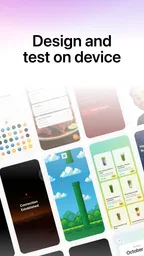
- Combines app creation and previewing in one mobile workflow.
- Can help speed up early-stage product ideas.
What could be better
- AI-generated results may need careful testing before release.
- Complex requirements can take multiple rounds of prompting.
- Fine-grained design control may be limited compared with manual tools.
- Generated apps may require troubleshooting to work as intended.
- Some features or usage limits may depend on a paid plan.





