

Expo Go review
 Analysis by Appsdrops
I would give Expo Go a place on my phone when I’m actively building or testing a JavaScript app, not because it is a general-purpose app I expect to open every day. Its appeal becomes clear quickly: it provides a way to run a project on a mobile device without first turning that phone into a full development workstation. That can make an early prototype feel tangible, and it gives a developer a convenient way to check how an app behaves away from a desktop screen.
That narrower purpose is important. Expo Go is a companion for development and experimentation, not a finished app for everyday entertainment or productivity. If you are curious about React Native projects, learning how mobile interfaces feel in practice, or checking your own work on a real device, it can be useful. If you simply want an app that keeps offering new things to do after the first few sessions, this is unlikely to earn that kind of lasting attention.
Useful from the first project, if you know what you’re opening
The first-week appeal is the short path between an idea and seeing it on a phone. The app is connected to the Expo ecosystem, a platform for building apps with JavaScript and React, and it is developed by Expo Project. In practical terms, it is most relevant when you already have a project or are following a learning exercise that uses Expo. It is not a visual app builder that turns a rough idea into a complete product on its own.
For a beginner, that distinction can prevent frustration. Installing Expo Go does not replace learning how a project is created, nor does it remove the need for the tools and setup used to develop one. Think of it as the device-side part of a workflow: the code and project still need to come from somewhere, and the app is valuable when that project is ready to run. Someone looking for a no-code way to make an app should choose a different kind of tool.
Once a project is available, using a real phone changes the quality of feedback. A layout that looks sensible in a desktop preview may feel cramped when held in one hand; text that seems readable on a large screen may need a second look at phone size. Testing on the device you actually carry also makes ordinary interactions easier to judge than staring at a browser preview. I find that kind of quick reality check more valuable than the novelty of seeing a prototype appear for the first time.
A practical loop for learning and review
A realistic use case is a student working through a small React project after class. They can make a change on the computer, open the project on a phone, and inspect whether the screen still makes sense in the setting where it would be used. The useful habit is to test one question at a time: does the content fit, is the main action easy to notice, and does the screen remain understandable when held at normal viewing distance? That focused loop produces better feedback than repeatedly opening the app without a specific thing to check.
It can also help a small team discuss a prototype. Instead of debating how a mobile screen might feel, a designer or developer can look at the experience on a handset and talk about the same concrete details. Expo Go is especially appealing when the project is already built around Expo; it is less compelling if a team’s existing workflow is based on another framework or a different preview process. Compatibility with the project matters more than the app’s general reputation.
The app is free, and its Everyone age rating makes it accessible from the store’s perspective, but those points should not be mistaken for a promise that it suits every phone user. The task it serves is technical, and the audience that gets the most from it is people building, studying, or evaluating mobile software. Its current version is 58.0.5, and the minimum operating-system requirement is 7.0, which gives prospective users a straightforward compatibility check before they plan a workflow around it.
Why the value depends on your routine
After the first project, Expo Go’s value is less about discovery and more about whether it becomes part of a repeatable development routine. If you make changes regularly, a convenient on-device check can become a small but useful step before showing work to someone else. You do not need to treat every edit as a full review. A sensible pattern is to use it when a change affects the visible interface or the way a screen is used, then save broader checks for milestones where the project’s overall flow matters.
One non-obvious benefit of that approach is that it can catch design assumptions early, before a polished demo makes people reluctant to revisit basic choices. A rough screen tested on a phone invites practical questions: is the important information immediately visible, does the layout feel natural, and is the primary action obvious without explanation? These are not questions the app answers for you. The advantage is having a convenient place to ask them while the work is still changing.
For occasional learners, the recurring value may be more modest. You might use Expo Go intensely during a course or a weekend experiment, then leave it untouched until the next project. That is not necessarily a flaw. This is a specialist utility, so usefulness can arrive in bursts rather than as a daily habit. I would judge it by whether it removes friction when you need to inspect an Expo project, not by how often its icon appears in your routine.
The store’s audience figures suggest that it has found a substantial user base: Expo Go has more than five million installs, an average rating of 4.3 from around thirty-two thousand ratings, and nearly five hundred written reviews. Those figures can offer a little reassurance that it is not an obscure experiment, but they do not tell you whether it fits your particular project. The more useful question is whether your development setup is already based on Expo and whether testing on a phone is part of your work.
Keeping the workflow manageable
The maintenance burden on the phone is relatively easy to understand: this is not an app that asks you to build a personal library of content or return to manage a growing collection. Its relevance follows the projects you work on. The more important maintenance is on the development side. You need an Expo-based project and a working process for making that project available to the app. If you are new to coding, the surrounding setup may feel like the difficult part, rather than the mobile app itself.
A useful tip is to decide what you want to learn before opening a project on the device. For example, if you are checking a navigation change, follow the same route a first-time user would take instead of jumping straight to the screen you edited. If you are reviewing a layout, look at the whole screen before focusing on a single button. This helps keep the phone test grounded in real use rather than turning it into a quick visual glance.
Another practical trade-off is that a project running through a development-oriented companion is not automatically the same thing as a finished, independently distributed app. If your goal is to evaluate the final product as an ordinary customer would receive it, you may need a release-oriented build and a different testing process. Expo Go is useful during development, but it should not be treated as the only proof that a project is ready to ship. That distinction matters most when a prototype is becoming a real product.
Compared with the usual alternatives, Expo Go’s strength is its fit with Expo projects and its emphasis on trying work on a phone. A browser preview can be convenient for rapid layout work, while an emulator or a more platform-specific testing route may be preferable when you need a different kind of development check. Those options are not interchangeable in every workflow. I would choose Expo Go when the project and learning materials are already built around it, rather than switching tools just because one sounds simpler in isolation.
Where fatigue can set in
The main source of fatigue is repetition without a clear purpose. Opening the same project over and over just to confirm that it is still there adds little. The app becomes much more worthwhile when each visit checks a meaningful change or helps answer a question about how a screen works on a handset. That is why I would not recommend keeping it as a novelty app after a first demo; the initial excitement fades, and the practical reason to return needs to come from a project.
There is also a learning curve around expectations. People who are not already comfortable with JavaScript, React, or app-development concepts may install it and then wonder what to do next. That reaction does not mean the app is broken; it means the tool sits inside a broader workflow. If you want to explore mobile development, it can be a useful companion while you learn. If you want a self-contained experience with tutorials, templates, and guided creation all in one place, a dedicated learning or no-code product may be a better starting point.
Another limitation is that Expo Go is most valuable within its intended ecosystem. A developer who relies on a different framework, needs a workflow centered on native platform tools, or is testing a release candidate may be better served by the tools already suited to that job. I would not make it the default answer for every mobile project. The right choice depends on what the project uses and what kind of test you are trying to perform.
Who should keep it installed
I would keep Expo Go installed if I were actively learning React-based mobile development, building an Expo project, or regularly showing early work on a real device. It can also make sense for a designer or collaborator who needs to inspect a prototype without turning every conversation into a discussion of screenshots. Its best recurring value is practical and specific: it helps connect code on a computer with the experience of holding a mobile interface.
I would skip it if I had no interest in building or reviewing apps, if I expected it to generate a finished app without a development setup, or if my projects did not use the Expo workflow. In those situations, installation is likely to produce a brief moment of curiosity followed by an unused icon. There is no shame in that; a focused development companion is not meant to be useful to everyone.
Expo Go was released on December 8, 2015, and its continued place in the app catalog makes sense because its purpose is clear rather than broad. I see it as a practical bridge for the moments when a developer needs to experience an Expo project on a phone. It does not remove the work of building an app, and it is not a substitute for every stage of testing, but it can make early feedback more immediate.
My long-term verdict is that Expo Go earns space when it supports a real development habit. If you are learning or maintaining an Expo project, it can remain useful well beyond the first demo because the need to check real-device behavior returns with new changes. If you are only curious about the name or want a general-purpose app, the novelty will probably wear off quickly. I would recommend it to someone already taking their first steps with Expo, while being honest that its lasting value comes from the projects they bring to it.
What we like
- Preview React Native projects on a device without a custom build.
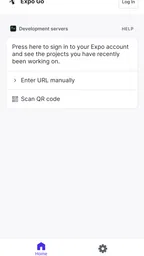
- Scan a QR code to open a project shared by its developer.
- Supports testing on both Android and iOS devices.
- Hot reloading speeds up many development changes.
- Free access makes it useful for learning and prototyping.
What could be better
- Some native modules require a custom development build.
- App behavior can differ from a standalone production release.
- A reliable network is usually needed to load projects.
- Expo Go is mainly useful for development rather than daily use.
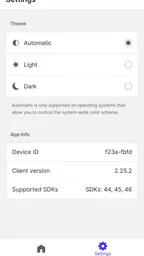
- Projects may fail to open when they use unsupported SDK versions.





