

Cardboard review
 Analysis by Appsdrops
Cardboard is best understood as a doorway into phone-based virtual reality, not as a headset or a complete collection of experiences by itself. I find it appealing when I want to try a simple VR scene without committing to a dedicated system, but its success depends on more than opening an app: the phone, headset, and viewing setup all have to cooperate. That makes it an interesting little utility and, at times, a slightly fussy one.
Made by Google LLC, this free app sits in the libraries-and-demos corner of the app world. It has a 3.2 average from around 163,000 ratings, with roughly 5,100 written reviews and more than 10 million installs. Those numbers suggest a widely tried experience that does not work equally well for everyone. It is rated for Everyone, and the current version is 4.0.1.
Where the first attempt can go wrong
The most common source of disappointment is expecting the app alone to create a convincing VR setup. Cardboard is meant to be used with a compatible phone-viewing arrangement, so a phone held at the wrong distance or not seated squarely can make the image uncomfortable or hard to focus. If the display looks doubled, blurred, or uneven, I would check the physical alignment before assuming the app has failed.
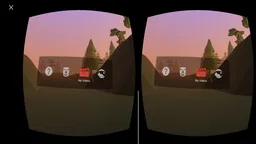
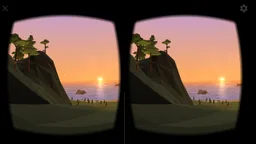
It also helps to separate “the app opened” from “the experience is working properly.” A scene may appear, yet head movement or the split view may not feel right if the phone is tilted, the viewer is assembled poorly, or the handset is not positioned as intended. I recommend starting seated, adjusting the phone and viewer carefully, and only then deciding whether the experience itself is the problem.
There is a practical comfort issue, too. Phone-based VR puts a screen close to your eyes, and not everyone finds that pleasant for long. I would begin with a short session rather than planning to spend an evening in it. If you feel eye strain, dizziness, or discomfort, stop and take the headset off; persistence is not a useful troubleshooting technique.
The key is to treat the phone and viewer as part of the setup, not as accessories that cannot affect the result. That simple change in expectation can save time and make it easier to identify what is actually going wrong.
Check the basics before blaming the software
Before opening a VR experience, make sure the phone is supported by the version you are installing. Cardboard’s minimum operating-system requirement is Android 10, so an older Android device can be a dead end even if the app appears in a search. On iOS, check the app store’s compatibility details for the particular device rather than assuming that every phone can run the same setup.
Next, inspect the viewer itself. The phone should sit securely and centrally, with the screen facing the lenses and the viewer held in its intended orientation. If the image appears lopsided, remove the phone and reseat it instead of trying to compensate by twisting your head. A small physical misalignment can be mistaken for a software fault.
For a cleaner first test, close distracting apps, set the phone’s brightness to a comfortable level, and begin with a basic experience rather than juggling several tasks. These are sensible general checks, not guarantees: phones differ, and a particular viewer or experience may behave differently. If the display remains uncomfortable, stop and reassess rather than repeatedly restarting.
One useful habit is to test the same phone and viewer in a familiar, controlled setting before taking them somewhere else. That gives you a baseline. If everything looks acceptable at home but becomes hard to use in a bright room or while moving around, the surroundings may be contributing to the problem. VR is much easier to assess when you are stationary and can make one adjustment at a time.
Recover your session without making it harder
If the app seems stuck, I would first exit the current view and reopen it once, then check whether the phone is still positioned correctly. Avoid changing several things at once; otherwise, you will not know whether the fix came from reseating the phone, restarting the app, or simply getting a better view. A small, deliberate troubleshooting sequence is more useful than repeatedly tapping around inside an unfamiliar scene.
If a view is distorted, compare what happens after reseating the phone with what happens after reopening the app. If the image improves after reseating, the cause was likely physical alignment. If the same issue persists across attempts, check that the phone meets the operating-system requirement and that the particular experience is compatible with your device. The app is a starting point for VR, but it cannot make every phone-and-viewer combination behave identically.
For a casual demonstration, I suggest preparing the viewer before inviting someone else to try it. Set up the phone, check the image, and choose a short experience first. That avoids handing a guest a device that needs several minutes of adjustment. It is also a considerate way to introduce VR to someone who may not know what the split image is supposed to look like or how to hold the viewer.
When you are interrupted, remove the phone carefully and leave the viewer in a stable place rather than trying to manage the handset while it is still inside. That is a small workflow improvement, but it reduces the chance of dropping the phone or losing your place during a demo. I would also make sure the person using it knows they can stop immediately if the experience feels uncomfortable.
When the app is not the real problem
Not every failed VR session points to Cardboard. A phone that is too old for the required system version, a viewer that does not hold it securely, or an experience that does not suit the device can all produce a disappointing result. If the app launches but the image remains hard to view after careful alignment, it is worth checking those parts of the setup before concluding that reinstalling the app will help.
Expectations matter as much as compatibility. Cardboard is a lightweight way to explore phone-based VR, not a substitute for a dedicated headset with its own controls and carefully integrated hardware. If you want a polished, hands-free system for frequent use, a purpose-built headset is likely a better fit. If you mainly want to understand what VR feels like or show someone a short immersive scene, the lower-commitment phone approach makes more sense.
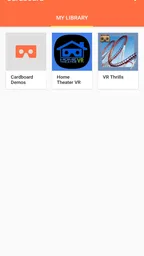
It also differs from ordinary library or demo apps that mainly present information on a flat screen. Here, the value is in using a phone as part of a viewing arrangement. That makes it more hands-on than simply browsing a catalogue, but it also creates more setup friction. People who want to tap once and immediately get a consistent result may prefer a conventional video or demo app on the phone screen.
For families, the Everyone age rating makes it broadly approachable, but I would still supervise young users and keep sessions brief. The rating does not remove the need to check comfort, secure the phone, and make sure the viewer is being used sensibly. For anyone who gets motion discomfort easily, a regular screen-based alternative is the safer and more comfortable choice.
Who will get the most from it
I would recommend Cardboard to curious first-timers, educators or presenters who want a simple VR demonstration, and people who already have a suitable viewer and phone. It can turn a short break into a small exploration, or help a friend understand the basic appeal of immersive viewing without needing to buy into a larger system. Its free price makes experimenting easier, although the viewer and compatible phone remain important parts of the experience.
A realistic use case is a quiet weekend afternoon: I would check that the phone meets the system requirement, seat it properly, and let a friend try a short scene while seated. If the image is uncomfortable, I would stop and adjust the setup rather than insist that the app is working fine. That kind of low-pressure test is where Cardboard makes the most sense: a brief introduction, not an all-day entertainment plan.
It is less suitable for someone who has no compatible viewer, expects a large library to be organized like a streaming service, or wants the convenience of a dedicated headset. The app’s role is narrower than those expectations. Its strength is giving a phone a path into VR; its weakness is that the quality of the experience rests on several pieces fitting together.
A practical verdict on the experience
Cardboard remains an approachable experiment rather than a universal VR solution. Google released it on June 25, 2014, and version 4.0.1 keeps its identity focused on smartphone-based virtual reality. I like the idea because it lowers the barrier to trying an immersive view, but the modest average rating is a reminder that ease of use and compatibility can be uneven in real life.
My advice is to install it if you have a suitable phone and a viewer, and approach the first session as a setup test. Confirm the system requirement, align the handset carefully, start seated, and keep the first viewing short. If those checks do not make the experience comfortable, switch to a regular screen-based option or consider a more integrated VR system instead of spending time fighting the same setup.
For someone who wants a quick, free way to sample phone VR, Cardboard is worth trying with realistic expectations. It is not the smoothest choice for people who value instant, dependable setup, but it can still be a useful demonstration tool when the phone and viewer are a good match. I would think of it as a small invitation to explore VR, with the understanding that the hardware around the app matters just as much as the app itself.
What we like
- Turns a compatible phone into an affordable virtual reality viewer.
- Works with many VR apps and experiences from Google Play.
- Simple viewer setup makes it approachable for first-time VR users.
- Supports stereoscopic viewing for an immersive 3D effect.
- Its compact design is easy to store and carry.
What could be better
- Requires a phone with a gyroscope for many VR experiences.
- Long sessions may cause eye strain or motion discomfort.
- Cardboard viewers vary in fit and build quality.
- Some experiences may not work well on older phones.
- A controller may be needed for easier interaction in some apps.





