
Ventra review
 Analysis by Appsdrops
I think of Ventra as a practical transit companion rather than an all-purpose map. It is made by the Chicago Transit Authority and focuses on the decisions that matter when traveling around the region: managing fares, buying Metra tickets, and checking arrivals. That narrow purpose is useful, but it also sets expectations. If you want detailed route discovery across every mode of travel, a general navigation app may still be the better place to start.
Where Ventra earns a place on a Chicago trip
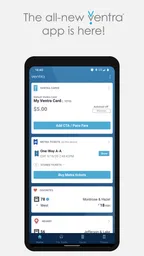
Ventra is a free Maps & Navigation app for riders using CTA, Metra, and Pace. I find its appeal clearest when a trip involves more than looking at a line on a map. Checking when a vehicle is due, keeping fare-related tasks close at hand, and handling a Metra ticket are different parts of the same journey; having them in one transit-focused app can reduce the need to jump between tools.
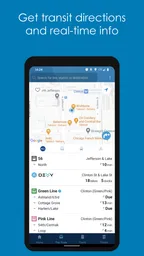
Picture leaving work and deciding whether to take a CTA train or wait for a bus. Arrival information can help turn that into a more grounded choice than guessing from a timetable. On another day, a Metra ride may require buying a ticket before boarding. Ventra is aimed at exactly these practical moments, rather than at car directions, restaurant searches, or broad travel planning.
Its focus on Chicago-area services is both its strength and its boundary. A visitor who already knows which system they need can use it as a useful transit utility. Someone unfamiliar with the region may first want a general map for figuring out destinations and possible routes, then rely on Ventra for transit-specific tasks. I would not treat it as a replacement for every navigation app on a phone.
For routine local trips, its value is in bringing fare tasks and arrival checks into one transit setting. That is a different job from showing the fastest route by every possible mode. Keeping that distinction in mind makes it easier to judge whether Ventra belongs in your travel routine.
Trust starts with a clear purpose
For a transit app, trust is not only about whether a screen looks polished. It is also about understanding why you are opening it: checking an arrival, dealing with a fare, or buying a rail ticket. Ventra’s stated role is concrete, and that clarity helps me decide when it is relevant without treating it as a general-purpose travel assistant.
The app is rated for Everyone, and its listed release date is November 18, 2015. It has a 3.2 average from around 6,700 ratings, alongside roughly 3,800 written reviews. Those figures suggest that experiences vary, so I would approach it as a useful tool to test against my own commute rather than assume every rider will find it equally smooth.
Ventra has more than a million installs, which shows that it is used by a substantial number of people, but popularity alone does not answer whether it fits a particular rider’s needs. I would weigh its specific transit functions more heavily: if you use CTA, Metra, or Pace, those are directly relevant; if your travel is mostly outside those systems, the app is unlikely to add much.
What the app can—and cannot—settle
The most useful distinction is between checking transit information and planning an unfamiliar journey from scratch. Arrival details are helpful when you already know the stop or service you intend to use. They can help with timing, but I would still leave room for the ordinary uncertainty of public transport and avoid planning a tight connection around a single expected arrival.
For a first-time visitor, a broader map can be easier for comparing routes, walking segments, and destinations in one view. Ventra makes more sense once the relevant CTA, Metra, or Pace service is in the picture and you need to handle a transit task. I see the two kinds of app as complements: one helps explore the city, while this one is centered on the region’s transit use.
A helpful habit is to check the arrival before leaving a building or finishing a walk to the stop, rather than only after reaching the platform. That gives you a chance to adjust your timing if the wait is longer than expected. It is a small workflow change, but it makes an arrival screen more useful than treating it as a guarantee.
Fare tasks and the moments that deserve care
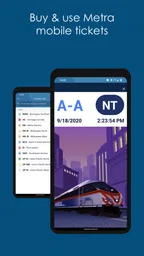
Buying a Metra ticket is the kind of action I would handle deliberately. Before completing a purchase, I would confirm that I have selected the intended ticket for the trip I am about to take. That simple pause matters more than tapping quickly through a screen, especially when I am distracted, in a hurry, or preparing for a ride with someone else.
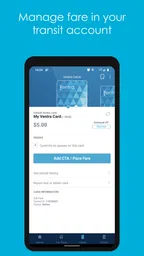
Fare management also calls for a little planning. If you expect to use the app while traveling, it is sensible to open it before you are rushing to board, check that you can reach the task you need, and avoid leaving a purchase until the last possible moment. I would not assume every fare-related action is interchangeable across CTA, Metra, and Pace; the app covers these services, but a rider should pay attention to which system and task a screen concerns.
That is where the app’s transit focus can be helpful: fare actions and arrival checks are part of the same general travel routine. At the same time, anything involving a ticket or payment deserves more care than a quick glance at an arrival. I would verify the details displayed during the transaction rather than rely on memory of what I selected earlier.
Questions about account security, payment handling, or what information the app collects are reasonable, particularly in a travel app that supports fare tasks. I would look for the app’s own account and privacy controls and review the choices presented there before adding or using sensitive details. I would not assume a particular permission or privacy setting exists without seeing it in the app; the practical advice is to make decisions from the controls actually shown on your device.
Keeping control of your own routine
Ventra is most useful when you choose a specific job for it. I would use it to check an arrival, manage relevant fare tasks, or buy a Metra ticket, then use another tool if I need a broader view of city streets or want to compare transit with walking and driving. This division keeps expectations realistic and avoids asking one app to be the answer to every travel question.
If you are new to Chicago transit, begin with a known trip rather than trying to learn the whole system through one app session. Identify the service you expect to use, check the relevant arrival or fare task, and then confirm the details before acting. Once that routine feels familiar, it becomes easier to tell when Ventra is the right tool and when a general map offers a clearer overview.
There is also a sensible case for limiting what you do in a rush. If a ticket purchase screen is unclear or the trip details do not look right, stop and review them instead of tapping through just to save a few seconds. The app’s purpose is to support a journey, not to remove the rider’s responsibility to check important choices. A calm, repeatable process is especially useful when traveling with a tight schedule.
The current version is 2.2.17, and the minimum operating system listed is 7.0. If you are deciding whether to install it, those compatibility details are worth checking against your phone before relying on the app for an upcoming trip. I would also try the functions I expect to use before the day I need them, so that a first encounter with the interface does not happen at a busy stop.
Who should choose it, and who should pass
I would recommend Ventra to someone who regularly rides CTA, Metra, or Pace and wants a dedicated place for arrivals and fare-related tasks. It is especially relevant if Metra ticket purchases are part of your routine, or if you prefer to check transit information in an app built around the local systems rather than start with a general map every time.
I would be less enthusiastic about it as the only travel app for a visitor who has not yet worked out where to go or which service to take. A broad navigation tool may do a better job of exploring unfamiliar neighborhoods and comparing different ways to reach a destination. Likewise, anyone whose regular travel does not involve the covered Chicago-area services has little reason to make Ventra a daily habit.
The rating is a modest 3.2 average, so I would not ignore the possibility of friction. My practical approach would be to install it, try the arrival and fare functions relevant to my own trips, and judge whether the experience is dependable enough for my routine. Since the app is free, that trial does not require a purchase, though the app itself is only useful if its local transit focus matches your needs.
A cautious recommendation for local riders
My overall view is positive but specific: Ventra is worth considering as a Chicago transit tool, not as a universal navigation solution. Its combination of arrival checks, fare management, and Metra ticket purchasing addresses real steps in a local journey. The strongest reason to keep it is that those tasks are relevant to your trips often enough to justify having them close at hand.
I would pair it with a general map when planning unfamiliar routes and use care whenever handling a ticket or other sensitive account task. I would also check the app’s visible controls directly instead of assuming anything about permissions or data practices. Those habits make the app easier to use thoughtfully without overstating what it can do.
In short, Ventra is a sensible companion for riders already using CTA, Metra, or Pace, particularly when they want transit arrivals and fare tasks together. It is not the tool I would choose to explore every travel option across a new city, and the middling user rating is a reason to test it for yourself rather than take its convenience for granted. For the right local commute, though, its focused role can make everyday transit easier to manage.
What we like
- Mobile tickets make boarding faster on supported routes.
- The app stores tickets for easy access while traveling.
- Trip planning helps compare transit options and schedules.
- Fare balances can be checked without visiting a station.
- Service alerts help travelers stay informed about disruptions.
What could be better
- Some features require a Ventra account.
- Mobile ticket availability varies by route.
- Ticket activation may require an internet connection.
- Payment card acceptance can depend on the device.
- Transit schedules may change without much notice.





