
Trucker Path: Truck GPS & Fuel review
 Analysis by Appsdrops
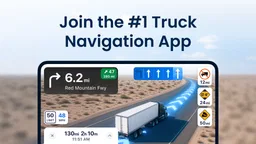
When I’m driving a truck, a route is only useful if it makes sense for the vehicle I’m actually in. That is the practical idea behind Trucker Path: it is a free Maps & Navigation app from Trucker Path, designed around the decisions truck drivers face on the road, including finding parking, fuel, and weight stations. I find that focus more useful than expecting a general-purpose map to answer every trucking question.
The distinction matters most when a journey is going smoothly and I need to keep it that way. A car-oriented navigation app may guide me toward a destination, but truck driving also involves planning around stops and weighing whether a route is workable for a large vehicle. This app’s value is in bringing those concerns into the same driving-focused experience, rather than treating them as afterthoughts.
Why truck-focused navigation changes the route
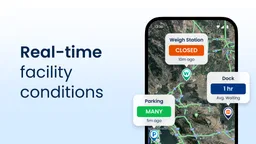
Trucker Path’s central strength is its truck-specific approach to navigation. Its store summary points to safe GPS navigation alongside maps for parking, fuel, diesel, and weight stations. That combination signals a different kind of route planning from simply entering an address and following turn-by-turn directions: I can think about where the trip will need to pause as well as where it should end.
For me, that is the most important distinction to understand before installing it. A truck driver’s route is not just a line between two places. A practical plan has to account for fuel and rest opportunities, and the prospect of a suitable place to park can influence when to stop and how to approach the next leg. A tool that keeps those concerns in view can reduce the mental juggling that comes with switching between navigation and separate searches.
The app has earned a 4.7 average across around 78,000 ratings, and it has passed five million installs. Those figures suggest that many drivers have found a reason to keep it in their toolkit, but they do not mean every route or driver will have the same experience. I would treat it as a specialized navigation companion, not as a promise that every stop or route choice will fit every truck and schedule.
Turning a destination into a workable trip
In practice, I would begin by thinking about the journey as a sequence: where I am going, what I need along the way, and which stop should come before the next stretch of driving. The app’s emphasis on parking, fuel, diesel, and weight stations supports that broader planning mindset. Instead of planning only around the destination, I can consider the infrastructure that makes the drive manageable.
A useful habit is to look ahead before a stop becomes urgent. If I wait until the fuel gauge or the clock forces a decision, I have less room to compare options. Checking the route and relevant truck-oriented destinations earlier gives me a chance to build a more deliberate plan. That is not a special feature claim; it is a better way to use any navigation tool that surfaces the places a truck driver may need.
Another practical point is to use the map as a planning aid rather than treating it as the final authority. A location appearing on a map does not automatically settle whether it suits a particular vehicle, timing, or personal preference. I would use the app to identify possibilities, then apply judgment before committing to a stop. That small distinction can prevent overconfidence in any digital map.
Truck drivers also benefit from separating route decisions from stop decisions. A route may look attractive on screen, while the available places to refuel or park along it may make another plan more comfortable. Looking at those needs together is where a truck-specific app can help; it makes the route feel less like a rigid instruction and more like a plan that can be adjusted around real driving priorities.
A realistic use case: planning before the day gets busy
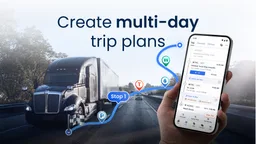
Imagine setting out on a long working day with a destination that is clear but a schedule that can shift. I would check the route before departure, consider where fuel could fit naturally into the drive, and pay attention to parking options before the end of the day approaches. The benefit is not that the app can guarantee a perfect stop. It is that I can make those decisions with more lead time instead of searching under pressure.
If conditions or timing change, I would revisit the plan rather than blindly sticking to the first idea. A stop that made sense earlier may no longer be the best choice once the day develops. Truck-focused navigation is most useful when it supports that kind of ongoing decision-making: map the possibilities, make a choice, and remain ready to adjust.
This workflow is especially helpful for drivers who already know their basic route but want a more organized way to think about truck-related stops. It can also help someone who is less familiar with a region and needs a starting point for finding relevant places. In either case, I would still check that a candidate stop matches the needs of the specific trip instead of assuming that a map marker answers every practical question.
Where it fits beside ordinary map apps
Compared with a general navigation app, Trucker Path’s advantage is its attention to trucking concerns rather than broad, everyday travel. A standard map may be perfectly adequate for a driver in a car who just wants directions and nearby businesses. For a trucker, seeing fuel, diesel, parking, and weight-station considerations in a truck-oriented context is more relevant to the working day.
That does not make ordinary maps pointless. I would still reach for a general map when I want a broader overview of an area or when I am planning a simple trip where truck-specific decisions are not central. The two approaches serve different needs. Trucker Path makes more sense when the vehicle and the requirements of a trucking route shape the decision; a conventional app can be simpler when they do not.
The best comparison is not “which map is universally better?” but “which one helps me answer the question I have right now?” If I need to think about truck stops and route planning together, this app’s focus is a meaningful advantage. If I only need an uncomplicated point-to-point route or prefer an all-purpose map interface, a mainstream alternative may feel more familiar and sufficient.
Tradeoffs to keep in mind
A focused tool can also feel less necessary to people who do not drive trucks. Its categories and purpose are aimed at professional or truck-oriented travel, so someone looking for a general city-navigation app may find that emphasis misplaced. I would skip it if my usual journeys are in a car and I have no need to plan around truck-related stops.
There is also a difference between having useful places represented on a map and knowing which one is right for the moment. Drivers should not treat any app as a substitute for checking whether a stop fits their vehicle, route, and immediate circumstances. The map can narrow the search, but the final choice still belongs to the person behind the wheel.
Cost deserves a little attention too. The app is free to download, but it includes in-app purchases ranging from $1.99 to $499.99 per item. That is a wide span, so I would look carefully at what an optional purchase offers before paying and avoid assuming that every useful capability requires an upgrade. The free starting point makes it easier to assess whether the app suits a real workflow first.
It is rated for Everyone, and the current version is 7.1.9, with Android support beginning at version 8.0. It was released on September 18, 2014, so it is an established product rather than a new arrival. For a prospective user, the practical questions are whether the device meets that minimum, whether the truck-oriented approach matches the work, and whether any optional purchase is genuinely worthwhile.
Who gets the most from it
I would recommend giving Trucker Path a look if truck-related route planning is part of your regular work and you want parking, fuel, diesel, and weight-station considerations close to the navigation experience. It is particularly relevant to drivers who prefer to plan stops before they become urgent, or who want a specialized alternative to relying entirely on an ordinary map app.
It may be less appealing to drivers who already have a routine that works well with other tools, or who need only basic directions. There is no need to add a specialized app just because it is built for trucks if its focus does not solve a problem in your day. A driver who mainly travels by car is likely better served by a general navigation option.
My practical recommendation is to start with one familiar route and see whether the truck-focused map helps you plan the journey more comfortably. Pay attention to whether it makes stop planning easier, not just whether it draws a route to the destination. If that difference matters in your work, the app has a clear purpose; if it does not, a simpler map may be all you need.
Overall, I see Trucker Path as a specialized planning companion whose main appeal is connecting navigation with the stop-related needs of truck driving. It will not remove the need for judgment, and its optional purchases are worth reviewing carefully, but its focused approach can make a working route easier to think through. For a trucker who wants more than car-style directions, it is a sensible app to try; for everyone else, its narrow focus is also a good reason to choose something simpler.
What we like
- Truck-specific routing helps avoid roads with unsuitable restrictions.
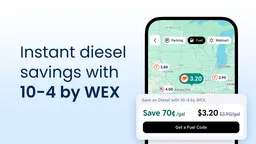
- Fuel price information can help drivers compare nearby stations.
- Parking availability tools can make trip planning easier.
- The app includes locations for truck stops and weigh stations.
- Route planning features are useful for long-haul trips.
What could be better
- Some features may require a subscription or in-app purchase.
- Fuel prices and parking availability may not always be up to date.
- Routing accuracy can vary by location and road conditions.
- The app may use significant battery power during navigation.
- Some tools depend on a reliable internet connection.





