


Tropical Smoothie Cafe review
 Analysis by Appsdrops
I think Tropical Smoothie Cafe makes the most sense when it fits into a routine you already have: choosing a smoothie or meal, checking which cafe is convenient, and placing an order before you arrive. It is a free Food & Drink app from Tropical Smoothie Cafe, and its focus is deliberately practical rather than broad. I would treat it as a companion for ordering from this particular cafe, not as a general restaurant-discovery or meal-planning tool.
The app has been around since July 21, 2015, and its current version is 6.8.31. It has a 3.9 average from around 45,000 ratings, with over a million installs. Those figures suggest a well-used service, but they do not promise that every cafe visit will feel equally smooth: ordering depends on the location you choose and how well the app fits your habits. It is free to download and rated for Everyone, so trying it is a low-commitment way to see whether it suits your usual stops.
Make the first order fit your real routine
On an initial visit, I would start by finding the cafe I actually expect to use, rather than browsing the menu as if every location were interchangeable. A nearby result is only useful if it is the branch that fits the route I take, the area where I work, or the place I can reach at lunchtime. Getting that choice right is a small step, but it prevents the most avoidable ordering mistake: preparing an order for the wrong stop.
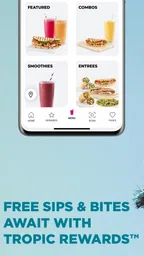
From there, the basic rhythm is straightforward: look through the available food and drink choices, decide what you want, and use the app to place an order ahead. That is the main advantage over walking in and making every decision at the counter. I find this especially useful when I already know my order and would rather spend the time on the commute or a short break than on choosing in person.
For a first order, I would still review the selections carefully instead of rushing through the screens. Ordering ahead is convenient only if the chosen items and pickup cafe match what you intended. A familiar name on a menu is not a substitute for checking the order before completing it, particularly when you are trying the app for the first time or ordering for someone else.
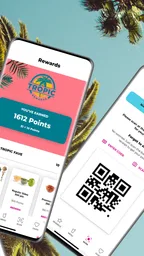
The app also brings rewards into the same routine. That can make it easier to keep track of the cafe relationship without treating rewards as a separate task, but I would not assume that every purchase or offer works in a particular way unless the app itself shows the relevant details. My useful habit would be to check the rewards area during an order I was already going to make, rather than opening the app just to chase a benefit.
Choose the location before you build a habit
Location selection deserves more attention than it might seem to at first. If you use different cafes on workdays and weekends, make a point of checking the selected branch each time your plans change. A saved or recently used choice can be convenient, but convenience becomes a drawback if you stop noticing which cafe is attached to the order.
A realistic use case is a lunch break with a short window: I would decide what I want before leaving, check that the app is set to the cafe near the office rather than one near home, and submit the order with enough time to make the trip. That sequence reduces unnecessary decision-making, while the final location check protects against a preventable detour. The app helps most when the user supplies that bit of attention.
For a family or group order, the same principle matters even more. It is easier to collect preferences before opening the ordering flow than to make several people decide while you are navigating it. I would confirm each person’s choices aloud, enter them deliberately, and review the completed order before placing it. This is not a special feature; it is a practical way to avoid turning a convenience app into a rushed guessing game.
Check the details that affect your order
Before relying on the app for a regular order, I would look through its available account and rewards options and understand what information it displays during checkout. Those are the settings and details that influence whether ordering feels worthwhile: what the app asks me to provide, how it presents the selected cafe, and where it shows the reward information relevant to my visit. I would make choices based on what is actually on screen rather than expecting an unlisted preference or shortcut.
It is also worth reviewing any order details that matter to you every time, especially when changing from a familiar drink to a different item or placing an order for another person. A repeat customer can be tempted to tap through automatically, but a quick check of the cafe and selected items is a better safeguard than relying on memory. For a food order, accuracy is part of convenience.
If you have a dietary requirement or a specific customization in mind, do not assume that an app menu alone answers every question. Read the choices presented for the item and use the cafe’s available information or ask staff when you need clarification. The app is useful for making a known choice easier to order; it should not be treated as a substitute for confirming details that matter to your health or the exact preparation you need.
I would also keep expectations sensible around rewards. Seeing a rewards option does not mean every visit will have the same value to every customer, and a rewards program is only useful if you visit often enough to care about it. Check what the app currently displays and decide whether it adds value to your normal purchases. That is a more grounded approach than changing what you order just to make the app feel worthwhile.
Build speed with habits, not guesswork
The fastest reliable pattern is a repeatable one: choose the intended cafe, settle on the order, review the selections, and then place it. Once that sequence becomes familiar, the app can cut down the effort of an ordinary stop without encouraging careless taps. I would keep the final review even after using the app many times; it takes little attention and catches the kinds of errors that a saved routine can make easy to overlook.
For regulars, the best “shortcut” is often deciding outside the app. If I know what I want before opening it, I can use the ordering flow to complete a decision instead of browsing under time pressure. If I am unsure, the counter may be a better place to ask questions than trying to work them out while moving through an app. That distinction helps avoid confusing faster ordering with better decision-making.
Another useful pattern is to align the order with a trip that is already planned. If I am passing a cafe on the way back from an errand, I can check that location and order with that route in mind. If my plans are uncertain, ordering too early may be less helpful than waiting until I know which branch I can reach. The app supports planning ahead, but the user still has to judge when a plan is firm enough.
People who alternate between locations should make the branch check part of the routine, rather than assuming that the last cafe selected remains the right one. People who visit the same cafe repeatedly can focus more on reviewing the order itself. These are simple adjustments, but they make the app work better for different patterns of use without relying on hidden tools or undocumented features.
Where it falls short of broader alternatives
Tropical Smoothie Cafe is narrow by design: it serves people who want to interact with Tropical Smoothie Cafe. A general delivery or restaurant app may be a better fit if you are comparing many businesses, looking for a broader range of cuisines, or trying to coordinate a delivery from somewhere else. A walk-in order may also be the better choice when you want to ask a question, take your time deciding, or change your mind through a conversation.
The app’s convenience is therefore tied to a particular kind of customer. If you rarely visit the cafe, the download may not earn a lasting place on your phone, and the rewards aspect may not matter much. If you already have a predictable order and a convenient branch, the same focused design can be a plus: you are not using a broad marketplace when what you need is a direct way to handle a familiar cafe visit.
There is also a trade-off in ordering ahead. It can make the visit feel more organized, but it asks you to make choices before you arrive and to pay attention to the location and order details as you go. When you are unsure what you want, when your route may change, or when you need clarification from staff, an in-person order gives you more flexibility. I would choose the app for a planned stop, not force every cafe visit into a pre-order.
The rating gives a useful, imperfect snapshot of how customers have responded: the app sits at a 3.9 average across around 45,000 ratings. I would read that as a reason to keep expectations realistic rather than as a verdict on my own experience. A focused ordering app can be genuinely handy for one person’s routine and less appealing to someone who wants broader discovery or more conversation before ordering.
A good fit when the cafe is already part of your day
My view is that Tropical Smoothie Cafe is best for regular or occasional customers who know which branch they want and appreciate handling an order before they reach the counter. Its combination of ordering, cafe-finding, and rewards gives those tasks one home. The app is less compelling if you only visit once in a while, need to compare unrelated restaurants, or prefer to decide everything in person.
I would try it by making one ordinary order, not by reorganizing my routine around it. Check the cafe, read the available choices, review the order, and see whether the process saves effort on a real trip. If it does, repeat the same careful sequence and check rewards when convenient. If choosing ahead feels restrictive or the app adds more steps than it removes, ordering directly at the cafe is a perfectly sensible alternative.
For the right user, the mastery is not a secret setting or a complicated trick. It is knowing when an order is settled, matching it to the right location, and keeping a quick accuracy check in the routine. That makes this a practical, focused Food & Drink app rather than an essential tool for everyone—and that is a fair reason to install it only if Tropical Smoothie Cafe already fits your day.
What we like
- Order ahead to make pickup more convenient.
- Browse smoothies and food options in one place.
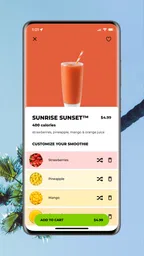
- Customize eligible items to match your preferences.
- Find nearby cafes through the app.
- Earn rewards on qualifying purchases.
What could be better
- Menu availability may vary by cafe.
- Pickup times can change during busy periods.
- Some customizations may increase the price.
- Rewards may have limits or expiration dates.
- An account may be needed to access loyalty features.





