


Topgolf review
 Analysis by Appsdrops
If you’re heading to a Topgolf venue for the first time, the app can be a useful starting point—but I’d treat it as a companion to the visit, not as a substitute for asking staff how things work. Topgolf is a free sports app from Topgolf, and its brief “Let’s Play!” message gives little away about what you’ll find inside. My practical advice is to install it before you leave home, take a few minutes to look around, and avoid assuming that every part of a venue visit is managed through your phone.
What to expect from the app
The app is aimed at people interested in Topgolf, whether they already visit regularly or are trying a golf-and-social outing for the first time. It belongs to the sports category, but its appeal is broader than golf practice alone: the setting is also a place to spend time with friends or family. That makes it most useful when you’re planning a visit or want a digital connection to the Topgolf experience, rather than when you need a general-purpose golf instruction or scorekeeping tool.
Topgolf was developed by Topgolf and has been available since August 31, 2013. It has a 4.5 average from around 8,400 ratings, with about 1 million or more installs. Those figures suggest that plenty of people have tried it, but they don’t tell you whether it suits your particular reason for downloading it. I’d judge it by a simpler question: are you likely to visit Topgolf, or do you want an app specifically for improving your game on a traditional course?
The app is free and rated for Everyone. Its current version is 4.16.3, and it requires Android 8.0 or later. That makes the basic decision straightforward for Android users: check your device’s software version, install it from your app store, and see whether the available tools fit your plans. The free price removes a purchase decision, though it doesn’t mean every possible venue service or activity should be assumed to be included in the app.
The most helpful expectation to set is that this is a Topgolf-specific app. If you’re choosing between it and a conventional golf app, think about the outing you’re preparing for. A standard golf utility is generally the more natural choice for course-focused needs such as working on your own practice routine. Topgolf makes more sense when the venue itself is part of the plan and you want to begin with the company’s own app.
Start with a simple setup
Once installed, give yourself a quiet minute to explore before you’re standing at a venue trying to coordinate with a group. Look at the available sections and decide what you actually need for your visit. This sounds obvious, but it prevents a common first-time mistake: opening an unfamiliar app only when everyone else is ready to go, then expecting it to explain the venue’s entire process at a glance.
I’d also make sure the app is installed on the phone you expect to bring. If you’re organizing an outing with friends, tell them in advance that you’re checking the app, rather than turning the group’s arrival into a last-minute download session. People can then decide for themselves whether they want it, and you can keep the visit moving if someone would rather use their phone only when needed.
For a first visit, don’t try to learn every screen. Start by identifying the parts that relate to your immediate plans, then leave the rest for later. If you’re going with a group, agree on who is handling any planning tasks rather than having several people make assumptions at once. This small bit of coordination is more useful than browsing without a clear purpose.
I wouldn’t build your whole schedule around an expectation that the app will answer every venue question. If something important affects your arrival or your group’s plans, confirm it through the venue’s usual official channels or ask staff. That’s not a knock on the app; it’s sensible planning when a digital tool is tied to a real-world location and the details of your visit matter.
Your first useful outcome
A realistic first success is modest: open the app before your outing, find the information or tools relevant to your intended visit, and arrive with a clearer idea of what you want to do. For example, imagine you and two friends are considering a weekend visit. You can check the app together beforehand, settle on a rough plan, and avoid spending the first few minutes at the venue debating what everyone wants from the outing.
That preparation matters because first-time groups often have different expectations. One person may be keen to focus on hitting balls, another may see the visit as a social event, and someone else may simply want to know what to expect before arriving. The app is most valuable when it helps you prepare for those conversations, not when you expect it to make the decisions for the group.
Here’s a useful workflow: explore the app on your own, note any questions it leaves you with, and discuss those questions with your group before the visit. If a detail is essential, verify it rather than relying on a guess. This keeps the app in its strongest role—as a practical starting point—while leaving venue-specific uncertainties to a more reliable source.
For someone who has visited before, the first meaningful action may be different. You may already know what kind of outing you want, so the app can be part of your routine rather than a guide to the whole experience. I’d still use it with a specific purpose in mind. A tool is easier to assess when you know whether you’re opening it to plan, to check something, or simply to stay connected with Topgolf.
Where first-time users can get confused
The biggest source of confusion is expecting the short store description to explain the app’s full role. It doesn’t. “Topgolf” tells you who the app is for, but it doesn’t by itself set expectations about how a particular venue visit works. Go in curious, not overconfident: explore what’s available, and ask the venue about anything that affects your plans.
Another easy mistake is treating the app like a universal golf companion. If your main goal is to work on your swing away from a Topgolf venue, you may be better served by a dedicated golf practice or course tool. The Topgolf app is a more natural fit when the brand and the venue are central to what you’re doing. That distinction can save you from downloading it for a job it was not presented as being designed to do.
Groups can also mistake a shared plan for a shared understanding. If one person has explored the app and the others haven’t, explain what you found in plain language rather than assuming everyone has seen the same screens. Keep important decisions—such as when to meet and what the group expects to do—clear outside the app too. That’s especially helpful when the outing includes people who are less comfortable using apps.
Finally, don’t confuse a high average rating with a guarantee that every feature will be relevant to you. Around 1,600 written reviews accompany the ratings, but people use apps for different reasons and visit under different circumstances. I’d take the overall response as a sign that many users find the app worthwhile, while still evaluating it against your own needs and the specific outing you’re planning.
Who will get the most from it
I’d recommend giving it a try if you’re planning a Topgolf visit, especially if you’re new to the venue and want to arrive with a basic plan. It can also make sense for someone who visits often and prefers to keep the company’s app close at hand. Since it is free, trying it doesn’t require a purchase, though you should still be selective about whether it earns a place on your phone after you’ve explored it.
It may be less useful if you rarely or never go to Topgolf. In that case, a golf app built around the activities you actually do—such as practice or playing on courses—will probably be a better match. Likewise, if you prefer to plan every outing directly with the venue or don’t want another app, you can skip it and ask staff or use the venue’s ordinary communication options when needed.
For a family or mixed-age group, the Everyone rating is reassuring in a basic suitability sense, but it doesn’t remove the need for an adult to organize the outing. I’d have the person coordinating the visit explore the app first, then share only the useful details with the rest of the group. That keeps the experience simple for people who aren’t interested in managing another app themselves.
What to do after the first visit
After you’ve used the app once, decide whether it actually helped. Did it make planning easier, answer a question you had, or give you a reason to keep it installed? If so, use it again when you have a clear Topgolf-related task. If you found yourself opening it without getting value, there’s no need to keep treating it as essential just because it’s the official app from the developer.
The app’s age and ongoing version number indicate that it has been around and continues to receive versions, but that alone shouldn’t determine your choice. What matters day to day is whether its current experience fits your phone and your plans. Keep your device’s operating system in mind, and make sure you’re using a current install when you rely on it for an upcoming outing.
My overall view is that Topgolf is worth trying when you have a real connection to Topgolf—particularly if you’re a first-time visitor who wants to prepare without making the app responsible for every detail. It’s not the right pick for every golfer, and it won’t replace direct venue guidance when a specific answer matters. But as a free, focused way to begin planning and get familiar with the Topgolf experience, it’s a reasonable place to start.
What we like
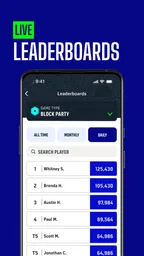
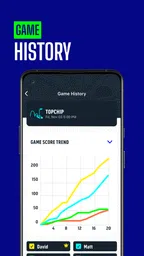
- Track scores and stats to follow your progress over time
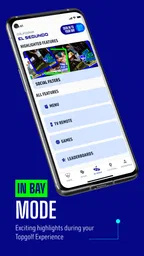
- Multiple game modes suit different skill levels
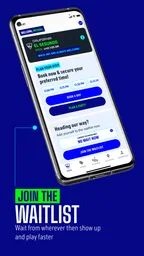
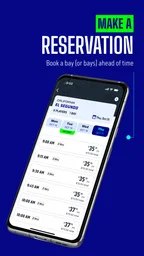
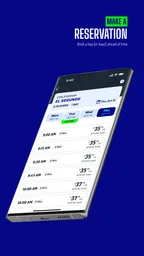
- Reservations help plan a visit before arriving
- The app can make checking in at venues more convenient
- Digital scorecards reduce the need for paper
What could be better
- Some features may vary by venue
- A visit can become expensive during busy hours
- Reservations may be limited at popular locations
- Location access may be needed for venue features
- App performance can depend on a stable internet connection





