
Texas Roadhouse review
 Analysis by Appsdrops
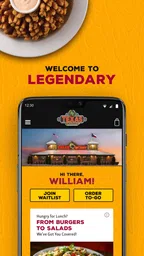
I think of the Texas Roadhouse app as a companion for planning a restaurant visit, not as a replacement for the restaurant itself. It is a free Food & Drink app from Texas Roadhouse, Inc, and its appeal is straightforward: when I already have a Texas Roadhouse meal in mind, having the restaurant’s app on my phone gives me a more direct place to begin than searching around for general restaurant information. That focus is also its main limitation. If I am choosing among many restaurants or looking for a broad dining guide, I would rather use a general discovery app.
Where a connection matters
Restaurant apps are most useful at the exact moment I need to make a decision: while deciding where to eat, getting ready to leave, or checking something before arriving. Those are also moments when I may be on mobile data, in a car park, or moving between places with uneven reception. I would open this app before setting off, rather than assume I can rely on a quick lookup at the door. That small change in timing makes the experience less dependent on a strong connection when I am already in a hurry.
The app’s purpose is tied to Texas Roadhouse, so it makes most sense when I have already chosen that restaurant. I can use it as a starting point for exploring the brand’s offerings and planning a visit, while keeping expectations practical: an app can help organize the decision, but it does not make the meal or the restaurant experience happen on the phone. I would still check current details in the app when I need them, rather than rely on something I saw earlier and assume it has not changed.
For a realistic everyday example, imagine I am arranging dinner with family and someone asks what Texas Roadhouse offers. I would check the app while I have a reliable connection, then share the useful information in conversation and settle on a plan. If we are already on the way and the signal becomes patchy, I would avoid leaving every decision until that point. This is not a special trick so much as a sensible workflow for any restaurant app: do the browsing before the last-minute rush.
Planning on the move
On a phone, the useful distinction is between browsing at leisure and needing an answer immediately. When I am at home, I can take time to look through the app and decide whether it fits the group. On the move, I want quick access to the information that will actually affect the visit. If I have a particular question, I try to resolve it before leaving rather than repeatedly reopening screens while walking or driving. The app is a better fit for the first kind of use than for hurried, connection-dependent improvisation.
That matters especially when several people are involved. One person may be deciding whether the restaurant works for the group, while another wants to know what to expect before agreeing. I find it more useful to look things up together in advance than to treat the phone as a substitute for talking through preferences. If a diner has a specific dietary concern or needs an exact answer, I would verify it directly with the restaurant instead of assuming an app view settles every individual case.
I would also separate trip planning from arrival logistics. A restaurant app can support the first by helping me orient myself around the brand, but I would not assume that every action I might want is available in the same way on every visit. When timing, seating, or a special request is important, checking the relevant current options before setting out is more dependable than building a plan around a feature I have not confirmed in the app.
When the connection is unreliable
Any app that needs to fetch current content can feel slow or unhelpful when a connection is weak. I would not interpret a blank or delayed screen as proof that the information does not exist; I would first try a stable connection and reopen the relevant section. If I were outside with poor reception, I would move somewhere with better signal or wait until I could reconnect, rather than repeatedly tapping and hoping the page will load. Repeated attempts can waste time without making a restaurant decision any clearer.
My practical recovery routine is simple: give the screen a moment, check whether the phone has a working connection, and retry once the signal is better. If I still cannot get what I need, I would use another way to confirm the visit rather than let the app become a bottleneck. For an urgent question, contacting the restaurant directly is a more sensible fallback than depending on a mobile screen that is not responding. That is not a criticism unique to this app; it is a useful boundary for any connected restaurant service.
I also would not wait until the group is standing outside to investigate an unfamiliar detail. If the visit depends on a specific menu choice or an arrangement that matters to someone in the party, I would check ahead and keep the plan flexible. This reduces the chance that a slow connection turns a minor uncertainty into a frustrating delay. The app is most helpful when it is part of preparation, not the single point of failure for the whole outing.
Using it without wasting mobile data
If I am being careful with mobile data, I would do most of my browsing on Wi-Fi before going out and avoid refreshing pages just to see whether anything has changed. I would also close the app when I am finished rather than leave it open as a habit. Those are general, low-effort ways to keep a restaurant-planning session contained; I would not assume that the app has a particular data-saving mode or that its content will be available without a connection.
A useful trade-off is convenience versus certainty. Looking things up on the phone while connected is quick, but anything that depends on current restaurant information is better checked close to the visit. On the other hand, checking too early and then repeatedly revisiting the same screens does not necessarily help. I would browse once when planning, then check again only if something important has changed or needs confirming.
For someone who mostly wants to compare many places, a general map or restaurant search tool is likely to be more efficient and may make it easier to see alternatives nearby. For someone who has already settled on Texas Roadhouse, the dedicated app is the more focused place to begin. That difference is more useful than trying to make one app serve both purposes: discovery across the whole dining scene and planning around a single restaurant brand.
Who will get the most from it
I would recommend the app to people who visit Texas Roadhouse often enough to want a direct mobile companion, and to anyone planning a specific visit who would rather start with the restaurant’s own app than search broadly. It is also a reasonable option for a group organizer who wants to look into the restaurant before proposing it. Texas Roadhouse has an average rating of 4.8 from around 21,000 ratings, and it has passed five million installs, signs that many people are willing to keep it in their restaurant-app mix. Those figures are context, not a guarantee that it will suit every diner.
The app is less compelling if I rarely visit Texas Roadhouse, prefer not to install single-brand apps, or mainly need a tool for comparing restaurants in a particular area. In those cases, a browser or general restaurant app may cover more ground with less commitment. I would also advise cautious users not to rely on a restaurant app as the only source for a time-sensitive or personally important question. A direct check with the restaurant is the better choice when getting the answer wrong would affect the outing.
Texas Roadhouse’s app is free, has an Everyone content rating, and is listed as version 9.1.0, with Android support beginning at version 7.0. It was released on July 4, 2016, so it is an established offering rather than a new experiment. I would still keep my expectations tied to what I need from it: a focused way to engage with the Texas Roadhouse brand, not a universal restaurant planner. Its identity is clear, and that clarity helps when the restaurant is already the destination.
My connectivity verdict
After weighing how I would use it, I see Texas Roadhouse as most valuable when I have a reliable connection and a clear reason to plan a visit. I would browse before leaving, verify important details close to the outing, and keep a direct fallback in mind if a screen does not load. That approach makes the app a helpful part of the process without asking it to do more than a restaurant app should.
My overall recommendation is positive but specific: if Texas Roadhouse is already on your shortlist, this is a sensible place to start. If you want broad restaurant discovery, an independent dining tool is a better fit. The app’s focused purpose is both its strength and its boundary, and the best experience comes from using it early enough that connectivity problems do not dictate the plan. For regular visitors, Texas Roadhouse earns a place on the phone as a practical companion; for occasional diners, it is worth installing only when a visit is actually in the works.
What we like
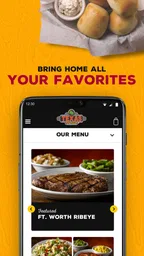
- Menu browsing makes it easy to check dishes before visiting.
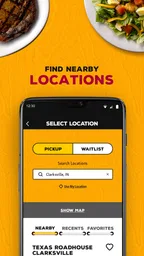
- Location details help you find a nearby restaurant.
- The app offers a convenient way to explore current menu options.
- Useful for planning a meal around Texas Roadhouse favorites.
- A familiar interface makes basic restaurant information easy to find.
What could be better
- Features and availability may vary by location.
- Some information may not reflect the latest menu changes.
- The app is less useful if there is no nearby restaurant.
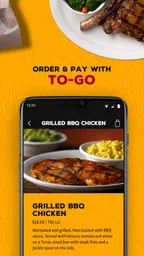
- Online ordering options may not be available at every location.
- App performance can vary depending on your device and connection.





