
Test DPC review
 Analysis by Appsdrops
I see Test DPC as a specialist tool rather than an everyday Android app. Its purpose is to help people examine how Android Enterprise device policies behave, which makes it useful for developers, IT administrators, and anyone learning about managed-device setups. That focus also defines its accessibility story: it is less about offering a polished, broadly accessible consumer experience and more about providing a practical environment for testing policy-controlled behavior.
The app is free, comes from Google LLC, and sits in the libraries and demonstration tools space. It has a 4.1 average from around 1,800 ratings, with over 500,000 installs. Those figures suggest that it has found a real audience, but they do not make it a sensible download for everyone. I would install it with a specific testing or learning goal in mind, not simply to explore Android settings.
Working with policy screens and navigation
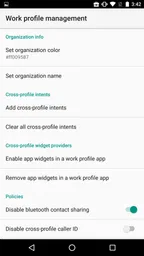
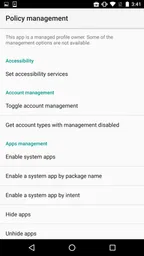
The first thing to understand is that Test DPC is a sample device policy controller: it provides a way to work with Android Enterprise management behavior. That means the useful questions are practical ones. Can I examine how a managed configuration affects a device? Can I reproduce a policy scenario before relying on it elsewhere? Can I learn how enterprise controls change the experience? Those are better reasons to open the app than expecting a general-purpose device manager.
For readability, I would judge it in the context of the Android device and the policy being tested, not as a standalone reading app. The screens involved in device management can contain technical terminology and settings that make sense to administrators but may be opaque to a first-time user. Someone unfamiliar with managed profiles or enterprise policy concepts may need documentation or guidance alongside the app. Test DPC is not designed to teach every underlying idea through plain-language explanations.
Navigation is most approachable when I already know what behavior I want to test. For example, an administrator preparing to evaluate a work-device setup can use a controlled test device, apply a scenario, and inspect the result rather than guessing how a policy might appear in practice. The key workflow tip is to write down the intended test before changing anything: the policy question, the expected outcome, and what you actually observe. That simple discipline makes a sample controller more useful and helps separate an app issue from a misunderstanding of the policy.
It is also worth treating the device as a test environment, not as a personal phone whose ordinary setup should remain untouched. Device-policy experiments can affect the way a device behaves, so I would avoid mixing exploratory tests with tasks I depend on every day. A spare or otherwise appropriate test device is the more sensible choice when the goal is repeated experimentation. That is not a special feature of the app; it is a practical safeguard when working with management controls.
Motor and sensory considerations
Test DPC’s technical purpose does not automatically make it easy for people with different motor or sensory needs. I would not assume that it offers dedicated accessibility modes or specialized input options. Instead, its usability depends in part on the Android device’s own interaction and display settings, as well as on how clear the policy task is to the person using it.
For someone who benefits from larger text or a less visually demanding display, it can be worth adjusting Android’s system-level presentation before beginning a test. The trade-off is that changing display settings may alter how much content fits on screen, which can make dense administrative screens require more scrolling. If precise tapping is difficult, slowing down and confirming each selection is wiser than moving quickly through unfamiliar controls. In a policy-testing workflow, a mistaken choice can invalidate the result even if it does not cause lasting harm.
Sensory load is also contextual. A person who finds technical menus tiring may do better by working through one policy question at a time, taking breaks, and keeping notes outside the device. That may sound modest, but it prevents a long sequence of settings from becoming a memory test. For training sessions, I would give learners a short, concrete task rather than asking them to explore every option at once.
There is a useful distinction here: Android’s built-in accessibility tools can make device interaction more manageable, but they do not explain enterprise terminology or make a complex policy decision simpler. If the difficulty is reading or tapping, system settings may help. If the difficulty is understanding what a management control means, a knowledgeable instructor or clearer reference material is the better support.
Access across work, study, and shared devices
The strongest situational use is in a controlled learning or administration setting. A developer can investigate how an enterprise-oriented configuration behaves on Android, while an IT learner can use a test device to become more familiar with policy-managed experiences. A support team could also use it as part of a deliberate troubleshooting exercise, provided the device and test plan are appropriate.
Here is a realistic example: I am helping prepare a phone for a staff member who needs a managed work setup. Rather than changing settings on that person’s daily device while trying to understand the result, I would use a separate test environment to examine the relevant behavior first. I would note the starting state, make one change at a time, and compare what the device does with the expected workflow. This makes the exercise easier to repeat and reduces the risk of confusing several changes with one another.
Test DPC can also fit a classroom demonstration, but it is not a substitute for a complete enterprise-management system. Its role is to let people examine sample policy-controller behavior; organizations that need to deploy, monitor, and support a fleet should choose tools built for their actual management process. Likewise, a casual Android user who only wants to configure their own phone will usually be better served by the standard settings app or by guidance from their device administrator.
The app is rated for Everyone and is free, which lowers the barrier to trying it, but that does not mean every use is suitable for every person or device. The relevant distinction is expertise and context rather than age: a technically confident learner with a test goal may find it useful, while someone who expects a friendly, guided setup experience may find it confusing. It runs on Android 6.0 or later, and version 9.0.16 is the current version listed for it.
Where it fits beside other options
Compared with ordinary Android settings, Test DPC is more focused on enterprise policy behavior. The settings app is the obvious choice for everyday adjustments such as display preferences or personal device configuration. Test DPC makes more sense when the question concerns a managed-device scenario and a sample controller is appropriate. That narrower purpose is its main advantage and its main limitation.
Compared with a full device-management platform, it is a testing and demonstration tool rather than a complete operational answer. If I needed to manage real staff devices, assign policies at scale, or support an organization’s day-to-day deployment, I would look for an established management solution suited to that job. A sample controller can help me understand or evaluate behavior, but it should not be mistaken for the whole administrative workflow.
Another practical trade-off is that experimentation has value only when the results are interpreted carefully. A setting that behaves as expected on one test device does not, by itself, prove that every device or organizational configuration will behave identically. I would use Test DPC to explore a specific question and then verify any important conclusion in the environment where it will actually matter.
Barriers that shape the experience
The biggest barrier is the learning curve. The app’s purpose assumes interest in Android Enterprise, and users without that background may not know what to test or how to interpret what they see. This can make the experience feel sparse or overly technical compared with consumer apps, even when the app is serving its intended role.
A second barrier is the need for a suitable test context. Installing a policy-testing tool on a device that is essential for work or personal communication is not my first recommendation. Before experimenting, I would make sure the device is appropriate for testing and that I understand the consequences of the particular steps I am taking. If the goal is simply to set up a managed phone, an administrator’s instructions or the organization’s normal enrollment process is likely a better route.
Finally, accessibility cannot be judged only by whether an app can be installed or opened. Technical vocabulary, unfamiliar workflows, and the consequences of changing policy settings all affect who can use it comfortably. A well-prepared trainer can reduce those barriers with a clear task and patient explanation; a person left to guess may find the same tool frustrating. That makes the surrounding support unusually important for this kind of app.
Who I would recommend it to
I would recommend Test DPC to Android developers, IT professionals, and learners who specifically need to investigate Android Enterprise policy behavior. It is also a reasonable option for a guided demonstration where the device and the test objective are clearly defined. Its 39 reviews and established install base show that people use it, but the deciding factor should be whether its specialist purpose matches your task.
I would skip it if I wanted a general phone-management app, an accessible tutorial for beginners, or a tool for administering an organization’s devices in production. In those situations, the standard Android settings, a structured learning resource, or a full management platform will be a better fit. Test DPC is most useful when I treat it as a focused workbench: choose a question, test deliberately, record the outcome, and avoid confusing a demonstration environment with a complete solution.
My overall view is positive but narrow. Test DPC is worthwhile when controlled policy testing is the actual need, and its free access makes it easier to explore in an appropriate setting. It is not especially welcoming to casual users, and people who need extra support may find its technical language and task-driven nature a real obstacle. For the right user, though, it offers a practical way to examine managed Android behavior; for everyone else, a simpler or more comprehensive alternative is likely to be more useful.
What we like
- Useful for testing Android apps under managed device policies.
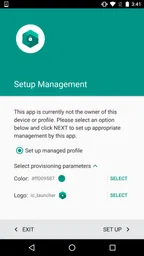
- Supports both device-owner and profile-owner provisioning.
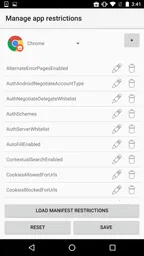
- Lets developers configure restrictions without custom code.
- Can simulate managed profiles on compatible Android devices.
- Free to download and focused on development workflows.
What could be better
- Designed for developers rather than everyday phone users.
- Provisioning can require a factory reset on some devices.
- Features vary across Android versions and manufacturers.
- Misconfigured policies may disrupt normal device use.
- It is not a substitute for a full enterprise management service.





