

Tesla Robotaxi review
 Analysis by Appsdrops
I think Tesla Robotaxi is easiest to judge as a service app rather than as another map to keep open all day. Its purpose is to help people use Tesla’s autonomous ride service, so the useful question is not whether it replaces every navigation app; it is whether it fits the way you and the people you live with actually arrange trips. That distinction matters in a shared household, where one person may be ready to try a new ride option while another still wants familiar, conventional transport.
In my view, the app makes most sense for someone who already has a reason to use the service and wants a direct way to engage with it. The name may suggest a futuristic experience, but I would approach it practically: a ride option to consider for suitable journeys, not a promise that every trip will be simpler or available in every circumstance.
How it fits into a shared household
Picture a typical weekday: one adult needs to get across town, another has the family car, and a housemate is deciding whether to come along. In a situation like that, a ride-service app can be useful because it gives the person making the trip a separate option to explore rather than making the whole household reorganize around one vehicle. The person travelling should still make the final decision about their own journey.
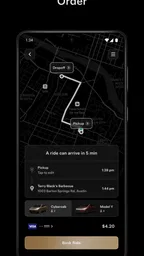
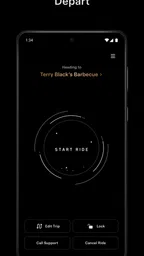
This is where Tesla Robotaxi has a distinct role. Tesla, Inc. develops the app, which sits in the maps and navigation space but is centered on an autonomous ride service. That focus separates it from conventional navigation tools: a map app primarily helps you plan or follow a route, while a ride-service app is relevant when you are considering how to travel without driving yourself.
For shared-device use, I would be cautious about treating one phone as a family booking station. A household may share a tablet or pass a device around, but personal travel decisions and account activity are better handled by the person who is actually taking the ride. Before anyone else uses a logged-in device, check whose account is active and whether the right person is making the request. That is a sensible boundary for any service involving travel, not a special control I would assume this app provides.
A practical household routine is to discuss the journey first, then let the intended passenger handle the app and confirm the details directly. This avoids a common coordination mistake: one person making arrangements on behalf of someone else without the passenger being ready, informed, or comfortable with the plan. For adults sharing a home, that small handoff can be more useful than trying to manage every trip from a single device.
Keeping setup and account use clear
When setting up any ride app, I recommend that the person who expects to travel should be the one to understand and manage the account they use. That keeps responsibility clearer if a trip needs attention and avoids confusion about who is signed in. I would not assume that a household profile, shared booking arrangement, or separate family permission system is available unless the app itself clearly presents it.
The same principle applies if you are helping a relative get started. Sit together while they review the app, let them make their own choices, and make sure they know how to reach the app again on their own device. This is more dependable than quietly configuring a service for them and expecting them to know what was changed later.
One useful, non-obvious habit is to separate trip planning from trip responsibility. A family member can help talk through whether a journey is suitable, but the passenger should know what ride option is being considered and be able to make the final call. That distinction matters especially when plans change at short notice. It also helps prevent a shared phone from becoming the only place where a passenger’s travel arrangements are visible.
If several people in a household are considering using the service, compare needs before choosing a routine. A commuter who travels alone may value a different arrangement from someone coordinating a pickup with a companion. I would not treat one person’s successful use as proof that the same setup will suit every passenger, route, or day. The app should be judged on the particular journey and the passenger’s comfort with it.
Coordinating a trip without creating confusion
Coordination is often the hardest part of shared travel, not opening an app. Agree who is travelling, who is making the decision, and how the passenger will keep the rest of the household informed. If the person arranging a trip is not the passenger, they should confirm the plan directly rather than assuming that a booking or message on a shared phone has reached everyone.
For an everyday example, imagine a household member wants a ride while another is out with the only car. I would first check whether the ride-service option suits the passenger’s timing and comfort, then have the passenger use the app and review the plan themselves. The family can agree on a simple check-in, such as telling someone when the journey is underway, without relying on unverified app features or expecting the app to coordinate the household automatically.
This approach is also helpful when plans involve a child or an older relative. A responsible adult can discuss the arrangement, but should not assume that installing an app makes the journey appropriate. The passenger’s age, ability to follow the plan, comfort with the ride, and access to help all matter. When any of those points is uncertain, a trusted adult accompanying the passenger or choosing a familiar transport option may be the better decision.
The service’s autonomous focus is a meaningful difference from ordinary ride-hailing, and that is precisely why I would avoid treating it as interchangeable with every other car trip. A conventional navigation app helps you get directions while you drive; a standard ride service involves a driver; this app is for Tesla’s autonomous ride offering. Each option answers a different need. If I need driving directions for my own car, I would reach for navigation. If I want a conventional driver-based ride, I would use a service designed for that. If I am considering Tesla’s service, this app is the relevant place to start.
Age, trust, and deciding who should use it
The app is rated for Everyone, which describes its content rating; it does not by itself settle whether a particular passenger should travel independently. Parents and caregivers still need to make their own judgement about a child’s maturity, the journey, and the support available. I would not read an age label as a substitute for an adult’s decision about travel safety or supervision.
Trust also means being clear about what the app is for. It is not a general-purpose family location tool or a substitute for talking through a travel plan. If a household needs to know who is going where, agree on a direct check-in method instead of assuming the app will provide shared visibility. That is a small but important distinction between using a ride service and coordinating care.
For an adult trying the service for the first time, I would choose a journey that feels straightforward and leave enough time to understand the app’s flow before relying on it for a time-sensitive commitment. This is a practical way to reduce pressure: do not make the first attempt the trip where a missed connection or a late arrival would cause a serious problem. The same advice applies when helping someone less confident with apps. A calm first use is more informative than a rushed one.
There is a trade-off here. A dedicated service app may be more relevant than a general map when you specifically want to consider Tesla’s ride offering, but it is not a replacement for every travel tool or every backup plan. If the journey depends on a particular arrival time, if the passenger is uncomfortable with an autonomous ride, or if the household needs a conventional driver, another option may be a better fit. I would keep the decision tied to the trip rather than choosing the app simply because it is installed.
What the app’s standing suggests—and what it doesn’t
The app is free and has an average rating of 4.8 from around a thousand ratings, with over a hundred written reviews. It has passed 100,000 installs, which suggests that people are actively exploring it, but popularity alone cannot tell me whether it suits a particular household or route. I would use those figures as background, not as a reason to skip the practical questions about the passenger and the journey.
The current version is 26.11.0-7771, and the app was released on April 21, 2026. For someone deciding whether to install it, the useful takeaway is simply that this is a current, dedicated Tesla app rather than a generic directions tool. I would still inspect the experience on my own device and make sure the person who will use it is comfortable navigating it before building a routine around it.
One trade-off worth keeping in mind is dependence on a service-specific app. If you already use a general map for nearly every trip, adding another app only makes sense when you are considering Tesla’s ride service. On the other hand, someone who expects to use that service may prefer having its dedicated app ready instead of trying to turn a general navigation tool into something it is not. I would avoid installing it for every member of a household by default; the people who may actually use the service are the ones who need to evaluate it.
My household verdict
I would recommend Tesla Robotaxi to adults who want to explore Tesla’s autonomous ride service and are comfortable handling their own travel decisions through a dedicated app. It can be a useful addition to a household’s transport options, especially when the usual car is unavailable and a passenger wants to consider a ride rather than drive. The strongest use case is specific: a person who is ready to travel and wants to assess this particular service, not someone simply looking for a better map.
I would be more cautious about making it a shared family tool. Keep account use and passenger decisions clear, do not assume it includes household coordination features, and involve a responsible adult when a young or less confident passenger is concerned. For a trip where the rider needs a conventional driver, driving directions, or a familiar backup, another transport or navigation option may be more appropriate.
Overall, I see it as a focused option rather than a universal solution. Its value depends on whether Tesla’s autonomous ride service fits the journey and whether the passenger is comfortable using it. If those conditions are met, the app is worth considering; if not, there is no reason to force it into a household routine. That is the practical way I would recommend deciding: choose it for the trip it is designed to support, and keep responsibility, communication, and alternatives in view.
What we like
- App-based booking makes requesting a Tesla ride straightforward.
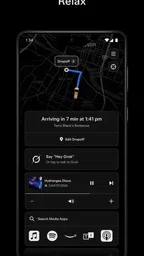
- Riders can track their vehicle as it approaches.
- Cashless payment keeps the checkout process simple.
- The service may offer a novel driverless travel experience.
- Ride details can be managed from a single app.
What could be better
- Availability is limited to selected service areas.
- Wait times may vary with demand and fleet size.
- Driverless rides may feel uncomfortable to cautious passengers.
- Service access depends on compatible devices and accounts.
- Routes and pickup options may be less flexible than expected.





