



TeamSnap ONE review
 Analysis by Appsdrops
I see TeamSnap ONE as a focused sports app whose biggest strength—and first hurdle—is that it is meant for people who have already been invited into its experience. That makes it different from a typical team-management app you can open and use with any group. If a coach or organizer has brought you in, it may offer a convenient place to follow along; if you are looking for a public directory of teams or a tool to organize a new group from scratch, it is unlikely to be the right starting point.
My overall impression is that TeamSnap ONE is most useful when the people around a team can agree to use the same app and keep its information current. That shared habit can reduce the mental work of checking scattered messages, but it also means the app’s usefulness depends on access to an invitation and on the organizer’s choices. For families, players, and team participants, that trade-off matters as much as any feature list.
Finding your way around the team experience
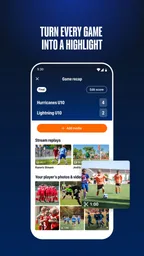
TeamSnap ONE is a sports app from TeamSnap, Inc. Its invite-only approach gives it a more closed, group-oriented feel than a broad sports news app or an open community platform. I would approach it as a place to keep up with an existing team connection, not as a way to discover sports communities or browse public content.
The app’s identity is clear, but the invite requirement shapes the first steps. Before downloading, I would ask the coach or organizer which invitation to use and whether the group has decided to rely on this app. That small check can prevent a frustrating start: installing an app without a path into the relevant team does not solve the practical problem that brought you there.
Once you are invited, the key usability question is whether the information you need is easy to locate and kept up to date. I recommend using one consistent place as your reference point rather than treating the app as one more inbox to check alongside several competing channels. If the team still sends important changes through text messages or email, decide as a group which channel is authoritative. Otherwise, an app intended to simplify coordination can add uncertainty about where the latest update lives.
I would also set a simple routine around checking team information. For example, a parent can look at the app when planning the next day rather than repeatedly opening it throughout the afternoon. That is not a special feature; it is a practical way to make an invite-based team tool feel predictable. The organizer can help by sharing updates in a consistent place and avoiding duplicate announcements unless there is a reason to do so.
There is a useful distinction between app navigation and group organization. Even an easy-to-follow interface cannot fix unclear team habits: a late change, vague instructions, or messages spread across several channels remain hard to manage. I would judge TeamSnap ONE not only by how quickly I can find what I need, but by whether the coach uses it consistently enough for that information to be trustworthy.
Readability and day-to-day use
For someone deciding whether the app will be comfortable to use, the most relevant question is not just whether it opens on a device, but whether the team’s communication style makes its content understandable. Short, direct updates are easier to scan than long announcements that mix several topics. If you help manage a team, separating a schedule change from a general reminder can make the experience clearer for people who are checking quickly between other tasks.
I would not assume that every participant reads information in the same way or at the same pace. A parent who is coordinating several children, a player checking between classes, and a coach handling a busy day may all need different levels of detail. Clear wording, dates written unambiguously, and a concise statement of what action is needed are practical habits that improve usability regardless of the device.
TeamSnap ONE is not a substitute for a conversation when a message is confusing. If an instruction affects attendance, transport, or participation, it is sensible to ask the organizer to clarify rather than infer meaning from a brief update. That is especially important in an invite-only group, where what one person can see or expects may depend on how the team has arranged its communication.
Different abilities and the way teams communicate
Sports participation involves people with different vision, hearing, reading, attention, and motor needs. I would treat the app as one possible route to team information, not as proof that every person can access it in an equally comfortable way. A reader who needs larger text, stronger contrast, or more time to process information should try the app on their own device and see whether the everyday tasks feel manageable.
For people who find small touch targets or precise gestures difficult, the practical test is whether they can complete the actions they actually need without repeated attempts. I would encourage a team to make essential information available in plain language and to offer a direct way to ask for help if someone cannot comfortably use the app. That avoids placing the whole burden on the participant to troubleshoot alone.
Sensory context matters too. A phone can be hard to use in a noisy gym, a bright outdoor setting, or while someone is moving between activities. Rather than relying on a quick glance at a busy moment, I would check important details beforehand and ask the organizer to repeat critical changes in a form that works for the group. The app may support coordination, but team members still need a backup way to communicate when a device or setting gets in the way.
One useful team-level practice is to avoid making participation depend on an immediate response to every update. A person may not be able to check a phone during work, school, practice, or travel. If a reply is genuinely time-sensitive, the organizer should say so clearly and provide a reasonable alternative for those who cannot use the app at that moment. This is a small policy choice that can make a closed digital group more inclusive.
When and where access works best
The app’s invite-only nature makes access a situational issue, not just a technical one. If you are already part of a team whose organizer has invited you, the app may fit naturally into your routine. If you are a new family waiting to join, a substitute caregiver who has not been added, or someone exploring teams before committing, the invitation boundary may leave you dependent on another person for information.
For a realistic example, imagine a parent preparing for a child’s practice while also arranging a pickup. The app is useful if the family has already been invited and the coach keeps the relevant details current. The parent can make a habit of checking the team’s information before leaving, then confirm any last-minute uncertainty with the organizer. If the invitation has not arrived or the coach continues to send changes only through another channel, the app cannot independently close that gap.
Shared devices and caregiving arrangements deserve thought as well. If more than one adult needs team information, make sure each person who is responsible for the child has an appropriate way to receive it through the team’s process. Do not assume that one person’s access automatically covers another caregiver. A direct conversation with the organizer is the simplest way to avoid missed updates when family responsibilities are shared.
On the road, in a crowded venue, or during a hectic handoff, it is better not to depend on a phone as the only source of an essential detail. I would check plans in advance and keep a simple fallback, such as asking the coach or another team contact to confirm a change. That advice applies particularly when a participant cannot safely or comfortably use a device while moving.
Where the experience can become a barrier
The main limitation I notice is structural: an invite-only app can be helpful to insiders but less welcoming to anyone who has not yet been included. The person who controls invitations becomes an important part of the access experience. If an invite is delayed, sent to the wrong contact, or overlooked, the participant may have to resolve that outside the app.
There is also a coordination cost when a team adopts another communication channel without agreeing how it fits with existing ones. If updates appear in TeamSnap ONE, email, and group texts, people may miss information or spend time comparing versions. I would not recommend using it as an additional channel by default. It works best when the organizer explains what belongs there and how urgent notices will be handled.
Some people may simply prefer a different format. A family that needs a public, open way to find activities should look for a directory or community service rather than expecting this app to provide discovery. A coach who wants to organize a new team should first confirm that this particular invite-based experience supports their intended workflow. And anyone who relies on a particular accessibility setting should test the tasks they need on their own device before making it the team’s sole information source.
The app is free to install, while it also offers in-app purchases priced from $9.99 to $69.99 per item. That is worth keeping in mind if you are considering any paid option: I would check what an item applies to and whether it is relevant to your role before purchasing. A participant who only needs to follow an existing team should not assume that every paid item is necessary for basic involvement.
TeamSnap ONE is rated for Everyone, and it has a 4.9 average from around 2.8 thousand ratings, with 100 thousand or more installs. Those figures suggest that it has attracted an established audience, but they cannot tell me whether the invitation process, readability, or day-to-day setup will suit a particular person. I would make that decision based on the team’s actual use and the comfort of the people who need access.
Who should choose it—and who should look elsewhere
I would recommend trying TeamSnap ONE if your coach or organizer has invited you and wants the group to use a shared sports-focused space. It is most promising for participants and families who need a dependable way to stay connected to one team and are willing to follow the group’s agreed routine. The app’s current version is 1.52.0+production-release.7835, and it requires Android 10 or later, a practical consideration if an older device is involved.
Compared with ordinary text-message groups, a dedicated team app can give participants a clearer shared home for team-related communication. Texts are familiar and quick, but they can become difficult to search or follow when many people reply. Compared with a general calendar, a team app is more closely tied to the group, while a calendar may be better for someone who needs to combine many commitments in one personal view. Neither alternative is automatically superior: the right choice depends on whether the team values a shared team space or a channel everyone already uses reliably.
I would skip it if you need open access before joining a team, want a sports discovery service, or are looking for a tool that works without an organizer’s involvement. I would also hesitate if the team refuses to settle on one source for important updates. In those cases, a familiar messaging method or a general calendar may create less friction, provided the group agrees to use it consistently.
A practical inclusive verdict
TeamSnap ONE makes the most sense as a team’s chosen meeting point for information, not as a universal solution to every communication need. Its invite-only design can help keep the experience focused on an existing group, yet it also makes inclusion dependent on the invitation process and the organizer’s habits. For a new participant, the best first move is to ask who sends invitations, which channel carries urgent changes, and whether every caregiver who needs updates can be included.
My recommendation is measured but positive for people who have a clear reason to be there. Before relying on it, test the tasks that matter to you, agree on a backup for time-sensitive information, and encourage concise updates that work for different reading and sensory needs. If the team follows through, the app can be a useful part of sports life. If access remains confusing or communication stays scattered, a simpler and more familiar option may serve the group better.
What we like
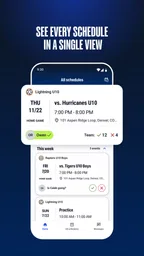
- Centralizes team schedules and updates in one place
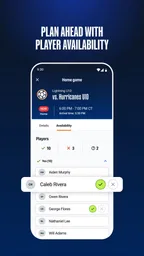
- Role-based tools help organize teams and clubs
- Mobile access makes schedule changes easier to follow
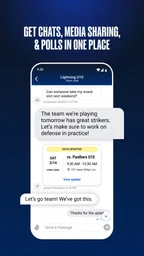
- Supports communication between coaches and families
- Useful for managing multiple teams in one organization
What could be better
- Some features may require a paid subscription
- The app can feel complex for small teams
- Setup may take time for larger organizations
- Notifications can become distracting when activity is high
- Available tools may vary by subscription plan





