

TeamReach - Your Team App review
 Analysis by Appsdrops
I can see the appeal of TeamReach quickly: it gives a sports team or club a shared place to coordinate, instead of leaving every detail scattered across personal chats. The real test, though, is not whether it feels useful during the first busy week. It is whether players and organizers keep opening it once the novelty wears off. In my view, it earns that space when a group has recurring plans and someone is willing to keep the information tidy.
TeamReach is a free sports app from TeamReach, built for teams, clubs, and other groups. It is rated for Everyone, has passed one million installs, and has an average rating of 3.3 from around three thousand ratings. Those figures suggest a widely tried tool with a mixed reception, which fits its practical, not especially glamorous, purpose. The app was released in 2016, and version 10.0.7 is the current release. Optional in-app purchases range from $0.99 to $9.99 per item.
Why the first week can feel easier
The first-week benefit is mostly about reducing coordination friction. A coach can direct people to one team space for routine updates, while players and families have a clearer place to check what the group is doing. That is more useful than it sounds when the alternative is a stream of separate messages, repeated questions, and details buried under unrelated conversation.
A realistic example is a youth team preparing for a weekend game. The coach can use the group to keep the plan visible, while parents can check the same place rather than asking another family member to forward a message. The app does not make people punctual or guarantee that everyone reads an update; it does make it easier to establish one shared reference point.
That distinction matters. TeamReach works best when a group agrees on what belongs there. If schedules, attendance questions, and team notices go into the same space, people can form a habit of checking it. If some updates stay in personal texts and others appear in the app, members have to monitor multiple channels, and the main advantage quickly weakens.
I would set expectations before inviting a whole roster: tell members what the app is for, where the important information will appear, and whether they should respond in the group or directly to an organizer. This small bit of housekeeping is a concrete way to make the first week smoother. Without it, a team tool can become just one more notification source.
For a new group, the app is most compelling when coordination repeats: practices, games, club activities, or regular meetups. A one-off event may not justify asking everyone to install and learn a separate app. In that situation, a familiar group chat may be enough. TeamReach has a stronger case when the same people need a continuing place to organize things.
Making recurring coordination stick
After the initial setup, the value depends less on the app itself and more on the group’s habits. I would treat it as a noticeboard and coordination channel, not as a magic replacement for every conversation. Put durable, group-wide details there; keep personal or sensitive discussions out of a shared team space. This boundary makes the app easier to scan and helps prevent routine coordination from turning into a noisy social feed.
A useful workflow is to make one person responsible for keeping the group’s information current. That does not need to mean a coach handles every task. A team manager, captain, or parent volunteer can take the lead on routine updates, while others contribute when they have something relevant. A reliable owner is often more important than adding more features: stale information undermines trust, and members stop checking if they repeatedly find outdated plans.
For organizers, the practical question is whether the app reduces repeated work. If the same question about a session keeps coming up, a clear update in the team space can answer it for everyone. If every change still needs to be copied into several chat groups, the tool may add rather than remove maintenance. Before making it the team’s central channel, try it with the people who handle scheduling and see whether it actually consolidates their routine.
For players and parents, the habit is simpler: check the shared space at a predictable time, especially before an activity. That is more sustainable than reacting to every alert. It also helps members distinguish an important team update from background chatter. If the organizer posts sparingly and consistently, checking the app can become a brief part of getting ready for practice rather than another all-day obligation.
Where the maintenance burden appears
The app is not self-maintaining. An organizer still has to add useful updates, correct changes, and make sure members know which channel is authoritative. A team that changes its plans often may find that keeping everyone aligned takes effort regardless of the software. TeamReach can gather communication, but it cannot decide who is responsible for updating the group or resolve confusion caused by inconsistent habits.
My advice is to avoid duplicating every message in several places. That may feel safer at first, but it trains people to ignore the team space because the same information arrives elsewhere. If a group is transitioning from an existing chat, agree on a clear point when routine coordination moves over. Keep a familiar fallback for urgent, individual contact if the group wants one, but do not let the fallback become the real home for every update.
There is also a social maintenance cost: not everyone wants another app, and some members may prefer the messaging tools they already use. A coach can make a good case for a single shared destination, but should explain the benefit in concrete terms rather than treating adoption as automatic. If only a fraction of the roster participates, the organizer may end up posting twice and managing two versions of the conversation.
The free price makes it relatively easy for a group to try, while the in-app purchase range is worth keeping in mind if someone is considering paid options. I would not assume a purchase is necessary for a team’s basic coordination without first checking what the group needs in the app. Start with the routine you want to improve; pay only if a clearly relevant option solves a real problem for that group.
What can cause people to drift away
The main fatigue risk is not a dramatic flaw; it is repetition without enough payoff. If members open the app and see little beyond low-value chatter, they may stop checking. If an organizer sends every minor thought as an alert, people may tune out the updates that matter. A team space needs a sensible signal-to-noise balance, especially during a long season when the same patterns repeat.
Another source of friction is fragmented communication. Some clubs have coaches, parents, players, and volunteers who already rely on different channels. TeamReach is a better fit when the group can agree to use it consistently; it is less attractive when it becomes an additional inbox layered over several established ones. In that case, a simpler shared messaging option may be easier, even if it offers less structure for team-specific coordination.
The average rating of 3.3 indicates that experiences are not uniformly positive, so I would not treat the app as a guaranteed improvement for every roster. A rating alone cannot explain why someone liked or disliked it, but it is a reminder to judge the fit with a small, real-world trial. Ask whether people can find the updates they need, whether organizers spend less time repeating themselves, and whether members return without being chased.
It is also not the right choice if a group needs a specialized system for a complex league or wants a full sports operations platform. TeamReach’s appeal is straightforward team coordination, not an invitation to assume it handles every administrative need. A club with demanding workflows may be better served by a tool designed specifically around those requirements, while a small recreational group may find an ordinary chat sufficient.
Who is likely to keep using it?
I would recommend trying TeamReach for a team or club with recurring activities, a clear organizer, and enough communication that personal chats have become hard to manage. It is especially plausible for groups where families need a shared place to check plans or where players and coaches repeatedly coordinate around the same schedule. Its sports focus makes that use case feel natural rather than improvised.
I would skip it for a group that meets once, a team whose members already coordinate smoothly in one existing channel, or an organizer who cannot commit to keeping updates current. It is also a poor fit when members refuse to adopt another app and no one has the authority to set a common routine. In those cases, the familiar alternative wins because participation matters more than having a dedicated team space.
TeamReach has been around since May 4, 2016, and its continuing appeal rests on an unflashy promise: make team communication easier to return to. My long-term verdict is cautiously positive. It can earn a lasting place on a phone when it replaces scattered coordination with a dependable shared habit. The key is to keep the group focused, appoint someone to maintain the information, and resist turning every small update into a notification. If those habits are already within reach, it is worth trying; if not, the app alone will not create them.
What we like
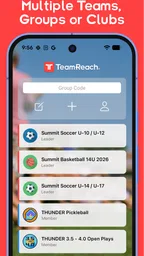
- Team codes make it easy for members to join the right group.
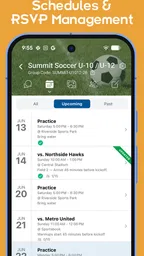
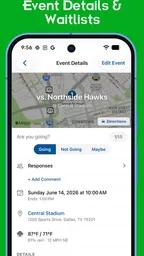
- Event reminders help players keep track of schedules.
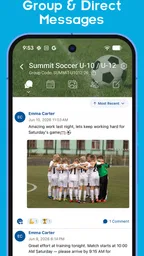
- Coaches can share updates with the whole team at once.
- Group messaging keeps team conversations in one place.
- The app supports multiple teams under one account.
What could be better
- Members may need an invite code to access a team.
- Frequent notifications can become distracting.
- The app is less useful when teammates do not check it regularly.
- Some teams may still rely on other tools for file sharing.
- Older phones may run the app less smoothly.





