
TCG Card Scanner TCG Collector review
 Analysis by Appsdrops
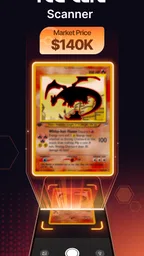
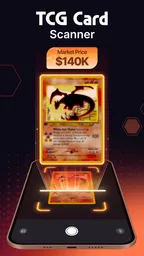
I like the idea behind a card scanner that aims to do more than identify a card: it can help turn a shoebox of trading cards into a collection you can actually keep track of. TCG Card Scanner TCG Collector is a sports-category app from Identifier Studio, built around scanning and collecting trading cards, with card values also part of its focus. For a first-time user, the promise is appealing: point the phone at a card and use the result as a starting point for organizing or researching it.
That first scan is useful, but it is worth approaching the app as a practical assistant rather than an unquestionable authority. A camera can help narrow down what you are holding; it cannot replace careful checking when two editions look almost identical or when a purchase depends on a precise market price. Used with that distinction in mind, the app has a clear role for casual collectors and people sorting cards they have inherited, traded for, or rediscovered.
What you can expect from a card scan
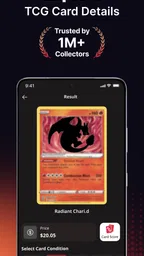
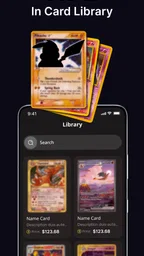
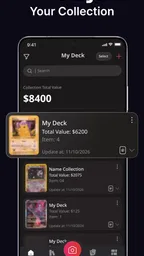
The app’s central appeal is straightforward: it brings card scanning, identification, value research, and collection keeping together in one place. Instead of starting every search from scratch, you can use a scan to get oriented, then decide whether the card belongs in your records or deserves closer investigation. That is a sensible workflow for a collection that is too large to remember card by card.
It is a free app, rated for Everyone, and has a 4.7 average from around 50,000 ratings, with over a million installs. Those figures suggest broad interest, but they do not guarantee that every card or printing will be recognized perfectly. I would treat the scan as the beginning of identification, especially for older, unusual, or visually similar cards.
The current version is 1.5.0, and the app requires Android 10 or later. If you are using an older Android device, that requirement is worth checking before you plan a sorting session around it. In-app purchases range from $3.99 to $39.99 per item, so although getting started is free, I would look carefully at what any paid option includes before committing.
Compared with the usual alternatives, this kind of all-in-one tool can be more convenient than searching each card manually and maintaining a separate spreadsheet. The trade-off is that a dedicated catalog or specialist marketplace may give a more familiar research process for a collector who already knows the exact set and edition. I see this app as most useful for moving from “What is this?” to “Should I keep track of it?” rather than as the final word on a card’s worth.
Start with a small, clear batch
When I try a card-identification workflow, I avoid beginning with a whole binder. I choose a few cards with readable fronts and distinct designs, then scan them one at a time. This makes it easier to notice whether the result matches the card in my hand and to learn how the app fits into my own sorting habits. If a scan is wrong or ambiguous, I can set that card aside instead of letting one uncertain result derail a large batch.
Good lighting and a flat surface are simple but useful habits for camera-based scanning. Keep the card’s face visible and avoid glare from sleeves; a reflection can obscure small print or artwork details that help distinguish one version from another. This is not a guarantee of recognition, but it gives the scanner a fairer chance and reduces the temptation to accept a result that only looks approximately right.
Make the first result meaningful
A useful first session has a modest goal: identify one card, check that the result describes the physical card you scanned, and decide whether you want it in your collection. That is more reassuring than trying to catalogue an entire set immediately. Once you have a result you trust, use the app’s collector purpose to establish a simple habit: record cards you care about, rather than treating every card in a stack as equally important.
For example, imagine you have a few sports cards mixed in with old trading cards and cannot remember which ones you meant to keep. Scan a likely candidate, compare the displayed identification with visible details on the card, and then note it as part of the collection only if the match makes sense. The practical win is not merely seeing a name on screen; it is turning a vague pile into a shortlist you can revisit.
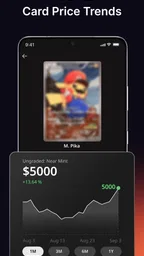
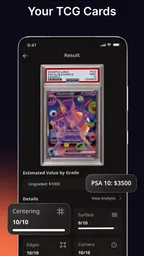
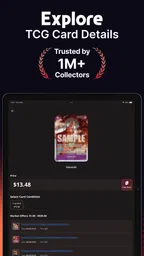
One non-obvious tip is to separate identification from valuation in your mind. A card can be correctly recognized while its displayed value still needs context: condition, edition, demand, and the difference between an asking price and a completed sale all matter. If you are deciding whether to sell, trade, or insure something, use the app to narrow the search, then check the exact version and condition against a source suited to that decision.
Where beginners can get confused
The most likely point of confusion is a result that looks close but does not match the card precisely. Similar artwork, alternate printings, small set marks, and condition differences can make two cards easy to mix up. Before saving a result as certain, compare the details you can see on the card rather than relying on the general image alone. When something does not line up, rescan under better light or leave the identification unconfirmed until you can inspect it more carefully.
Another common misunderstanding is to read “card value” as a guaranteed selling price. I would not use any scanner’s estimate as a promise of what someone will pay. A number can be a useful prompt for further research, but the actual value depends on the specific card and its condition. For a card that may be valuable, take the extra time to verify the edition and look for comparable sales before making a decision.
Collection tools also work best when you decide on a consistent standard. If you only record cards you would genuinely want to find again, your collection stays useful. If you add every scan without checking it, the record can become cluttered with uncertain matches. I would be selective at first, then expand the catalogue once the scanning and saving routine feels dependable.
There is also a practical difference between an app that helps identify cards and a specialist inventory system designed around a particular game, league, or set. If you need meticulous set-completion tracking or research focused on a narrow collecting niche, a dedicated alternative may fit better. This app’s broader scanner-and-collector approach is more inviting for someone who wants a starting point without first learning a complicated cataloging method.
Build a collection without turning it into homework
After the first successful scan, I would use the app in short sessions. Sort a small stack, scan the cards you are curious about, and pause whenever a result needs verification. This keeps the process manageable and helps you notice which cards are worth researching further. It is especially useful when you have inherited a collection or are helping a family member organize cards without knowing the sets in advance.
A second useful workflow is to scan before a trade, but only as an initial check. If a friend offers a card you do not recognize, identification can help you ask better follow-up questions and avoid confusing one version with another. I would still inspect the physical card and agree on condition and value separately. The scanner can make the conversation more informed; it should not make the decision for you.
For people who already maintain a detailed spreadsheet, the app may be most valuable as a discovery tool rather than a replacement. Scan unfamiliar cards first, then transfer only confirmed details into the system you already trust. That approach avoids duplicating work and reduces the risk of treating a preliminary match as a permanent record. On the other hand, if you have no catalog at all, keeping the process inside one collector-focused app may feel simpler than building a system from scratch.
Because there are paid in-app items, I would spend time with the free experience before buying anything. First establish whether the scanner handles the kinds of cards you own and whether the collection workflow suits you. Then judge a purchase by a specific need, not by a general hope that paid access will make every identification certain. The listed item range runs from $3.99 to $39.99, a broad enough spread that checking the individual purchase details matters.
Who will get the most from it
I would recommend TCG Card Scanner TCG Collector to a casual collector who wants a convenient way to identify cards and begin organizing them, especially if the collection is mixed or unfamiliar. It can also help a parent or relative sort cards with a child: scan a few, compare the results, and choose which ones to keep track of together. The easy entry point is the appeal, not an assumption that no research will ever be needed.
I would skip it, or pair it with another resource, if you need authoritative pricing for a sale, exact condition grading, or highly specialized tracking for a narrow collection. It is also less compelling if you already have a reliable catalog and know the cards you own. In those cases, a specialist reference or a carefully maintained inventory may offer more control than a general scanner.
Overall, the app gives first-time users a reassuring route into card identification: start with one clear scan, check the match, and save only what you are confident about. Its broad focus on scanning and collecting makes it approachable, while the need to verify lookalike editions and treat values cautiously is an important limit. If you want a free starting point for making an unknown stack of cards more manageable, I think it is worth trying; just keep final collecting and pricing decisions grounded in the card itself.
What we like
- Quickly identifies cards from a photo.
- Tracks card values and collection details.
- Useful for organizing a growing collection.
- Supports multiple popular trading card games.
- Makes checking a card's market value convenient.
What could be better
- Recognition may struggle with glare or worn cards.
- Prices can vary from actual local sale values.
- Some features may require an account.
- A steady internet connection may be needed.
- Scanning cards one by one can take time.





