

Starbucks review
 Analysis by Appsdrops
I see the Starbucks app as most worthwhile when it fits a routine you already have: you know what you like, visit Starbucks regularly, and want a smoother way to place and pay for an order. It can make a familiar stop feel more convenient, but it is not a compelling reason on its own to choose Starbucks over a nearby café. My overall impression is practical rather than dazzled: this is a focused companion for ordering and rewards, with its value depending heavily on how often you use the chain.
Where the app earns its place
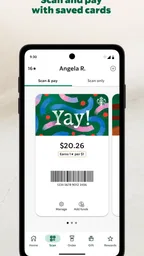
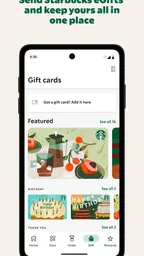
Made by Starbucks Coffee Company, this free food and drink app brings ordering, payment and rewards together. That combination is useful because it reduces the little decisions and steps around a repeat purchase. Instead of treating every visit as a fresh transaction, you can use the app as part of a regular coffee run and keep the payment and reward experience in the same place.
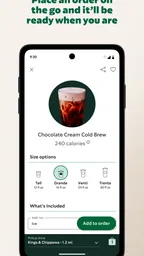
The best case is a predictable stop on a busy morning. I would decide what I want before leaving, place the order while I am on the way, and use the app to handle payment and rewards rather than sorting everything out at the counter. The benefit is not that coffee suddenly becomes faster in every circumstance; it is that I can move the ordering decision out of a crowded queue and arrive with a clearer plan. That is a small convenience, but a repeatable one.
It also suits people whose orders change in manageable ways. If I usually want the same drink but occasionally switch to another familiar choice, ordering digitally can make a routine feel less fiddly than rebuilding it from memory while other customers wait. My practical tip is to use the app for orders I already know I enjoy, rather than experimenting with unfamiliar choices when I am in a rush. That keeps the convenience real and reduces the chance of discovering a mismatch only after picking up the drink.
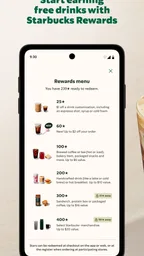
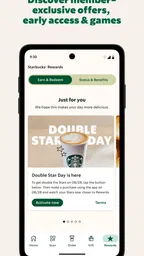
The rewards element gives regular customers another reason to keep the app close. A one-off visitor may see little benefit in adding a separate digital habit for a single purchase, whereas someone who returns often can make rewards part of the normal checkout routine. I would think of that as a bonus attached to an existing Starbucks habit, not as a reason to buy more than I otherwise would. If rewards encourage unnecessary extra stops, the convenience is working against your budget rather than for you.
There is also a useful planning distinction between ordering ahead and ordering impulsively. For a familiar morning run, placing an order before reaching the café can make the visit more predictable. For a new location, an unfamiliar menu choice or a moment when I am not sure what I want, ordering at the counter may be the more comfortable option. The app is strongest when I have already made the decision; it is less valuable when browsing and asking questions are part of the experience I want.
A smoother routine, not a guarantee
Mobile ordering can make the customer’s part of a visit feel more organized, but I would not assume it eliminates every wait. A busy café still has to prepare orders, and an order placed ahead is not the same thing as an instant handoff. I would use the app to reduce time spent deciding and paying at the counter, while leaving room for the actual preparation process. That expectation makes the experience more satisfying than treating a digital order as a promise of zero delay.
Another practical habit is to check the order carefully before submitting it. When I order face to face, I can clarify a preference as I speak; on a screen, it is easy to move quickly through familiar choices and overlook a detail. Taking a moment to review the drink and any selected changes is a modest safeguard. This matters most when I am ordering for someone else or changing my usual choice, since a fast checkout is no help if the order is not what we wanted.
For a shared coffee run, the app can help one person manage the purchase, but it does not remove the need to coordinate. I would collect everyone’s choices first, especially if the group has different preferences, then place the order once rather than trying to remember requests while walking. That workflow is simple, but it avoids a common source of friction: making a quick order for several people and realizing that one drink was left out or misunderstood.
What the numbers suggest, and what they do not
The app has an average rating of 4.8 from around 1.6 million ratings, with about 263,000 written reviews. It has been available since June 14, 2011, and has over 10 million installs. Those figures indicate a widely used product with a large body of user response, but they cannot tell me whether it will suit an occasional customer as well as it suits a daily regular. The personal value still comes down to whether its ordering and rewards tools match your habits.
It is rated for Everyone, and the current version is 6.135, with Android 10 as the minimum operating system. Those details matter if you are checking compatibility before installing, particularly on an older Android device. On iOS, I would check the app store’s requirements for the device in hand rather than assume the Android requirement applies. Either way, the app is free to download, so the more meaningful cost is the attention needed to maintain another account and digital routine.
The fact that it is free makes trying it a low-commitment choice, but free does not automatically mean useful. If you rarely visit Starbucks, an app that mostly supports a specific chain’s ordering and rewards can become one more icon you do not open. If you already go regularly, the same focused design may be an advantage: you are not looking for a directory of unrelated cafés or a general-purpose delivery service, but for a direct way to manage a Starbucks visit.
The trade-off: convenience within one chain
The main limitation is also the app’s defining boundary. It is built around Starbucks, so it is not a broad comparison tool for nearby coffee shops, nor is it a substitute for choosing a local independent café. If I am deciding where to go based on proximity, atmosphere, or a wider range of businesses, a maps app or a local search is more useful. If I want to support a particular neighborhood café, ordering directly there is the better fit.
That means the app’s convenience depends on a two-part match: I need to want Starbucks, and I need the digital process to suit the visit. At a quiet café where I enjoy ordering in person, tapping through a screen may add little. At a crowded stop where I know my usual drink, the same process can be worthwhile. I would not treat mobile ordering as universally superior to speaking with a barista; it is an alternative for specific moments, not a replacement for every kind of café visit.
There is a related trade-off with discovery. A screen can be helpful when I know what I want, but it may not provide the same spontaneous exchange as asking a person about a drink or describing what I feel like having. If recommendations and conversation are important to me, ordering at the counter is a better choice. If I am repeating an order and want fewer steps, the app has the advantage. Choosing between the two based on the visit is more sensible than forcing every purchase through one method.
Who should use it—and who can skip it
I would recommend Starbucks to regular customers who like to place orders digitally, pay through the app, and keep rewards connected to the same routine. It makes the most sense for commuters, people with a dependable usual order, and customers who value planning a pickup rather than deciding everything at the counter. Its appeal is not abstract: it is strongest when the next Starbucks visit is already likely and the app removes a step you would otherwise repeat.
I would skip it if I visit only occasionally, prefer cash or face-to-face ordering, or mainly want an app that compares coffee shops across a neighborhood. I would also avoid relying on it for an order that needs a detailed conversation. In those cases, ordering directly from staff—or choosing a different local option—is likely to be clearer. The app is not a universal coffee solution, and it does not need to be one to be useful for its intended audience.
For someone deciding whether to keep it installed, I would try a simple test: use it for a familiar order on a visit you were already planning, then judge whether the saved effort matters to you. Pay attention to whether you enjoy reviewing and submitting the order on your phone, whether the pickup routine suits your timing, and whether the rewards feature fits your normal spending rather than changing it. If those parts feel natural, the app has earned its place. If the process feels like extra administration, there is no reason to keep using it just because it exists.
My verdict
Starbucks is a useful, focused app for people who already choose Starbucks often enough to benefit from digital ordering, payment and rewards in one place. Its clearest strength is turning a familiar purchase into a more organized routine; its clearest weakness is that this convenience is tied to one chain and works best when you already know what you want. I would recommend it to regulars who appreciate planning ahead, while occasional visitors and café explorers are better served by ordering in person or using broader local options. For me, that is a fair and specific value: not a reason to change where you drink coffee, but a practical way to handle a Starbucks stop you were going to make anyway.
What we like
- Customize drinks with a wide range of milk and syrup options.
- Order ahead at participating locations to reduce waiting time.
- Save favorite orders for quicker repeat purchases.
- Earn Stars through eligible purchases in the Rewards program.
- Find nearby stores and check their opening hours.
What could be better
- Mobile ordering is not available at every location.
- Some app features require a Starbucks Rewards account.
- Rewards and offers can vary by country and location.
- Customization can make drink prices rise quickly.
- Store availability and menu details may not always be up to date.





